Minecraft version
Back to mods 
CurseForge · Minecraft mod
More Beautiful Buttons
Buttons in more colors to bring beauty to your world
Choose a version Pick your version below, then grab the matching file.
Quick answer
Which More Beautiful Buttons release should I use?
Latest stable file MoreBeautifulButtons-neoforge-1.21.1-1.8.0.jar
Game version 1.21.1
Loader NeoForge
More Beautiful Buttons MoreBeautifulButtons-neoforge-1.21.1-1.8.0.jar targets 1.21.1 with NeoForge. The project page does not say whether this file belongs on the client, dedicated server, or both. No extra mods listed for this file.
Where it goes
Is More Beautiful Buttons required on the client, server, or both?
The project page does not say whether this file belongs on the client, dedicated server, or both.
Client Source doesn’t say
Dedicated server Source doesn’t say
Loader for this release NeoForge
Required install it here Optional supported, not mandatory Not supported do not install here Source doesn’t say do not assume
The source does not explicitly classify this release as client-only or server-only.
What else does More Beautiful Buttons MoreBeautifulButtons-neoforge-1.21.1-1.8.0.jar need?
MoreBeautifulButtons-neoforge-1.21.1-1.8.0.jar. Change the file and its required mods may change too.
This file does not list any required mods. Do not add a library just because a different file uses it.
This file does not list any required or optional mods.
Before you install it
Add More Beautiful Buttons without breaking your instance.
Built for More Beautiful Buttons MoreBeautifulButtons-neoforge-1.21.1-1.8.0.jar. Pick another file and the loader, install side or required mods may change.
- 01
Stick to this file
Use MoreBeautifulButtons-neoforge-1.21.1-1.8.0.jar. It targets 1.21.1 with NeoForge; another release may have different loader, side or dependency requirements.
- 02
Bring the mods it needs
This file does not list any required mods. Do not add a library just because a different file uses it.
- 03
Put it on the correct side
The project page does not say whether this file belongs on the client, dedicated server, or both.
- 04
Pick the file you checked
Use the “Get this file” button beside MoreBeautifulButtons-neoforge-1.21.1-1.8.0.jar. It opens that exact file at the source.
About this project
What does More Beautiful Buttons add?


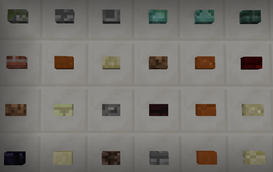
Over 200 buttons for pressing pleasure! Some buttons sound like sand, others like glass, some like wood, and yet others sound wet! Can you craft them all?
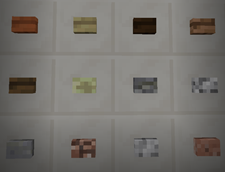
These buttons want to be pressed by you and only you.
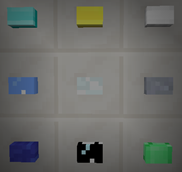
Gold, Iron, Diamond, Lapis, Glass, Emerald, …
Crafting
Combine any block with a button press and get your very own button version of that block. A button press is crafted with 8 sticks in a chest pattern.
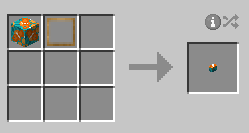
Want 200+ Giant Buttons?
Yeah, you know you do. So, head on over to Big Beautiful Buttons and get to pressing those massively enormous buttons.



If you want a server setup for the Any mod pack with zero effort, get a server with BisectHosting and receive 25% off your first month as a new customer using the code kreezxil
Modpacks
Yes, you can use my mod in your pack.
Project description from CurseForge.
Pick your setup
More Beautiful Buttons by Minecraft version and loader
Choose the version and loader you play, then open the matching release.
Minecraft version
1.20.4
2 loader buildsMinecraft version
1.20.2
2 loader buildsMinecraft version
1.20.1
2 loader buildsMinecraft version
1.19.4
2 loader buildsMinecraft version
1.19.3
2 loader buildsMinecraft version
1.19.2
2 loader buildsMinecraft version
1.18.2
2 loader buildsMinecraft version
1.17.1
1 loader buildMinecraft version
1.16.5
2 loader buildsMinecraft version
1.12.2
2 loader buildsMinecraft version
1.12.1
1 loader buildShowing the newest 12 of 15 game versions. Older files are in the list below.
Check the dependencies, then try the file in a copied instance before changing a world you care about.
Recent files
More Beautiful Buttons versions and loaders
MoreBeautifulButtons-neoforge-1.21.1-1.8.0.jar
13 Oct 2024
Client Source doesn’t say Server Source doesn’t say Dependencies No extras listed Listed on Release listing
Check the 1.21.1 · NeoForge setup 1.21.1NeoForge release
MoreBeautifulButtons-fabric-1.21.1-1.8.0.jar
13 Oct 2024
Client Source doesn’t say Server Source doesn’t say Dependencies No extras listed Listed on Release listing
Check the 1.21.1 · Fabric setup Fabric1.21.1 release
MoreBeautifulButtons-neoforge-1.20.4-1.7.0.jar
22 Feb 2024
Client Source doesn’t say Server Source doesn’t say Dependencies No extras listed Listed on Release listing
Check the 1.20.4 · NeoForge setup NeoForge1.20.4 release
MoreBeautifulButtons-fabric-1.20.4-1.7.0.jar
22 Feb 2024
Client Source doesn’t say Server Source doesn’t say Dependencies 1 required · 1 unchecked Listed on Release listing
Check the 1.20.4 · Fabric setup Fabric1.20.4 release
MoreBeautifulButtons-neoforge-1.20.2-1.6.0.jar
3 Dec 2023
Client Source doesn’t say Server Source doesn’t say Dependencies No extras listed Listed on Release listing
Check the 1.20.2 · NeoForge setup 1.20.2NeoForge release
MoreBeautifulButtons-fabric-1.20.2-1.6.0.jar
3 Dec 2023
Client Source doesn’t say Server Source doesn’t say Dependencies 1 required · 1 unchecked Listed on Release listing
Check the 1.20.2 · Fabric setup 1.20.2Fabric release
MoreBeautifulButtons-forge-1.20.1-1.5.0.jar
6 Jul 2023
Client Source doesn’t say Server Source doesn’t say Dependencies No extras listed Listed on Release listing
Check the 1.20.1 · Forge setup 1.20.1Forge release
MoreBeautifulButtons-fabric-1.20.1-1.5.0.jar
6 Jul 2023
Client Source doesn’t say Server Source doesn’t say Dependencies 1 required · 1 unchecked Listed on Release listing
Check the 1.20.1 · Fabric setup Fabric1.20.1 release
MoreBeautifulButtons-forge-1.19.4-1.4.0.jar
7 May 2023
Client Source doesn’t say Server Source doesn’t say Dependencies No extras listed Listed on Release listing
Check the 1.19.4 · Forge setup 1.19.4Forge release
MoreBeautifulButtons-fabric-1.19.4-1.4.0.jar
7 May 2023
Client Source doesn’t say Server Source doesn’t say Dependencies 1 required · 1 unchecked Listed on Release listing
Check the 1.19.4 · Fabric setup 1.19.4Fabric release
MoreBeautifulButtons-forge-1.19.3-1.3.0.jar
7 May 2023
Client Source doesn’t say Server Source doesn’t say Dependencies No extras listed Listed on Release listing
Check the 1.19.3 · Forge setup 1.19.3Forge release
MoreBeautifulButtons-fabric-1.19.3-1.3.0.jar
7 May 2023
Client Source doesn’t say Server Source doesn’t say Dependencies 1 required · 1 unchecked Listed on Release listing
Check the 1.19.3 · Fabric setup 1.19.3Fabric release
Looking for an older file? The official CurseForge project page is in Resources.
 mod
mod CurseForge + Modrinth · Minecraft
Hearth and Harvest
Hearth and Harvest is an addon for the popular food mod, Farmer's Delight
 mod
mod CurseForge · Minecraft
Cobblemon Roulette
Cobblemon Roulette is an exciting Minecraft mod that lets players spin a customizable roulette to win random Pokémon and items, featuring multiplayer support and in-game configuration!
 mod
mod CurseForge · Minecraft
Sonaris
SONARIS is a horror mod for Minecraft that replaces ordinary vision with lidar scanning. Explore the darkness, map the unknown, and uncover strange anomalies. Every scan reveals more of the world — but something might be listening.