Minecraft version
Back to mods 
CurseForge · Minecraft mod
Slime Breeder Advanced
Breedable Coloured Slimes with Custom Drops!
Choose a version Pick your version below, then grab the matching file.
Quick answer
Which Slime Breeder Advanced release should I use?
Latest stable file Slime Breeder Advanced 1.12.2-3.0.3
Game version 1.12.2
Loader Not required
Slime Breeder Advanced 1.12.2-3.0.3 targets 1.12.2. The project page does not say whether this file belongs on the client, dedicated server, or both. No extra mods listed for this file.
Where it goes
Is Slime Breeder Advanced required on the client, server, or both?
The project page does not say whether this file belongs on the client, dedicated server, or both.
Client Source doesn’t say
Dedicated server Source doesn’t say
Loader for this release No loader listed
Required install it here Optional supported, not mandatory Not supported do not install here Source doesn’t say do not assume
The source does not explicitly classify this release as client-only or server-only.
What else does Slime Breeder Advanced 1.12.2-3.0.3 need?
Slime Breeder Advanced 1.12.2-3.0.3. Change the file and its required mods may change too.
This file does not list any required mods. Do not add a library just because a different file uses it.
This file does not list any required or optional mods.
Before you install it
Add Slime Breeder Advanced without breaking your instance.
Built for Slime Breeder Advanced 1.12.2-3.0.3. Pick another file and the loader, install side or required mods may change.
- 01
Stick to this file
Use Slime Breeder Advanced 1.12.2-3.0.3. It targets 1.12.2; another release may have different loader, side or dependency requirements.
- 02
Bring the mods it needs
This file does not list any required mods. Do not add a library just because a different file uses it.
- 03
Put it on the correct side
The project page does not say whether this file belongs on the client, dedicated server, or both.
- 04
Pick the file you checked
Use the “Get this file” button beside Slime Breeder Advanced 1.12.2-3.0.3. It opens that exact file at the source.
About this project
What does Slime Breeder Advanced add?
{width=1402 height=317}
Summary
- This mod allows for a new type of slime to spawn in the Overworld.
- These slimes come in a variety of colours and can be crossbred to create new colours using real colour mixing mechanics!
- The slime's drops are colour dependant, carrot orange slimes drop carrots, diamond blue coloured Slimes drop diamonds!
- Slimes come with there own genetics allowing you to breed and customise your own perfect slime colony.
Big thanks again to KelsiThePyrofly for the updated mod review!
How to Breed 'Coloured Slimes'
- Find two coloured slimes in the wild (plains, forest, savanna, swampland ect while its raining).
- Craft two 'Breeding Catalysts'.
- Use 'Breeding Catalysts' on wild coloured slimes, activating them.
- Wait for the coloured slimes to bump into each other.
- ????
- Profit.
Recipes
Ingame Book
An ingame guide to the content of the mod, it covers everything you need to play the mod. Shapeless recipe:
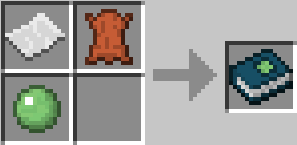
Empty Slime Capsule
One of the most basic items in the mod. Serves as 'ammo' for the Slimalyser (see below) as well as key components in the crafting recipes in this mod.
{width=471 height=218}
Breeding Catalyst
Right click a coloured slime with this to activate its latent breeding capabilities. Once two 'activated' slimes breed, their offspring will automatically be able to breed.
{width=468 height=222}
The Slimalyser
The Slimalyser is your main tool for engineering the colour of your slimes, use it (right-click) on a coloured slime with 'Empty Slime Capsules' in your inventory to take a sample. Once you have collected your sample sneak-use the Slimalyser to open it's gui.
{width=467 height=218}
Guis
The Slimalyser Gui
Place in either of the top slots (left or right) an item or 'Filled Slime Capsule' and the gui will change accordingly to tell you how similar the two items are in colour. Similarities of greater that 90% suggests the slime is capable of dropping that item! If an Item is unable to be added to one of the slots that means its currently unable to be dropped by slimes.
{width=453 height=326}
Changelog
slimebreeder 0.0.2
- Added a way of viewing a slime's genetics (tooltip for filled slime capsule)
- Nerfed Slow effect caused by slimes.
- Improved slime collision box size.
Slimebreeder V3
- Improved breeding and feeding AI
- Added ingame book
- Coloured Slimes can now be domesticated
- New form of crafting implemented
- Added slime infused tools and armour
- Many bugfixes
Slime Breeder Advanced 3.0.3
- Slime Crafting bug fixes
- Spawn egg added
- Despawning issues resolved
- Fixed lack of names for some Slime Infused tools
Future Plans
Add ingame information book?Implemented V3 and above!Add armour that prevents slimes attacking?Implemented V3 and above!Tameable pet slimes?Implemented V3 and above!1.11 UpdateImplemented in v3.0.31.12 UpdateImplemented in v3.0.3- Compatibility patches for other mods
- Automatation of slime crafting?
Mod Reviews!
Latest Review:
Archived reviews:
Credits
Big thanks to all the people who frequent the mod development section of the minecraft forum, (most notably BrightSpark) who helped me develop this mod. Also shout out to Jablar and Grey Ghost who's tutorials were very helpful. Also, very big thank you to KelsiThePyroFly for making such great videos!
Project description from CurseForge.
Pick your setup
Slime Breeder Advanced by Minecraft version and loader
Choose the version and loader you play, then open the matching release.
Minecraft version
1.11.2
1 loader buildMinecraft version
1.10.2
1 loader buildMinecraft version
1.9.4
1 loader buildMinecraft version
1.8.9
1 loader buildCheck the dependencies, then try the file in a copied instance before changing a world you care about.
Recent files
Slime Breeder Advanced versions and loaders
Slime Breeder Advanced 1.12.2-3.0.5 Language Update
slimebreeder-3.0.5.jar
14 Sept 2018
Client Source doesn’t say Server Source doesn’t say Dependencies No extras listed Listed on Release listing
Check the 1.12.2 setup 1.12.2 beta
Slime Breeder Advanced 1.12.2-3.0.4 Compatability Hotfix
Slime Breeder Advanced 1.12.2-3.0.4 Compatability Update.jar
6 Jun 2018
Client Source doesn’t say Server Source doesn’t say Dependencies No extras listed Listed on Release listing
Check the 1.12.2 setup 1.12.2 alpha
Slime Breeder Advanced 1.12.2-3.0.3
Slime Breeder Advanced 1.12.2-3.0.3.jar
1 Jun 2018
Client Source doesn’t say Server Source doesn’t say Dependencies No extras listed Listed on Release listing
Check the 1.12.2 setup 1.12.2 release
Slime Breeder Advanced 1.11.2-3.0.3
Slime Breeder Advanced 1.11.2-3.0.3.jar
1 Jun 2018
Client Source doesn’t say Server Source doesn’t say Dependencies No extras listed Listed on Release listing
Check the 1.11.2 setup 1.11.2 release
Slime Breeder Advanced 1.10.2-3.0.3
Slime Breeder Advanced 1.10.2-3.0.3.jar
1 Jun 2018
Client Source doesn’t say Server Source doesn’t say Dependencies No extras listed Listed on Release listing
Check the 1.10.2 setup 1.10.2 release
Slime Breeder Advanced 0.0.2
slimebreeder-0.0.2.jar
7 Aug 2017
Client Source doesn’t say Server Source doesn’t say Dependencies No extras listed Listed on Release listing
Check the 1.9.4 setup 1.9.4 beta
Slime Breeder Advance
slimebreeder-0.0.1.jar
29 Jul 2017
Client Source doesn’t say Server Source doesn’t say Dependencies No extras listed Listed on Release listing
Check the 1.8.9 setup 1.8.9 beta
Looking for an older file? The official CurseForge project page is in Resources.
 mod
mod Modrinth · Minecraft
Visually Waxed Golems
Give WAXED Copper Golems a unique texture to differentiate waxed golems from unwaxed ones!
 mod
mod CurseForge · Minecraft
_PARADOX_
Travel to the future to defeat the Paradox
 mod
mod CurseForge · Minecraft
ShuDynamics
Tech, magic infusion, tiered energy grids, digital crystal storage networks, and 3x3 mining hammers for Fabric.