Just Enough Items (JEI) Optional for Storage Tech StorageTech 1.16.4-R1.3 [for Refined Storage 1.9.9or+]
optionalMatching file found Matched file: jei-1.16.4-7.6.1.74.jar
CurseForge · Minecraft mod
Add custom disks for Refined Storage
Quick answer
Storage Tech StorageTech 1.16.4-R1.3 [for Refined Storage 1.9.9or+] targets 1.16.4 with Forge. The project page does not say whether this file belongs on the client, dedicated server, or both. All 1 required mods have matching files.
Where it goes
The project page does not say whether this file belongs on the client, dedicated server, or both.
The source does not explicitly classify this release as client-only or server-only.
StorageTech 1.16.4-R1.3 [for Refined Storage 1.9.9or+]. Change the file and its required mods may change too.
Install Refined Storage first. We found matching files for this game-version and loader setup. 13 come through another mod in the chain.
13 extra mods were pulled in by other dependencies. Indented rows show who needs each one. We only count dependency files that match this setup. A file for another loader does not fill the gap.
Before you install it
Built for Storage Tech StorageTech 1.16.4-R1.3 [for Refined Storage 1.9.9or+]. Pick another file and the loader, install side or required mods may change.
Use StorageTech 1.16.4-R1.3 [for Refined Storage 1.9.9or+]. It targets 1.16.4 with Forge; another release may have different loader, side or dependency requirements.
Install Refined Storage first. We found matching files for this game-version and loader setup. 13 come through another mod in the chain.
The project page does not say whether this file belongs on the client, dedicated server, or both.
Use the “Get this file” button beside StorageTech 1.16.4-R1.3 [for Refined Storage 1.9.9or+]. It opens that exact file at the source.
About this project
Storage Tech is addon for Refined Storage. the mod allow to create custom disk size to store items, fluids, energy and chemicals if Mekanism is loaded.
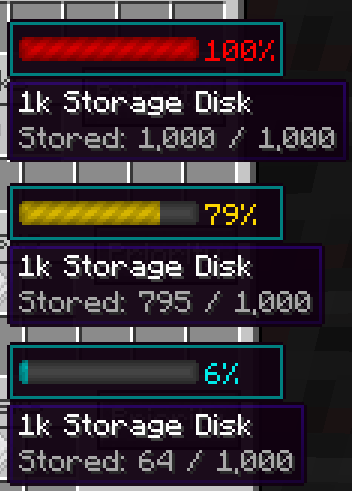
The mod add a overlay on disks
⚠ Mod Exception & Mod bugs :
MC 1.12.2:
if you add Blur_Mod please add javapower.storagetech.gui.GuiContainerDiskWorkbench and javapower.storagetech.gui.GuiContainerFluidDiskWorkbench to guiExclusions in the blur.cfg file :
# Configuration file

general {
    # The time it takes for the blur to fade in, in ms. [range: 0 ~ 2147483647, default: 200]
    I:fadeTime=200

    # The end color of the background gradient. Given in ARGB hex. [default: 75000000]
    S:gradientEndColor=75000000

    # The start color of the background gradient. Given in ARGB hex. [default: 75000000]
    S:gradientStartColor=75000000

    # A list of classes to be excluded from the blur shader. [default: [net.minecraft.client.gui.GuiChat]]
    S:guiExclusions <
        net.minecraft.client.gui.GuiChat
        javapower.storagetech.gui.GuiContainerDiskWorkbench
        javapower.storagetech.gui.GuiContainerFluidDiskWorkbench
     >

    # The radius of the blur effect. This controls how "strong" the blur is. [range: 1 ~ 100, default: 12]
    I:radius=12
}
Project description from CurseForge.
Pick your setup
Choose the version and loader you play, then open the matching release.
Check the dependencies, then try the file in a copied instance before changing a world you care about.
Recent files
storagetech-1.16.4-R1.3.jar
23 Dec 2020
storagetech-1.16.3-R1.5.jar
23 Dec 2020
storagetech-1.16.1-R9.6.jar
23 Dec 2020
storagetech-1.16.4-R1.2.jar
17 Dec 2020
storagetech-1.16.3-R1.4.jar
12 Dec 2020
storagetech-1.16.1-R9.5.jar
12 Dec 2020
storagetech-1.16.3-R1.3.jar
23 Nov 2020
storagetech-1.16.3-R1.2.jar
23 Nov 2020
storagetech-1.16.4-R1.0.jar
22 Nov 2020
storagetech-1.16.1-R9.4.jar
15 Nov 2020
storagetech-1.16.3-R1.1.jar
13 Nov 2020
storagetech-1.16.3-R1.0.jar
8 Nov 2020
Looking for an older file? The official CurseForge project page is in Resources.
 mod
modSBW Drone Warfare expands Superb Warfare with tactical FPV drones, LUCAS UAVs, fiber links, radar, etc...
 mod
modA programmable automation platform for Minecraft — write real Kotlin programs for computers, controllers, and eventually entire distributed systems.
 mod
modA superhero addon for Palladium that adds Marvel and DC heroes, suits, and powers. Play as Spider-Man, Superman, Thor and more!