Minecraft version
Back to mods 
CurseForge · Minecraft mod
SlimeCraft(add Tools etc)
It is MOD to add a tool
Choose a version Pick your version below, then grab the matching file.
Quick answer
Which SlimeCraft(add Tools etc) release should I use?
Latest stable file SlimeCraft 1.10.2-2.5.0
Game version 1.10.2
Loader Not required
SlimeCraft(add Tools etc) SlimeCraft 1.10.2-2.5.0 targets 1.10.2. The project page does not say whether this file belongs on the client, dedicated server, or both. No extra mods listed for this file.
Where it goes
Is SlimeCraft(add Tools etc) required on the client, server, or both?
The project page does not say whether this file belongs on the client, dedicated server, or both.
Client Source doesn’t say
Dedicated server Source doesn’t say
Loader for this release No loader listed
Required install it here Optional supported, not mandatory Not supported do not install here Source doesn’t say do not assume
The source does not explicitly classify this release as client-only or server-only.
What else does SlimeCraft(add Tools etc) SlimeCraft 1.10.2-2.5.0 need?
SlimeCraft 1.10.2-2.5.0. Change the file and its required mods may change too.
This file does not list any required mods. Do not add a library just because a different file uses it.
This file does not list any required or optional mods.
Before you install it
Add SlimeCraft(add Tools etc) without breaking your instance.
Built for SlimeCraft(add Tools etc) SlimeCraft 1.10.2-2.5.0. Pick another file and the loader, install side or required mods may change.
- 01
Stick to this file
Use SlimeCraft 1.10.2-2.5.0. It targets 1.10.2; another release may have different loader, side or dependency requirements.
- 02
Bring the mods it needs
This file does not list any required mods. Do not add a library just because a different file uses it.
- 03
Put it on the correct side
The project page does not say whether this file belongs on the client, dedicated server, or both.
- 04
Pick the file you checked
Use the “Get this file” button beside SlimeCraft 1.10.2-2.5.0. It opens that exact file at the source.
About this project
What does SlimeCraft(add Tools etc) add?
私はModding初心者です許してね。工エエェェ(´д`)ェェエエ工
I am a programming beginner.
翻訳にGoogle翻訳を利用しています。
I use Google translation for translation.
スライムクラフトについて・About SlimeCraft

このMODは簡単な道具を追加するMODです。
This mod is MOD to add a simple tool.
追加される道具について・About added tools

スライム製は石と同じ性能
鉄スライム製は鉄と同じ性能
ダイヤスライムはダイヤモンドと同じですが耐久が高いです。
Xシリーズはダイヤ以上の性能にエンチャ付与と耐久無限が付きます。
Slime made the same performance as stone
Iron slime made the same performance as iron
Diamond slime is the same as diamond, but durability is high.
In the X series, enchantment and durable infinity are attached to the performance over the diamond.
マルチツール・Multi Tool

マルチツールはつるはしとオノとシャベルとクワの機能がついた道具です。
右クリックすることで遠距離攻撃が可能です。
Multi tool is a tool attached with the functions of Tsuruhashi, Ono, Shovel and Mulberry.
Long range attacks are possible by right clicking.
アルティメットスライムスタッフ・Ultimate SlimeStaff

マルチツールの遠距離攻撃が進化しました。
遠距離攻撃時に範囲攻撃も可能になっています。
The long-range attack of multi tool has evolved.
Range attacks are also possible at long range attacks.
石をシフト右クリックでドリルへ変わって
これは右クリックでブロック破壊が可能です。
Shift stone right click to change to drill
This is possible by block clicking with right click.

原木等をシフト右クリックでチェーンソーになり
これは右クリックでブロック破壊が可能です。
Shift logs etc. Right click to become chain saw
This is possible by block clicking with right click.
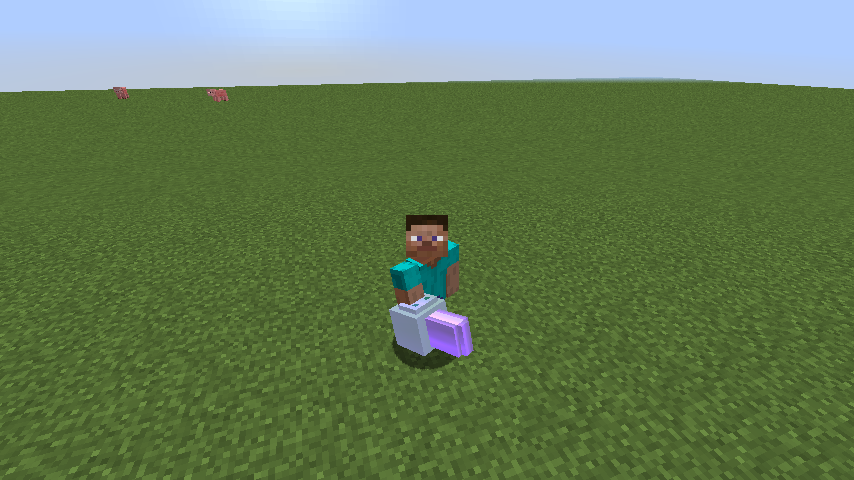
耕した土をシフト右クリックするとクワになります。
右クリックすると骨粉と同じ効果が得られます。
Shift the till you plow right click to become mulberry.
Right click to obtain the same effect as bone meal.

戻すときはもう一回クリックすれば戻ります。
To return it, click it again and it will return.
追加されるブロックについて・About added blocks

鉄スライムブロック、ダイヤスライムブロックはそれぞれ圧縮すれば作成可能です。
Iron slime blocks, diamond slime blocks can be created by compressing them individually.
スライムトロフィー、スライムランプ・Slime trophy, slime lamp

スライムトロフィーはスライムを倒すと落とします。
スライムクラフトで追加される道具はスライムトロフィーを右クリックすることで耐久回復します。
スライムランプは右クリックすると光ります。
The slime trophy drops it when you defeat the slime.
The tool added by slime craft will endure endurance by right clicking the slime trophy.
Right click the slime lamp to glow.
スライム自作キット・SlimeMakeKit

実質スライムボールが2個あれば作成可能です。
It can be created if there are two real slime balls.
スライム作業台、スライム経験値テーブル・Slime Table,Slime XpTable

スライム作業台はあるアイテムを持った状態で右クリックでアイテムを変更させることが出来ます。
例は
腐った肉4個→スライムボール1個
骨4個→スライムボール1個
矢4個→スライムボール1個
火薬4個→スライムボール1個
糸4個→スライムボール1個
スライム自作キット(10回クラフトの方)→1回カウントされて帰ってきます、10回目はスライムボール9個が出来ます。
The slime workbench can change items by right click with an item held.
An example is
Rotten meat 4 pieces → 1 slime ball
4 bones → 1 slime ball
4 arrows → 1 slime ball
4 gunpowder → 1 slime ball
4 threads → 1 slime ball
Slime self-made kit (10 times craft person) → It is counted once and returned, 10 times can make 9 slime balls.
スライム経験値テーブルはスライムボールを消費して経験値に変換できます。
Slime experience table can consume slime ball and convert it to experience value.
圧縮スライムブロック・CompactSlimeBlock
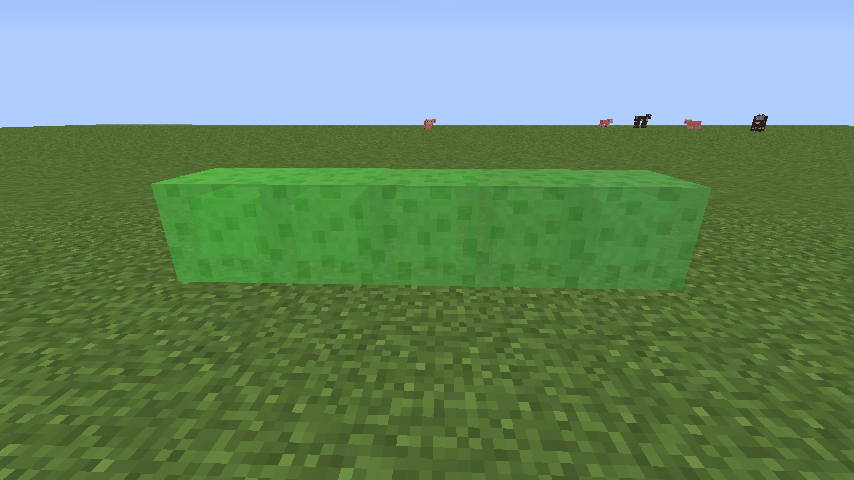
高く飛ぶことが出来ます。
5段階まであります。シフトを押せば飛ばなくなります。また減衰しません。
You can fly high.
There are up to 5 levels. If you press the shift you will not fly. It will not decay.
ポーションカード・Potion Card
削除予定。
右クリックでステータス効果が得られます。
耐久を回復させるにはスライムトロフィーを右クリックします。
plan to delete.
Right click to get status effect.
To restore endurance, right click on the slime trophy.
ツイッター・Twitter→@takusan_23
thx.
Project description from CurseForge.
Pick your setup
SlimeCraft(add Tools etc) by Minecraft version and loader
Choose the version and loader you play, then open the matching release.
Minecraft version
1.12.1
1 loader buildMinecraft version
1.11.2
1 loader buildMinecraft version
1.10.2
1 loader buildCheck the dependencies, then try the file in a copied instance before changing a world you care about.
Recent files
SlimeCraft(add Tools etc) versions and loaders
SlimeCraft 1.10.2-2.5.0
SlimeCraft-1.10.2-2.5.0.jar
24 Mar 2018
Client Source doesn’t say Server Source doesn’t say Dependencies No extras listed Listed on Release listing
Check the 1.10.2 setup 1.10.2 release
SlimeCraft 1.12.2-2.5.0
SlimeCraft-1.12.2-2.5.0.jar
24 Mar 2018
Client Source doesn’t say Server Source doesn’t say Dependencies No extras listed Listed on Release listing
Check the 1.12.2 setup 1.12.2 release
SlimeCraft 1.12.2-2.0
SlimeCraft-2.0.jar
10 Dec 2017
Client Source doesn’t say Server Source doesn’t say Dependencies No extras listed Listed on Release listing
Check the 1.12.2 setup 1.12.2 release
SlimeCraft 1.10.2-2.0.1
Slimecraft-1.10.2-2.0.1.jar
3 Dec 2017
Client Source doesn’t say Server Source doesn’t say Dependencies No extras listed Listed on Release listing
Check the 1.10.2 setup 1.10.2 release
SlimeCraft 1.11.2-2.0
SlimeCraft 1.11.2-2.0-2.0.jar
3 Dec 2017
Client Source doesn’t say Server Source doesn’t say Dependencies No extras listed Listed on Release listing
Check the 1.11.2 setup 1.11.2 release
SlimeCraft 1.10.2-2.0
Slimecraft-1.10.2-2.0.jar
25 Nov 2017
Client Source doesn’t say Server Source doesn’t say Dependencies No extras listed Listed on Release listing
Check the 1.10.2 setup 1.10.2 release
SlimeCraft 1.10.2-1.3.1
Slimecraft-1.10.2-1.3.1.jar
7 Oct 2017
Client Source doesn’t say Server Source doesn’t say Dependencies No extras listed Listed on Release listing
Check the 1.10.2 setup 1.10.2 release
SlimeCraft 1.12.2-1.3
SlimeCraft1.12.2-1.3.jar
7 Oct 2017
Client Source doesn’t say Server Source doesn’t say Dependencies No extras listed Listed on Release listing
Check the 1.12.2 setup 1.12.2 release
SlimeCraft 1.11.2-1.3
SlimeCraft-1.11.2-1.3.jar
7 Oct 2017
Client Source doesn’t say Server Source doesn’t say Dependencies No extras listed Listed on Release listing
Check the 1.11.2 setup 1.11.2 release
SlimeCraft 1.10.2-1.3
SlimeCraft-1.10.2-1.3.jar
7 Oct 2017
Client Source doesn’t say Server Source doesn’t say Dependencies No extras listed Listed on Release listing
Check the 1.10.2 setup 1.10.2 release
SlimeCraft 1.12.1-1.2
slimecraft-1.12.1-1.2.jar
2 Sept 2017
Client Source doesn’t say Server Source doesn’t say Dependencies No extras listed Listed on Release listing
Check the 1.12.1 setup 1.12.1 release
SlimeCraft 1.11.2-1.2
SlimeCraft-1.11.2-1.2.jar
2 Sept 2017
Client Source doesn’t say Server Source doesn’t say Dependencies No extras listed Listed on Release listing
Check the 1.11.2 setup 1.11.2 release
Looking for an older file? The official CurseForge project page is in Resources.
 mod
CurseForge · Minecraft
the real horror of the sea!(its kraken)
this mod add the kraken boss
 mod
CurseForge · Minecraft
Savaru's Affixology [Fabric/NeoForge]
An advanced RPG affix system that transforms weapons with rarity tiers, dynamic effects, and secret inscriptions.
 mod
CurseForge · Minecraft
Savaru's Dungeonology
A Savaru roguelike dungeon system with level-gated entries, difficulty tiers, dungeon objectives, rule-card buffs, party runs, external dungeon integration, and Affixology-linked rewards.