Minecraft version
Back to mods 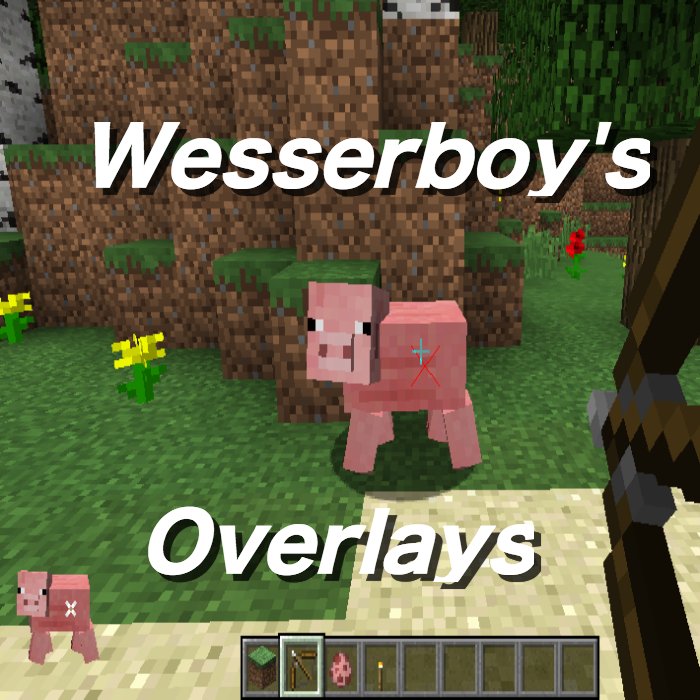
CurseForge · Minecraft mod
Wesserboy's Overlays
Useful overlays for the everyday minecrafter
Choose a version Pick your version below, then grab the matching file.
Quick answer
Which Wesserboy's Overlays release should I use?
Latest stable file WesserboysOverlays-1.0.0.1-1.14.4.jar
Game version 1.14.4
Loader Forge
Wesserboy's Overlays WesserboysOverlays-1.0.0.1-1.14.4.jar targets 1.14.4 with Forge. The project page does not say whether this file belongs on the client, dedicated server, or both. No extra mods listed for this file.
Where it goes
Is Wesserboy's Overlays required on the client, server, or both?
The project page does not say whether this file belongs on the client, dedicated server, or both.
Client Source doesn’t say
Dedicated server Source doesn’t say
Loader for this release Forge
Required install it here Optional supported, not mandatory Not supported do not install here Source doesn’t say do not assume
The source does not explicitly classify this release as client-only or server-only.
What else does Wesserboy's Overlays WesserboysOverlays-1.0.0.1-1.14.4.jar need?
WesserboysOverlays-1.0.0.1-1.14.4.jar. Change the file and its required mods may change too.
This file does not list any required mods. Do not add a library just because a different file uses it.
This file does not list any required or optional mods.
Before you install it
Add Wesserboy's Overlays without breaking your instance.
Built for Wesserboy's Overlays WesserboysOverlays-1.0.0.1-1.14.4.jar. Pick another file and the loader, install side or required mods may change.
- 01
Stick to this file
Use WesserboysOverlays-1.0.0.1-1.14.4.jar. It targets 1.14.4 with Forge; another release may have different loader, side or dependency requirements.
- 02
Bring the mods it needs
This file does not list any required mods. Do not add a library just because a different file uses it.
- 03
Put it on the correct side
The project page does not say whether this file belongs on the client, dedicated server, or both.
- 04
Pick the file you checked
Use the “Get this file” button beside WesserboysOverlays-1.0.0.1-1.14.4.jar. It opens that exact file at the source.
About this project
What does Wesserboy's Overlays add?
This is a client side mod that adds some useful overlays to the game.
There are currently four overlays in the mod:
Light level overlay
This overlay shows blocks where mobs can spawn. A red X indicates mobs can always spawn there, a yellow X indicates mobs can spawn during the night. This overlay can be toggled using a keybind (F7 by default)

Chunk Boundary Overlay
This overlay shows the chunk the player is currently in. The yellow line indicates the middle, the red lines the corners and the green mesh makes the boundaries easier to see. This overlay can be toggled between three modes using a keybind (F9 by default): off --> yellow+red lines only --> the entire overlay.

Slime Chunk Overlay
This overlay shows slime chunks. It shows a translucent slime in the middle of chunks that are slime chunks. It can be useful to combine this with the chunk boundary overlay. This overlay can be toggled using a keybind (F8 by default)

Bow Aim Overlay
This overlay shows a prediction of where an arrow will land. It shows a red X on the ground/mob that you will hit, and gives a preview of the target in the bottom left of the HUD. This overlay will automatically turn on when you draw your bow. It can be configured in the config file or using the mod options menu.

If you find any bugs, or have a suggestion for an existing or a new overlay, you can let me know on Github by creating an issue:
Project description from CurseForge.
Pick your setup
Wesserboy's Overlays by Minecraft version and loader
Choose the version and loader you play, then open the matching release.
Minecraft version
1.12.2
1 loader buildMinecraft version
1.12.1
1 loader buildCheck the dependencies, then try the file in a copied instance before changing a world you care about.
Recent files
Wesserboy's Overlays versions and loaders
WesserboysOverlays-1.0.0.1-1.14.4.jar
24 Aug 2019
Client Source doesn’t say Server Source doesn’t say Dependencies No extras listed Listed on Release listing
Check the 1.14.4 · Forge setup 1.14.4Forge release
WesserboysOverlays-1.0.0.1
wesserboysoverlays-1.0.0.1.jar
15 Sept 2017
Client Source doesn’t say Server Source doesn’t say Dependencies No extras listed Listed on Release listing
Check the 1.12.2 setup 1.12.11.12.2 release
WesserboysOverlays-1.0.0.0
wesserboysoverlays-1.0.0.0.jar
10 Sept 2017
Client Source doesn’t say Server Source doesn’t say Dependencies No extras listed Listed on Release listing
Check the 1.12.1 setup 1.12.1 release
Looking for an older file? The official CurseForge project page is in Resources.
 mod
CurseForge · Minecraft
Weird Mobs Port
Weird Mobs Mod (ZurraGameZ + UKdeccy) on 1.12.2 Cleanroom: 25 weird mobs, from Spider Creepers to the Wither Creeper.
 mod
CurseForge · Minecraft
Starminer Cleanroom Port
ARUBE's Starminer (1.7.10) on 1.12.2 Cleanroom: terraform your own tiny stars with their own gravity.
 mod
CurseForge · Minecraft
Villager's Nose Port
Villager's Nose (1.7.10) by StarSheep on 1.12.2 Cleanroom. NOT SERIOUS! Assets load from your copy of the original via ArchaicLib.