CraftDev Core Needed by SpookyCraft v1.0.3 MC1.12.2
requiredMatching file found Matched file: CraftDev-Core v2.2.8 MC1.12.2

CurseForge · Minecraft mod
Halloween mod made for MMD's SpookyJam
Quick answer
SpookyCraft v1.0.3 MC1.12.2 targets 1.12.2. The project page does not say whether this file belongs on the client, dedicated server, or both. All 1 required mods have matching files.
Where it goes
The project page does not say whether this file belongs on the client, dedicated server, or both.
The source does not explicitly classify this release as client-only or server-only.
SpookyCraft v1.0.3 MC1.12.2. Change the file and its required mods may change too.
Install CraftDev Core first. We found matching files for this game-version and loader setup.
We only count dependency files that match this setup. A file for another loader does not fill the gap.
Before you install it
Built for SpookyCraft v1.0.3 MC1.12.2. Pick another file and the loader, install side or required mods may change.
Use SpookyCraft v1.0.3 MC1.12.2. It targets 1.12.2; another release may have different loader, side or dependency requirements.
Install CraftDev Core first. We found matching files for this game-version and loader setup.
The project page does not say whether this file belongs on the client, dedicated server, or both.
Use the “Get this file” button beside SpookyCraft v1.0.3 MC1.12.2. It opens that exact file at the source.
About this project
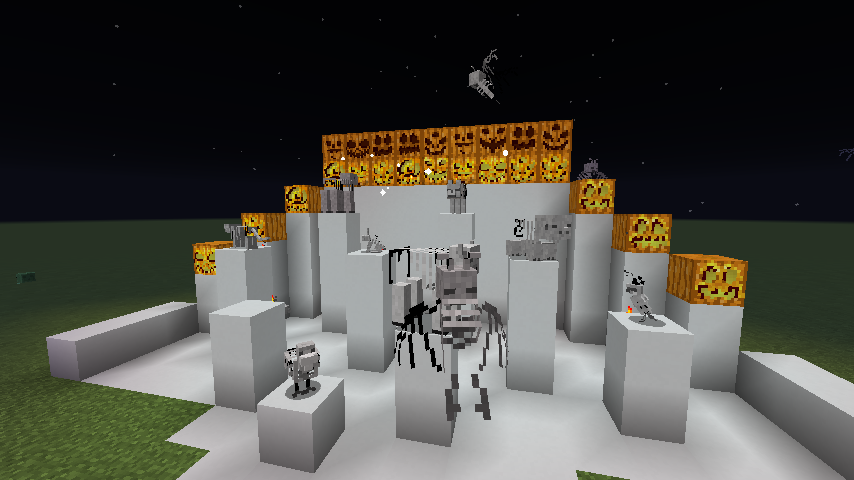
Adds new Skeletal mobs and other scary features to make a better Halloween experience.
But beware: if you don't wear a pumpkin hat at evening you probably won't make it to the end of the night!
Made for the MMD SpookyJam. (/r/feedthebeast) (#SpookyJamMC on Twitter)
developed during first SpookyJam contest from october 1st to october 7th 2017,
made by UpcraftLP and Epiic_Thundercat
artists: Subaraki, Epiic_Thundercat
Project description from CurseForge.
Pick your setup
Choose the version and loader you play, then open the matching release.
Check the dependencies, then try the file in a copied instance before changing a world you care about.
Recent files
spookycraft-1.12.2-1.0.3.jar
29 Nov 2017
spookycraft-1.12.2-1.0.2.jar
25 Oct 2017
spookycraft-1.12.2-1.0.1.jar
8 Oct 2017
spookycraft-1.12.2-1.0.0.jar
8 Oct 2017
Looking for an older file? The official CurseForge project page is in Resources.
 mod
Stop reading long tooltips mid-fight! ETag displays colorful enchantment initials in the 4 corners of your items and books—working standalone in Survival inventory and seamlessly inside JEI.
 mod
Police cruisers, fire trucks, robbers, banks, and patrol play for family Minecraft worlds.
 mod
An adventure mod featuring 4 new structures, 3 new bosses, new health bars for existing bosses, and much more! New Beta: Many bosses and items have been remodeled! Celestia's and Cursed Flora have been redesigned, and lots of new items have been added!