Minecraft version
Back to mods 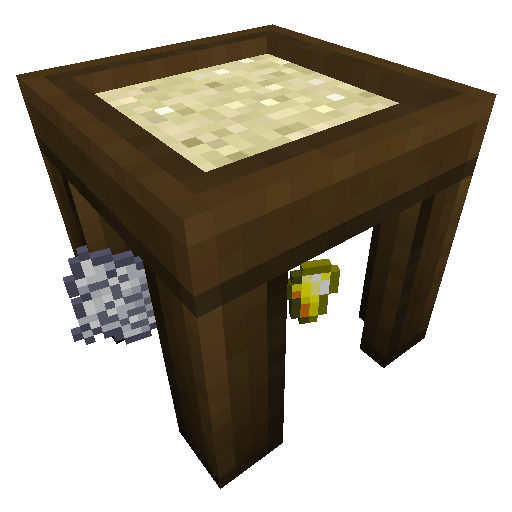
CurseForge · Minecraft mod
Sift
A Sieve like Ex Nihilo's but fully configurable for your skyblock.
Choose a version Pick your version below, then grab the matching file.
Quick answer
Which Sift release should I use?
Latest stable file zephsift-1.5.jar
Game version 1.12.2
Loader Not required
Sift zephsift-1.5.jar targets 1.12.2. The project page does not say whether this file belongs on the client, dedicated server, or both. No extra mods listed for this file.
Where it goes
Is Sift required on the client, server, or both?
The project page does not say whether this file belongs on the client, dedicated server, or both.
Client Source doesn’t say
Dedicated server Source doesn’t say
Loader for this release No loader listed
Required install it here Optional supported, not mandatory Not supported do not install here Source doesn’t say do not assume
The source does not explicitly classify this release as client-only or server-only.
What else does Sift zephsift-1.5.jar need?
zephsift-1.5.jar. Change the file and its required mods may change too.
This file does not list any required mods. Do not add a library just because a different file uses it.
This file does not list any required or optional mods.
Before you install it
Add Sift without breaking your instance.
Built for Sift zephsift-1.5.jar. Pick another file and the loader, install side or required mods may change.
- 01
Stick to this file
Use zephsift-1.5.jar. It targets 1.12.2; another release may have different loader, side or dependency requirements.
- 02
Bring the mods it needs
This file does not list any required mods. Do not add a library just because a different file uses it.
- 03
Put it on the correct side
The project page does not say whether this file belongs on the client, dedicated server, or both.
- 04
Pick the file you checked
Use the “Get this file” button beside zephsift-1.5.jar. It opens that exact file at the source.
About this project
What does Sift add?
I really wanted Ex Nihilo for my 1.11.2 modpack because I like the Sieve. But I couldn't find any releases for 1.11.2 so I made this mod. I took it a step further and made the inputs and outputs configurable. It generates a config file with some defaults but they are examples and you'll want to change them. If you want a more realistic config use this one:
Configuration file
general {
These are the items/blocks that can be placed in the sift.
S:inputs <
minecraft:sand:0
minecraft:sand:1
minecraft:soul_sand:0
minecraft:dirt:0
minecraft:dirt:1
minecraft:gravel:0
>
}
outputs {
S:0 <
minecraft:gold_nugget:0
minecraft:clay_ball:0
minecraft:dye:15
minecraft:dye:7
>
S:1 <
minecraft:clay_ball:0
minecraft:iron_nugget:0
minecraft:gunpowder:0
minecraft:sand:0
>
S:2 <
minecraft:glowstone_dust:0
minecraft:blaze_powder:0
minecraft:nether_wart:0
minecraft:quartz:0
>
S:3 <
minecraft:stick:0
minecraft:string:0
minecraft:wheat_seeds:0
minecraft:beetroot_seeds:0
minecraft:clay_ball:0
minecraft:dye:8
>
S:4 <
minecraft:dirt:0
minecraft:stick:0
minecraft:string:0
minecraft:gunpowder:0
minecraft:coal:0
minecraft:flint:0
minecraft:iron_nugget:0
>
S:5 <
minecraft:flint:0
minecraft:iron_nugget:0
minecraft:gunpowder:0
minecraft:coal:0
minecraft:sand:0
>
}
Items are added like this: modid:itemname:damage
So a working example for red sand would be: minecraft:sand:1
The inputs list under "general" is a list of items/blocks that can be placed in the sieve.
The numbers in the outputs refer to the inputs. So 0 would be the outputs of the first item in the inputs list. And 1 would be the outputs of the second item.
If you forget to add an output for an item then the mod will automatically generate one. If you accidentally add too many they will be ignored.
An incorrect name will cause that item to be null (air).
Using the wrong syntax might crash the game.
If you want to change the recipe you can currently do that with CraftTweaker or use the new 1.12 json recipes.
Also try Melt! A configurable Crucible.
Modpacks:
You are free to use this mod in any public or personal modpack.
Future plans:
Some way to fully automate the sifting process
Future ideas:
Sounds
Syntax checking
Changeable mesh/screen
JEI Support
Add option for multiple drops in the config
Project description from CurseForge.
Pick your setup
Sift by Minecraft version and loader
Choose the version and loader you play, then open the matching release.
Minecraft version
1.11.2
1 loader buildCheck the dependencies, then try the file in a copied instance before changing a world you care about.
Recent files
Sift versions and loaders
zephsift-1.5.jar
31 Aug 2021
Client Source doesn’t say Server Source doesn’t say Dependencies No extras listed Listed on Release listing
Check the 1.12.2 setup 1.12.2 release
zephsift-1.4.jar
1 Apr 2019
Client Source doesn’t say Server Source doesn’t say Dependencies No extras listed Listed on Release listing
Check the 1.12.2 setup 1.12.2 release
zephsift-1.3.jar
28 Feb 2019
Client Source doesn’t say Server Source doesn’t say Dependencies No extras listed Listed on Release listing
Check the 1.12.2 setup 1.12.2 release
zephsift-1.2.jar
30 Nov 2018
Client Source doesn’t say Server Source doesn’t say Dependencies No extras listed Listed on Release listing
Check the 1.12.2 setup 1.12.2 release
zephsift-1.1.jar
3 Nov 2017
Client Source doesn’t say Server Source doesn’t say Dependencies No extras listed Listed on Release listing
Check the 1.11.2 setup 1.11.2 release
zephsift-1.0.jar
30 Oct 2017
Client Source doesn’t say Server Source doesn’t say Dependencies No extras listed Listed on Release listing
Check the 1.11.2 setup 1.11.2 release
zephsift-0.2.0.jar
28 Oct 2017
Client Source doesn’t say Server Source doesn’t say Dependencies No extras listed Listed on Release listing
Check the 1.11.2 setup 1.11.2 beta
zephsift-0.1.0.jar
23 Oct 2017
Client Source doesn’t say Server Source doesn’t say Dependencies No extras listed Listed on Release listing
Check the 1.11.2 setup 1.11.2 beta
Looking for an older file? The official CurseForge project page is in Resources.
 mod
CurseForge · Minecraft
Smart Storage Plus
A powerful storage system with unlimited capacity, universal search, sorting, pagination, and built-in crafting access.
 mod
CurseForge · Minecraft
Beyond The End - Ender Eyes GUI
This mod display all the 24 Ender Eyes needed to obtain in the Beyond The End Mopack
 mod
CurseForge · Minecraft
Recrafted Moves
Bring your player to life with first- and third-person animations, stamina-based melee moves, dodges, parries and parkour.