Minecraft version
Back to mods 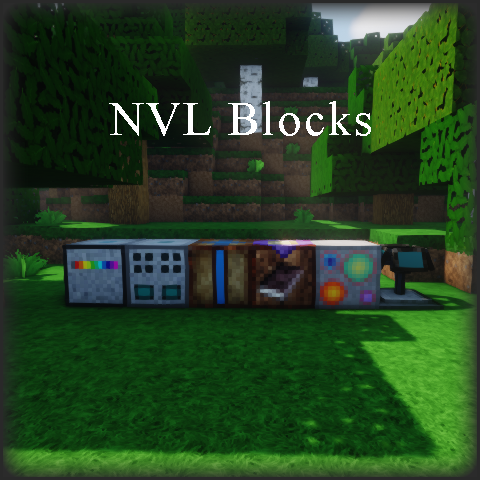
CurseForge · Minecraft mod
NVL's Blocks
Blocks which I think missing from vanilla Minecraft
Choose a version Pick your version below, then grab the matching file.
Quick answer
Which NVL's Blocks release should I use?
Latest stable file nvlblocks-1.20.1-25.jar
Game version 1.20.1
Loader Fabric, Forge
NVL's Blocks nvlblocks-1.20.1-25.jar targets 1.20.1 with Fabric, Forge. The project page does not say whether this file belongs on the client, dedicated server, or both. No extra mods listed for this file.
Where it goes
Is NVL's Blocks required on the client, server, or both?
The project page does not say whether this file belongs on the client, dedicated server, or both.
Client Source doesn’t say
Dedicated server Source doesn’t say
Loader for this release Fabric, Forge
Required install it here Optional supported, not mandatory Not supported do not install here Source doesn’t say do not assume
The source does not explicitly classify this release as client-only or server-only.
What else does NVL's Blocks nvlblocks-1.20.1-25.jar need?
nvlblocks-1.20.1-25.jar. Change the file and its required mods may change too.
This file does not list any required mods. Do not add a library just because a different file uses it.
This file does not list any required or optional mods.
Before you install it
Add NVL's Blocks without breaking your instance.
Built for NVL's Blocks nvlblocks-1.20.1-25.jar. Pick another file and the loader, install side or required mods may change.
- 01
Stick to this file
Use nvlblocks-1.20.1-25.jar. It targets 1.20.1 with Fabric, Forge; another release may have different loader, side or dependency requirements.
- 02
Bring the mods it needs
This file does not list any required mods. Do not add a library just because a different file uses it.
- 03
Put it on the correct side
The project page does not say whether this file belongs on the client, dedicated server, or both.
- 04
Pick the file you checked
Use the “Get this file” button beside nvlblocks-1.20.1-25.jar. It opens that exact file at the source.
About this project
What does NVL's Blocks add?
New rebuild for 1.20.1 and 1.21.1
- Universal MOD file: Supports Forge, NeoForge (1.21.1) and Fabric loaders!!!
- New block design. Brand new model and textures!
New Block and new Item in v21
Group Teleport Beacon
This beacon is a carriable block which gives your team teleport capabilities to each other. It can be very helpful when exploring and got separated from each other.
Preparation:
- place down a beacon
- Create a new group by adding a name on the GUI. It can be renamed later any number of times the bond will always stay.
- Each member of the group use a Group Teleport Handheld Device on the configured Beacon to bind it to the group.
- You can now break the beacon and take it with you. It stores no configuration the group exists in the bound devices.
Usage:
- Place down a Beacon
- Use an already bound Device on it to activate.
- Any group member using their Device in the world will be teleported near the Beacon.
- The teleport costs life points but not more than half of the total.
- Only the last activated Beacon will be active: it pulsates and emmit light when activated.
- The group cannot teleport members through dimensions.
Group Teleport Handheld Device
- Use this device on the Group Teleport Beacon to bind it to the group set on the Beacon.
- Once boud, you can use it to immediately teleport near the Beacon whenever it is located.
Older and well known blocks and items in version 21:
Enchantment Transfer Table:
This table can remove or add enchantments from/to enchantable items and Enchated Books. It is also able to merge Enchanted Books. The table operates with Lapis Lazuli and books. Now with simplified GUI.
Emergency Transporter:
This allows you to transport yourself back to your Emergency Teleport Point immediately.
- The cost of the transport will cost you almost all of your life points.
- To activate it, simply use it (previous versions were used swing - as attack)
- This new version has the deviced in all colors!
- It can also store coordinates for multiple dimansions!
Emergency Teleport Point Terminal:
You can set your emergency teleport point by activating the Transporter item on this block.
Holo Sign:
This block projects the image of the item placed in it. You can select the direction of the projection.
XP Vault:
- You can store your XP here safely while you go adventuring.
- You can also donate or take XP to the common account.
- The vault is now considers the real XP amount and cannot be used for cheating with cheap low levels.
- When broken the Vault drops the XP stored in individual tokens what can be used on a new Vault only.
Automated Compacter
- This device compacts items if they are compactable. (Everything which has a 3x3 recipe with the same item source. Example: 9 iron ingot -> iron block).
- Can be automated by the vanilla hoppers or any other block using the vanilla item transport system.
- The machine will sipmply bypass the non-compactable items to the output.
Dye Extractor
- The block extracts Dye from Dye source items. Example: From Bone Meal -> White Dye.
- You can use hoppers or any vanilla item transport compatible system for automation.
- The machine will sipmply bypass the non-dye-source items to the output.
NVL'S Universal Help Cube
This MOD is hosted here but it gives you the crafting recipes of all NVL blocks and items in any of my MODs.
You can see it in action in the screenshots.
Older versions:
his MOD was born when NVL Warpdrive Extensions were split up to allow MODPack creators to have more choices on block selections and keeping the pack balance.
Contains the following blocks and items:
Enchantment Transfer Table: This table can remove or add enchantments from/to enchantable items and Enchated Books. The table operates with Lapis Lazuli.
Block Compressor: This is the latest advancements of nano technology combined with compressors. It can comress any compressible items including ingots, planks, dirt, cobblestone, etc...
Decrafting Table: Did you have the feeling when you just used up all of your precious diamonds for a second pickaxe when you wanted a shovel instead, and there is no going back? Now, there is! This table can decraft anything (almost) including IC2 stuff too. (Or it just show you the crafting recipe ... )
Spawn Point Terminal: You can set your spawn point in the dimension you are as simply activating this block. When you die you will be spawned to that location.
Emergency Transporter: This allows you to transport yourself back to your spawnpoint immediately. The cost of the transport will be either: 1 emerald or 3 diamond or almost all of your lifepoints. Keep the emerald or diamonds in your inventory next to this item. To activate it, simply swing it to the air (or space :))
Holo Sign: This block projects the image of the item placed in it. You can select the direction of the projection too.
Project description from CurseForge.
Pick your setup
NVL's Blocks by Minecraft version and loader
Choose the version and loader you play, then open the matching release.
Minecraft version
1.21
1 loader buildMinecraft version
1.20.4
1 loader buildMinecraft version
1.20.1
2 loader buildsMinecraft version
1.20
1 loader buildMinecraft version
1.12.2
1 loader buildMinecraft version
1.12.1
1 loader buildMinecraft version
1.12-Snapshot
1 loader buildMinecraft version
1.12
1 loader buildMinecraft version
1.11.2
1 loader buildMinecraft version
1.11.1
1 loader buildMinecraft version
1.11-Snapshot
1 loader buildShowing the newest 12 of 18 game versions. Older files are in the list below.
Check the dependencies, then try the file in a copied instance before changing a world you care about.
Recent files
NVL's Blocks versions and loaders
nvlblocks-1.20.1-25.jar
24 Jun 2026
Client Source doesn’t say Server Source doesn’t say Dependencies No extras listed Listed on Release listing
Check the 1.20.1 · Fabric setup Fabric1.20.1Forge release
nvlblocks-1.20.1-23.jar
6 May 2026
Client Source doesn’t say Server Source doesn’t say Dependencies No extras listed Listed on Release listing
Check the 1.20.1 · Fabric setup Fabric1.20.1Forge release
nvlblocks-1.21.1-23.jar
6 May 2026
Client Source doesn’t say Server Source doesn’t say Dependencies No extras listed Listed on Release listing
Check the 1.21.1 · Fabric setup FabricForge1.21.1NeoForge release
nvluniversalhelp-1.21.1-8.jar
29 Jun 2025
Client Source doesn’t say Server Source doesn’t say Dependencies No extras listed Listed on Release listing
Check the 1.21.1 · Fabric setup FabricNeoForgeForge1.21.1 release
nvlblocks-1.21.1-21.jar
29 Jun 2025
Client Source doesn’t say Server Source doesn’t say Dependencies No extras listed Listed on Release listing
Check the 1.21.1 · Fabric setup FabricNeoForgeForge1.21.1 release
nvluniversalhelp-1.21.1-52.0.24-6.jar
4 Dec 2024
Client Source doesn’t say Server Source doesn’t say Dependencies No extras listed Listed on Release listing
Check the 1.21.1 · Forge setup Forge1.21.1 release
nvlblocks-1.21.1-52.0.24-19.jar
4 Dec 2024
Client Source doesn’t say Server Source doesn’t say Dependencies No extras listed Listed on Release listing
Check the 1.21.1 · Forge setup Forge1.21.1 release
nvluniversalhelp-1.21-51.0.18-5.jar
2 Sept 2024
Client Source doesn’t say Server Source doesn’t say Dependencies No extras listed Listed on Release listing
Check the 1.21 · Forge setup 1.21Forge release
nvlblocks-1.21-51.0.18-18.jar
2 Sept 2024
Client Source doesn’t say Server Source doesn’t say Dependencies No extras listed Listed on Release listing
Check the 1.21 · Forge setup 1.21Forge release
NVL_MODBlocks 1.21 v240701.zip.jar
4 Jul 2024
Client Source doesn’t say Server Source doesn’t say Dependencies No extras listed Listed on Release listing
Check the 1.21 · Forge setup 1.21Forge release
nvluniversalhelp-1.20.4-49.0.31-3.jar
21 May 2024
Client Source doesn’t say Server Source doesn’t say Dependencies No extras listed Listed on Release listing
Check the 1.20.4 · Forge setup Forge1.20.4 release
nvlblocks-1.20.4-49.0.31-15.jar
21 May 2024
Client Source doesn’t say Server Source doesn’t say Dependencies No extras listed Listed on Release listing
Check the 1.20.4 · Forge setup Forge1.20.4 release
Looking for an older file? The official CurseForge project page is in Resources.
 mod
CurseForge + Modrinth · Minecraft
Sophisticated Storage Create Integration
Full Featured Sophisticated Storage on Create Contraptions
 mod
CurseForge · Minecraft
Sloppy Fishy (Another Jujutsu Slop Addon)
Adds way more slop to the Jujutsu Slop systems and menus. Too much slop to handle, honestly.
 mod
CurseForge · Minecraft
Book of Dragons: Mazon's Almenac
A Book of Dragons addon that turns dragon ownership into a hands-on bond: heal them, feed them, and customize them your way