Minecraft version
Back to mods 
CurseForge · Minecraft mod
Advanced Mortars
Four in-world mortars with CraftTweaker and JEI integration.
Choose a version Pick your version below, then grab the matching file.
Quick answer
Which Advanced Mortars release should I use?
beta file advancedmortars-1.12.2-1.7.1.jar
Game version 1.12.2
Loader Forge
Advanced Mortars advancedmortars-1.12.2-1.7.1.jar targets 1.12.2 with Forge. The project page does not say whether this file belongs on the client, dedicated server, or both. No extra mods listed for this file.
Where it goes
Is Advanced Mortars required on the client, server, or both?
The project page does not say whether this file belongs on the client, dedicated server, or both.
Client Source doesn’t say
Dedicated server Source doesn’t say
Loader for this release Forge
Required install it here Optional supported, not mandatory Not supported do not install here Source doesn’t say do not assume
The source does not explicitly classify this release as client-only or server-only.
What else does Advanced Mortars advancedmortars-1.12.2-1.7.1.jar need?
advancedmortars-1.12.2-1.7.1.jar. Change the file and its required mods may change too.
This file does not list any required mods. Do not add a library just because a different file uses it.
This file does not list any required or optional mods.
Before you install it
Add Advanced Mortars without breaking your instance.
Built for Advanced Mortars advancedmortars-1.12.2-1.7.1.jar. Pick another file and the loader, install side or required mods may change.
- 01
Stick to this file
Use advancedmortars-1.12.2-1.7.1.jar. It targets 1.12.2 with Forge; another release may have different loader, side or dependency requirements.
- 02
Bring the mods it needs
This file does not list any required mods. Do not add a library just because a different file uses it.
- 03
Put it on the correct side
The project page does not say whether this file belongs on the client, dedicated server, or both.
- 04
Pick the file you checked
Use the “Get this file” button beside advancedmortars-1.12.2-1.7.1.jar. It opens that exact file at the source.
About this project
What does Advanced Mortars add?
Advanced Mortars
This mod is designed for modpack makers. It contains only example recipes and is intended to be used with CraftTweaker. JEI integration is supported, however item transfer functionality has been intentionally omitted.
Overview
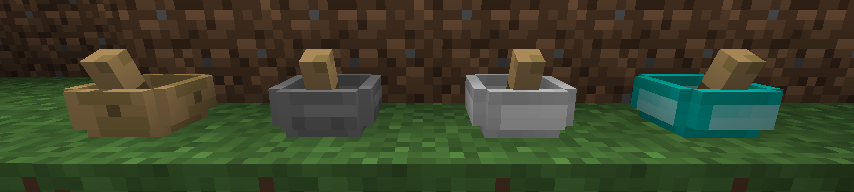
This mod contains four in-world mortars, each with a configurable durability.

Usage
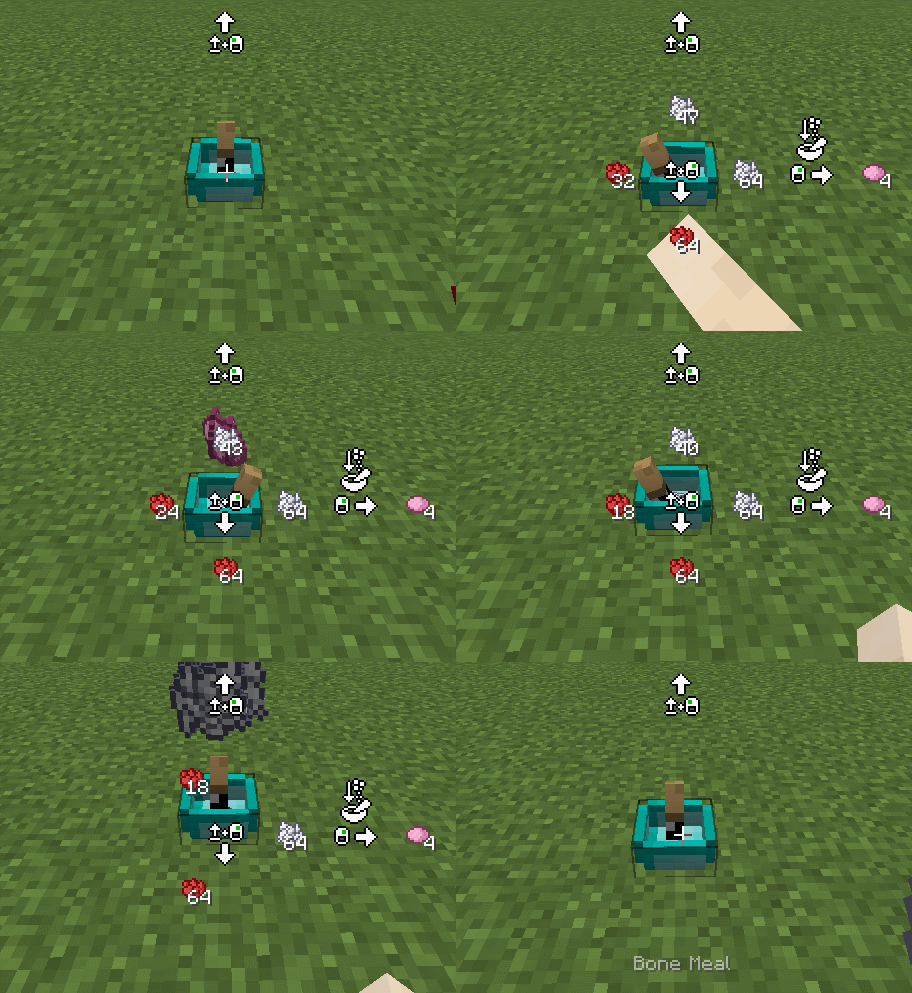
Insertion
Place up to eight stacks of items in the mortar by right-clicking the mortar while holding the items. Then, perform the craft by right-clicking or holding down the right mouse button with an empty hand (empty hand requirement is configurable).
Retrieval
Retrieve items in the mortar by sneaking and right-clicking the mortar with an empty hand.
Pick-Up
The mortar can easily be picked up and moved by sneaking and left-clicking the mortar. When picked up this way, the mortar will retain its contents.
Recipes
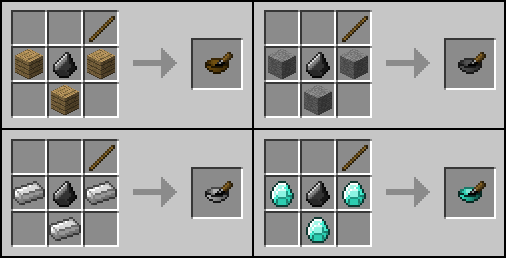
Four crafting recipes have been added, one for each mortar.
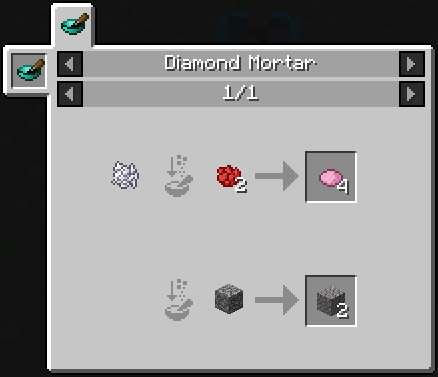
Two example recipes for each mortar are also included. The example recipes are intended for modpack makers to quickly grab the mod and test its functionality without having to first supply recipes via CraftTweaker and ZenScript. These recipes can be quickly and easily disabled in the config.
Project description from CurseForge.
Pick your setup
Advanced Mortars by Minecraft version and loader
Choose the version and loader you play, then open the matching release.
Check the dependencies, then try the file in a copied instance before changing a world you care about.
Recent files
Advanced Mortars versions and loaders
advancedmortars-1.12.2-1.7.1.jar
8 Sept 2019
Client Source doesn’t say Server Source doesn’t say Dependencies No extras listed Listed on Release listing
Check the 1.12.2 · Forge setup Forge1.12.2 beta
advancedmortars-1.12.2-1.7.0.jar
29 May 2019
Client Source doesn’t say Server Source doesn’t say Dependencies No extras listed Listed on Release listing
Check the 1.12.2 setup 1.12.2 beta
advancedmortars-1.12.2-1.6.23.jar
14 May 2019
Client Source doesn’t say Server Source doesn’t say Dependencies No extras listed Listed on Release listing
Check the 1.12.2 setup 1.12.2 beta
advancedmortars-1.12.2-1.6.22.jar
10 Oct 2018
Client Source doesn’t say Server Source doesn’t say Dependencies No extras listed Listed on Release listing
Check the 1.12.2 setup 1.12.2 beta
advancedmortars-1.12.2-1.6.21.jar
7 Jun 2018
Client Source doesn’t say Server Source doesn’t say Dependencies No extras listed Listed on Release listing
Check the 1.12.2 setup 1.12.2 beta
advancedmortars-1.12.2-1.6.20.jar
4 Feb 2018
Client Source doesn’t say Server Source doesn’t say Dependencies No extras listed Listed on Release listing
Check the 1.12.2 setup 1.12.2 beta
advancedmortars-1.12.2-1.6.19.jar
3 Feb 2018
Client Source doesn’t say Server Source doesn’t say Dependencies No extras listed Listed on Release listing
Check the 1.12.2 setup 1.12.2 beta
advancedmortars-1.12.2-1.6.18.jar
2 Feb 2018
Client Source doesn’t say Server Source doesn’t say Dependencies No extras listed Listed on Release listing
Check the 1.12.2 setup 1.12.2 beta
advancedmortars-1.12.2-1.6.17.jar
1 Feb 2018
Client Source doesn’t say Server Source doesn’t say Dependencies No extras listed Listed on Release listing
Check the 1.12.2 setup 1.12.2 beta
advancedmortars-1.12.2-1.6.16.jar
9 Jan 2018
Client Source doesn’t say Server Source doesn’t say Dependencies No extras listed Listed on Release listing
Check the 1.12.2 setup 1.12.2 beta
advancedmortars-1.12.2-1.6.15.jar
2 Jan 2018
Client Source doesn’t say Server Source doesn’t say Dependencies No extras listed Listed on Release listing
Check the 1.12.2 setup 1.12.2 beta
advancedmortars-1.12.2-1.6.14.jar
28 Dec 2017
Client Source doesn’t say Server Source doesn’t say Dependencies No extras listed Listed on Release listing
Check the 1.12.2 setup 1.12.2 beta
Looking for an older file? The official CurseForge project page is in Resources.
 mod
mod CurseForge + Modrinth · Minecraft
Arcanum
Magic, Armor and Tools all in one mod. This mod is extremely tiered but can become incredibly powerful as you move up!
 mod
mod CurseForge + Modrinth · Minecraft
Millager (Village Defenders)
Millager arms the villager side with a standing military of specialised infantry, mounted cavalry, summoners, and constructs, backed by raid reinforcements, patrols, player-issued orders, and diverse structures across the world.
 mod
mod CurseForge · Minecraft
Old School Levels
This is an overhaul to the progression system of Minecraft based on Old School Runescape!