Minecraft version
Back to mods 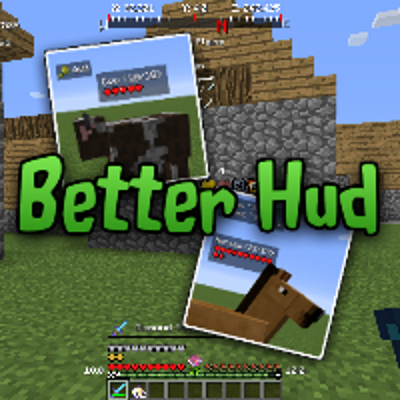
CurseForge · Minecraft mod
Better HUD
Customizable vanilla HUD and 25+ new in-game widgets. Configure everything!
Choose a version Pick your version below, then grab the matching file.
Quick answer
Which Better HUD release should I use?
Latest stable file betterhud-1.12.2-1.4.4.jar
Game version 1.12.2
Loader Forge
Better HUD betterhud-1.12.2-1.4.4.jar targets 1.12.2 with Forge. The project page does not say whether this file belongs on the client, dedicated server, or both. No extra mods listed for this file.
Where it goes
Is Better HUD required on the client, server, or both?
The project page does not say whether this file belongs on the client, dedicated server, or both.
Client Source doesn’t say
Dedicated server Source doesn’t say
Loader for this release Forge
Required install it here Optional supported, not mandatory Not supported do not install here Source doesn’t say do not assume
The source does not explicitly classify this release as client-only or server-only.
What else does Better HUD betterhud-1.12.2-1.4.4.jar need?
betterhud-1.12.2-1.4.4.jar. Change the file and its required mods may change too.
This file does not list any required mods. Do not add a library just because a different file uses it.
This file does not list any required or optional mods.
Before you install it
Add Better HUD without breaking your instance.
Built for Better HUD betterhud-1.12.2-1.4.4.jar. Pick another file and the loader, install side or required mods may change.
- 01
Stick to this file
Use betterhud-1.12.2-1.4.4.jar. It targets 1.12.2 with Forge; another release may have different loader, side or dependency requirements.
- 02
Bring the mods it needs
This file does not list any required mods. Do not add a library just because a different file uses it.
- 03
Put it on the correct side
The project page does not say whether this file belongs on the client, dedicated server, or both.
- 04
Pick the file you checked
Use the “Get this file” button beside betterhud-1.12.2-1.4.4.jar. It opens that exact file at the source.
About this project
What does Better HUD add?
Open full changelog - CurseForge Project Page - Minecraft Forum Thread - Planet Minecraft Page
Better HUD gives you heaps of customization options for the in-game HUD: move around vanilla widgets, add or remove new widgets, and configure it all to your liking! Better HUD features a powerful positioning system to get everything just right, and plenty of tweaks for each widget.
Settings
To open the settings menu, the default key binding is U. This can be changed just like any other key, from Options... Controls... Miscellaneous. From the menu you have control over everything on screen, down to the crosshair. Enable or disable widgets, or click the options button for more options and positioning.
Configure Vanilla
In beta-1.4 and later (check the CurseForge project page!), vanilla elements can be moved and configured. Move around your hotbar, your health and hunger bars, and everything else. You can even turn off your health bar for extra-hard mode!
Widgets
Better HUD has a grand total of 40 configurable widgets. There's an on-screen compass, armor status, item pickup tracker, blood splatters and many more. Mix and match to create your perfect HUD. Check the full list below:
| Element | Description |
|---|---|
| Air Bar | |
| Armor Bar | |
| Armor Bars | Shows your current armor and its durability. |
| Biome | Displays the current biome. |
| Block Viewer | Shows the block you're looking at, including custom names. |
| Blood Splatters | When you're hit, blood splatterrs will show up on your screen. |
| CPS | Clicks Per Second. |
| Compass | Shows the relative position of each cardinal direction N, E, S, W. |
| Connection | Displays information about the current server and the number of players. |
| Coordinates | Shows your X, Y, Z coordinates. |
| Crosshair | |
| Distance | Shows how far away the closest block is from the crosshair. |
| Experience Bar | |
| FPS | Displays current FPS. |
| Full Inv. Indicator | Shows a warning when your inventory is full. |
| Game Clock | Shows the in-game date and time. Can be configured to require a clock in the player's inventory. |
| Heal Indicator | Shows an indicator when the player can heal naturally. |
| Health Bar | |
| Helmet Overlay | The overlay used for wearing pumpkins and some mods. |
| Holding Bar | Displays the currently held item/offhand item. |
| Horse Info | Shows speed and jump height for horses. |
| Hotbar | |
| Hunger Bar | |
| Item Pickup | Keeps track of all the items the player picks up. |
| Jump Bar | The jump bar while riding a horse. |
| Light Level | Shows the light level of the block the player is standing on. |
| Mob Info | Shows health bars for mobs. |
| Mount Health | |
| Off-Hand | The offhand slot. |
| Player Info | Shows currently held item and armor for other players. |
| Portal Overlay | The wavy purple effect when entering a nether portal. |
| Potion Display | Displays current potion effects with amplifiers. |
| Saturation | Shows hunger bar saturation. |
| Scoreboard | |
| Sign Reader | Shows the text on a sign, even if standing behind, far away, or blocked by other players or mobs. |
| System Clock | Shows the current date and time on your computer. |
| Vignette | The radial gradient that darkens the edges of your screen. |
| Water Drops | When it's raining, or you exit water, your screen will be covered in water droplets. |
| XP Info | Shows how much experience the player has and needs to get to the next level, over the bar. |
Error Reporting
Comments are disabled because they are not a place to post crash reports. If your game crashes or has a bug, please follow these steps:
- Ensure you are running the latest version of the mod and can reproduce the problem
- Ensure the problem is actually related to this mod: crash reports (excluding forced ones, see below) must mention the modid
betterhudoutside of the mod list. Look for a line that starts withat jobicade.betterhud. - Include the full crash report, including mod list (from
.minecraft/crash-reports/) - Include your configuration file from Better HUD and any mods you think may be relevant to the problem
- Provide a description of what you were doing/looking at/holding when the game crashed
- If you think you know the cause, please include it
- Search the issue tracker to see if your issue has been solved or reported already
- If not, create a new issue with all the information you gathered.
If you encounter a bug/visual glitch that doesn't end the game, you can force a crash by holding F3+C for 10 seconds. Then provide your crash report as normal.
F.A.Q.
- Q: Can I use this mod in a modpack?
A: Yes, and I thank those who use CurseForge since it counts towards my total downloads and helps boost the mod! - Q: Where should I make suggestions?
A: The issue tracker is the best place to do so, and you can add the "suggestion" label to make it clear. Suggestions about updating to Minecraft version X are likely to go ignored. - Q: My favourite server banned Better HUD. Can you make a version without X and Y/with a different name?
A: No. This mod has one standard release and the only likely variants would be for different Minecraft versions. - Q: Why? I really like this mod and I want to play it!
A: I appreciate the support, but neither can I nor do I want to make specific exceptions for just a few people. The mod's license permits you to remove any features you don't want for your own build (and I know modding is hard, that's why I won't do this for you!)
Project description from CurseForge.
Pick your setup
Better HUD by Minecraft version and loader
Choose the version and loader you play, then open the matching release.
Minecraft version
1.12.1
1 loader buildMinecraft version
1.12-Snapshot
1 loader buildMinecraft version
1.12
2 loader buildsMinecraft version
1.11
1 loader buildMinecraft version
1.10.2
1 loader buildMinecraft version
1.9.4
1 loader buildMinecraft version
1.9
1 loader buildMinecraft version
1.8.9
1 loader buildMinecraft version
1.7.10
1 loader buildCheck the dependencies, then try the file in a copied instance before changing a world you care about.
Recent files
Better HUD versions and loaders
betterhud-1.12.2-1.4.4.jar
28 May 2021
Client Source doesn’t say Server Source doesn’t say Dependencies No extras listed Listed on Release listing
Check the 1.12.2 · Forge setup Forge1.12.2 release
betterhud-1.12.2-1.4.3.jar
15 Jun 2020
Client Source doesn’t say Server Source doesn’t say Dependencies No extras listed Listed on Release listing
Check the 1.12.2 · Forge setup Forge1.12.2 release
betterhud-1.12.2-1.4.2.jar
22 May 2020
Client Source doesn’t say Server Source doesn’t say Dependencies No extras listed Listed on Release listing
Check the 1.12.2 · Forge setup Forge1.12.2 release
betterhud-1.12.2-1.4.1.jar
22 Aug 2019
Client Source doesn’t say Server Source doesn’t say Dependencies No extras listed Listed on Release listing
Check the 1.12.2 · Forge setup 1.12.11.12Forge1.12.2 release
betterhud-1.12.2-1.4.jar
4 Apr 2019
Client Source doesn’t say Server Source doesn’t say Dependencies No extras listed Listed on Release listing
Check the 1.12.2 setup 1.12.2 release
betterhud-1.12.2-1.4-beta.4.jar
4 Feb 2019
Client Source doesn’t say Server Source doesn’t say Dependencies No extras listed Listed on Release listing
Check the 1.12.2 setup 1.12.2 beta
betterhud-1.12.2-1.4-beta.3.jar
19 Jan 2019
Client Source doesn’t say Server Source doesn’t say Dependencies No extras listed Listed on Release listing
Check the 1.12.2 setup 1.12.2 beta
betterhud-1.12.2-1.4-beta.2.jar
16 Jan 2019
Client Source doesn’t say Server Source doesn’t say Dependencies No extras listed Listed on Release listing
Check the 1.12.2 setup 1.12.2 beta
hud-1.4-beta-1.12.2.jar
26 Sept 2018
Client Source doesn’t say Server Source doesn’t say Dependencies No extras listed Listed on Release listing
Check the 1.12.2 setup 1.12.2 beta
hud-1.3.9-1.12.jar
24 Jan 2018
Client Source doesn’t say Server Source doesn’t say Dependencies No extras listed Listed on Release listing
Check the 1.12 setup 1.12 release
hud-1.3.9-1.11.jar
24 Jan 2018
Client Source doesn’t say Server Source doesn’t say Dependencies No extras listed Listed on Release listing
Check the 1.11 setup 1.11 release
v1.3.8-1.9.4-1.10.2
Better HUD by NukeDuck [1.9.4][1.3.8].jar
24 Jan 2018
Client Source doesn’t say Server Source doesn’t say Dependencies No extras listed Listed on Release listing
Check the 1.10.2 setup 1.9.41.10.2 release
Looking for an older file? The official CurseForge project page is in Resources.
 mod
mod CurseForge + Modrinth · Minecraft
AniTexLib
Tired of static textures? Alive them!
 mod
mod CurseForge · Minecraft
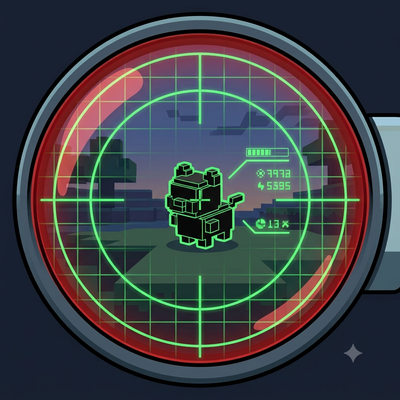
Pixelmon Scouter
Look at any wild Pokemon or trainer to see their real stats - nature, IVs, moves, drops and more - in a scouter-style HUD, powered entirely by Pixelmon's own data.
 mod
mod CurseForge · Minecraft
Burnt + Additions. Better Vanilla Fire
The vanilla fire enhancing mod. Light it up, burn it down. Realistic fire spread and burnt blocks.