Minecraft version
Back to mods 
Modrinth · Minecraft mod
GIF Inventory
Replaces the inventory background with a smooth looping animation of your own GIFs or images.
Choose a version Pick your version below, then grab the matching file.
Quick answer
Which GIF Inventory release should I use?
Latest stable file 1.1.0+mc1.16.5
Game version 1.16.5
Loader Fabric
GIF Inventory 1.1.0+mc1.16.5 targets 1.16.5 with Fabric. It must be installed on the client. Do not install it on the dedicated server. No extra mods listed for this file.
Where it goes
Is GIF Inventory required on the client, server, or both?
It must be installed on the client. Do not install it on the dedicated server.
Client Required
Dedicated server Not supported
Loader for this release Fabric
Required install it here Optional supported, not mandatory Not supported do not install here Source doesn’t say do not assume
This file is marked client-only.
What else does GIF Inventory 1.1.0+mc1.16.5 need?
1.1.0+mc1.16.5. Change the file and its required mods may change too.
This file does not list any required mods. Do not add a library just because a different file uses it.
This file does not list any required or optional mods.
Before you install it
Add GIF Inventory without breaking your instance.
Built for GIF Inventory 1.1.0+mc1.16.5. Pick another file and the loader, install side or required mods may change.
- 01
Stick to this file
Use 1.1.0+mc1.16.5. It targets 1.16.5 with Fabric; another release may have different loader, side or dependency requirements.
- 02
Bring the mods it needs
This file does not list any required mods. Do not add a library just because a different file uses it.
- 03
Put it on the correct side
It must be installed on the client. Do not install it on the dedicated server.
- 04
Pick the file you checked
Use the “Get this file” button beside 1.1.0+mc1.16.5. It opens that exact file at the source.
About this project
What does GIF Inventory add?
🎞️ GIF Inventory
Bring your inventory to life. This mod replaces the survival inventory background with a smooth, looping animation made from your own GIFs or images — right in-game, instead of clunky resource packs.
Add a file → pick it in the menu → open your inventory. That's it.
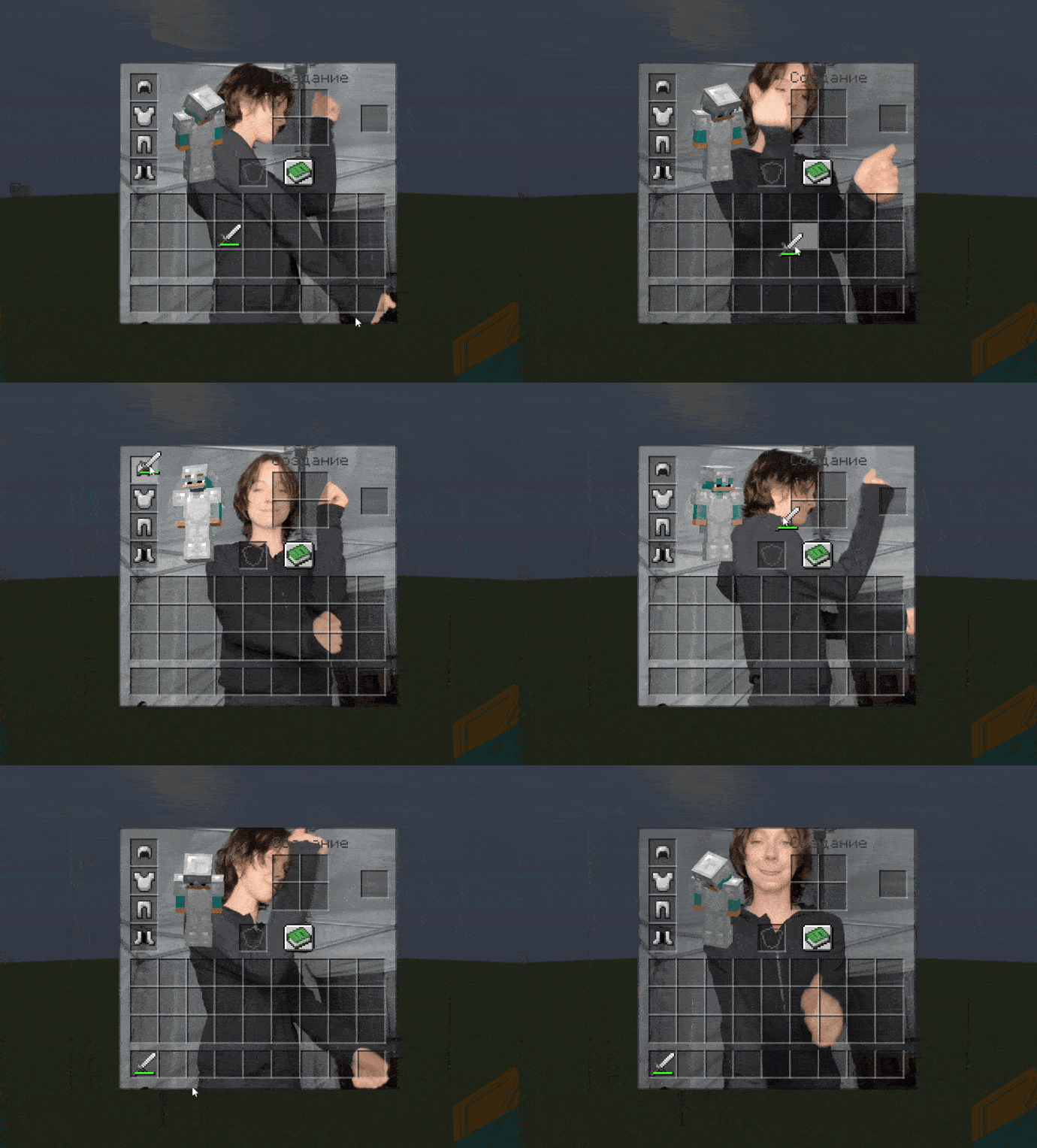
✨ Features
- 🖼️ Up to 5 personal slots — GIFs or static images (PNG, JPG, BMP)
- 🎬 Each file is processed automatically: cropped to fit, super-sampled for sharpness, and animated
- ⚡ Smooth apply with a progress indicator — no freezes or lag
- 🧩 Clean interface: a handy menu, nothing extra
- 🌐 English and Russian localisation (follows your game language)
- 🪶 Lightweight and client-side — not required on servers
🎮 How to use
- Press Esc → the small square button in the menu corner
- "Add GIF / image…" and choose a file
- Wait for it to apply, then open your inventory (E)
📦 Compatibility
- Fabric loader (latest version)
- Requires Fabric API
- Importing your own files is available on Windows and Linux
🎞️ GIF Inventory (Русский)
Оживи свой инвентарь. Мод заменяет фон инвентаря выживания на плавную зацикленную анимацию, собранную из твоих собственных GIF или картинок — прямо в игре, вместо неудобных ресурспаков.
Добавил файл → выбрал в меню → открыл инвентарь. Всё.
✨ Возможности
- 🖼️ До 5 своих слотов — GIF или статичные картинки (PNG, JPG, BMP)
- 🎬 Файл обрабатывается автоматически: вписывается в окно, сглаживается (суперсэмплинг) и анимируется
- ⚡ Плавное применение с индикатором прогресса — без фризов и подлагиваний
- 🧩 Аккуратный интерфейс: удобное меню, ничего лишнего
- 🌐 Русский и английский языки (по языку игры)
- 🪶 Лёгкий и клиенткоторый — на сервере не нужен
🎮 Как пользоваться
- Нажми Esc → маленькая квадратная кнопка в углу меню
- «Добавить GIF / картинку…» и выбери файл
- Дождись применения и открой инвентарь (E)
📦 Совместимость
- Загрузчик Fabric актуальной версии
- Требуется Fabric API
- Импорт своих файлов доступен на Windows и Linux
Project description from Modrinth.
Pick your setup
GIF Inventory by Minecraft version and loader
Choose the version and loader you play, then open the matching release.
Minecraft version
26.1.2
1 loader buildMinecraft version
26.1.1
1 loader buildMinecraft version
26.1
1 loader buildMinecraft version
1.21.11
1 loader buildMinecraft version
1.21.10
1 loader buildMinecraft version
1.21.8
1 loader buildMinecraft version
1.21.4
1 loader buildMinecraft version
1.21.1
1 loader buildMinecraft version
1.20.6
1 loader buildMinecraft version
1.20.4
1 loader buildMinecraft version
1.20.1
1 loader buildShowing the newest 12 of 13 game versions. Older files are in the list below.
Check the dependencies, then try the file in a copied instance before changing a world you care about.
Recent files
GIF Inventory versions and loaders
1.1.0+mc1.16.5
gif-inventory-1.1.0+mc1.16.5.jar
7 Aug 2026
Client Required Server Not supported Dependencies No extras listed Listed on Release listing
Check the 1.16.5 · Fabric setup 1.16.5Fabric release
1.1.0+mc26.2
gif-inventory-1.1.0+mc26.2.jar
6 Aug 2026
Client Required Server Not supported Dependencies No extras listed Listed on Release listing
Check the 26.2 · Fabric setup 26.2Fabric release
1.1.0+mc26.1.2
gif-inventory-1.1.0+mc26.1.2.jar
6 Aug 2026
Client Required Server Not supported Dependencies No extras listed Listed on Release listing
Check the 26.1.2 · Fabric setup 26.1.2Fabric release
1.1.0+mc26.1.1
gif-inventory-1.1.0+mc26.1.1.jar
6 Aug 2026
Client Required Server Not supported Dependencies No extras listed Listed on Release listing
Check the 26.1.1 · Fabric setup 26.1.1Fabric release
1.1.0+mc26.1
gif-inventory-1.1.0+mc26.1.jar
6 Aug 2026
Client Required Server Not supported Dependencies No extras listed Listed on Release listing
Check the 26.1 · Fabric setup 26.1Fabric release
1.1.0+mc1.20.1
gif-inventory-1.1.0+mc1.20.1.jar
6 Aug 2026
Client Required Server Not supported Dependencies No extras listed Listed on Release listing
Check the 1.20.1 · Fabric setup 1.20.1Fabric release
1.1.0+mc1.20.4
gif-inventory-1.1.0+mc1.20.4.jar
6 Aug 2026
Client Required Server Not supported Dependencies No extras listed Listed on Release listing
Check the 1.20.4 · Fabric setup 1.20.4Fabric release
1.1.0+mc1.20.6
gif-inventory-1.1.0+mc1.20.6.jar
6 Aug 2026
Client Required Server Not supported Dependencies No extras listed Listed on Release listing
Check the 1.20.6 · Fabric setup 1.20.6Fabric release
1.1.0+mc1.21.1
gif-inventory-1.1.0+mc1.21.1.jar
5 Aug 2026
Client Required Server Not supported Dependencies No extras listed Listed on Release listing
Check the 1.21.1 · Fabric setup 1.21.1Fabric release
1.1.0+mc1.21.4
gif-inventory-1.1.0+mc1.21.4.jar
5 Aug 2026
Client Required Server Not supported Dependencies No extras listed Listed on Release listing
Check the 1.21.4 · Fabric setup 1.21.4Fabric release
1.1.0+mc1.21.8
gif-inventory-1.1.0+mc1.21.8.jar
5 Aug 2026
Client Required Server Not supported Dependencies No extras listed Listed on Release listing
Check the 1.21.8 · Fabric setup 1.21.8Fabric release
1.1.0+mc1.21.10
gif-inventory-1.1.0+mc1.21.10.jar
5 Aug 2026
Client Required Server Not supported Dependencies No extras listed Listed on Release listing
Check the 1.21.10 · Fabric setup 1.21.10Fabric release
Looking for an older file? The official Modrinth project page is in Resources.
 mod
mod CurseForge + Modrinth · Minecraft
Resettable Trial Vaults & Spawners
Sneak and use the Trial Key to reset Trial Vaults and Trial Spawners.
 mod
mod CurseForge + Modrinth · Minecraft
Iris Shaders
A modern shader pack loader for Minecraft intended to be compatible with existing OptiFine shader packs
 mod
mod Modrinth · Minecraft
Create: Brassworks Missions
A Create addon adding missions with a clean, Create-style UI, HUD tracking, and full data-driven customization.