The One Probe Optional for Quest Utils QuestUtils - 0.4.0
optionalNo matching file
CurseForge · Minecraft mod
A mod that helps modpacks based on objectives and/or quests
Quick answer
Quest Utils QuestUtils - 0.4.0 targets 1.12.2. The project page does not say whether this file belongs on the client, dedicated server, or both. 1 required mod needs a matching file.
Where it goes
The project page does not say whether this file belongs on the client, dedicated server, or both.
The source does not explicitly classify this release as client-only or server-only.
QuestUtils - 0.4.0. Change the file and its required mods may change too.
Install McJtyLib first, but 1 required mod has no matching file for this setup. Do not mix loader builds to force a match.
We only count dependency files that match this setup. A file for another loader does not fill the gap.
Before you install it
Built for Quest Utils QuestUtils - 0.4.0. Pick another file and the loader, install side or required mods may change.
Use QuestUtils - 0.4.0. It targets 1.12.2; another release may have different loader, side or dependency requirements.
Install McJtyLib first, but 1 required mod has no matching file for this setup. Do not mix loader builds to force a match.
The project page does not say whether this file belongs on the client, dedicated server, or both.
Use the “Get this file” button beside QuestUtils - 0.4.0. It opens that exact file at the source.
About this project
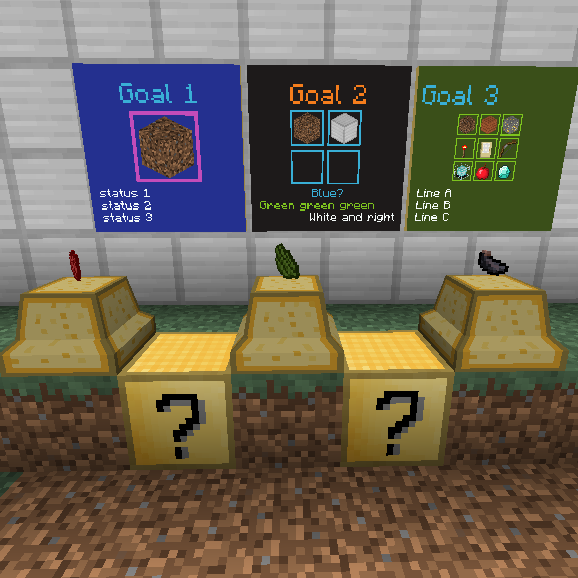
Quest Utils is a mod that contains items and blocks that help quest/story based modpacks. It is not a questing system mod but it can be used in combination with one. It is still in early development and currently contains only three blocks:
This mod supports Open Computers and all three blocks can be controlled from a computer program.
All blocks in this mod support the notion of 'saveable state'. That means that you can save and load the contents and current state of these blocks to a json file. This can be done based on the ID's of these blocks (supporting wildcards) so that you can easily make separate json files for various stages in your modpack.
More documentation on this can be found here: https://wiki.mcjty.eu/mods/index.php?title=Quest_Utilities
Project description from CurseForge.
Pick your setup
Choose the version and loader you play, then open the matching release.
Check the dependencies, then try the file in a copied instance before changing a world you care about.
Recent files
questutils-0.4.0.jar
27 Apr 2019
questutils-0.3.1.jar
14 Jan 2019
questutils-0.3.0.jar
28 Dec 2018
questutils-0.2.0.jar
12 Jun 2018
questutils-0.1.0.jar
4 Jun 2018
questutils-0.1.0-alpha.jar
29 May 2018
9 Apr 2018
6 Apr 2018
Looking for an older file? The official CurseForge project page is in Resources.
 mod
modImplements the most requested features from feedback.minecraft.net
 mod
modA Journal for all the mobs you've seen / discovered!
 mod
moda SSC(Shape Shifter Curse) addon add some extra form and few extra item