Minecraft version
Back to mods 
CurseForge · Minecraft mod
Server Tab Info
A client and/or server mod that gives nice a way to view the mean tick time and ticks per second (TPS) of the game
Choose a version Pick your version below, then grab the matching file.
This page is having a moment, so a few details may be a little behind.
Quick answer
Which Server Tab Info release matches 1.8.4?
Best match for your filters ServerTabInfo-1.8.9-Final-b3.jar
Game version 1.8.7, 1.8.4, 1.8.8
Loader Forge
Server Tab Info ServerTabInfo-1.8.9-Final-b3.jar targets 1.8.7, 1.8.4, 1.8.8 with Forge. The project page does not say whether it belongs on the client. The project page does not say whether it belongs on the dedicated server. No extra mods listed for this file.
Where it goes
Is Server Tab Info required on the client, server, or both?
The project page does not say whether it belongs on the client. The project page does not say whether it belongs on the dedicated server.
Client Source doesn’t say
Dedicated server Source doesn’t say
Loader for this release Forge
Required install it here Optional supported, not mandatory Not supported do not install here Source doesn’t say do not assume
The source does not explicitly classify this release as client-only or server-only.
What else does Server Tab Info ServerTabInfo-1.8.9-Final-b3.jar need?
ServerTabInfo-1.8.9-Final-b3.jar on 1.8.4. Every mod below is checked against that same setup.
This file does not list any required mods. Do not add a library just because a different file uses it.
This file does not list any required or optional mods.
Before you install it
Add Server Tab Info without breaking your instance.
Built for Server Tab Info ServerTabInfo-1.8.9-Final-b3.jar on 1.8.4. Pick another file and the loader, install side or required mods may change.
- 01
Stick to this file
Use ServerTabInfo-1.8.9-Final-b3.jar. It targets 1.8.7, 1.8.4, 1.8.8 with Forge; another release may have different loader, side or dependency requirements.
- 02
Bring the mods it needs
This file does not list any required mods. Do not add a library just because a different file uses it.
- 03
Put it on the correct side
The project page does not say whether it belongs on the client. The project page does not say whether it belongs on the dedicated server.
- 04
Pick the file you checked
Use the “Get this file” button beside ServerTabInfo-1.8.9-Final-b3.jar. It opens that exact file at the source.
About this project
What does Server Tab Info add?
Should really be called Tab Info, because it now also works when in singleplayer!
Introduction
This is a mod that can be installed on both the client and the server without causing missing mods errors for clients without the mod or servers without the mod.
When connected to a server the mod only works when the server also has the mod.
The version on the server does not need to match the version on the client, but if the client connects to a server with an too old version some features will be missing.
Features showcase
The new and improved dimension tps list
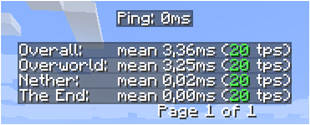
The new player list

Inspiration
The inspiration for the mod and the presentation have been based on a small feature from MineTogether, where if an optional mod was installed on the server and query feature was active, you could view information like tps and entities in world. It would present this information like the player tab list, when pressing Tab + Ctrl.
The spark for me was that it stopped working, therefore I made this small mod to view tps for all dimensions.
To activate the gui press Tab + Ctrl (standard but configuable in keybindings) then you are presented with the tps overall for the server and for each dimension.
Know issues
- If MineTogether is installed and siv intregration is enabled and ServerInfoProvider is not installed, you can get lag issues when using the keybind for the tps page, because they use the same keybinds.
To fix this issue either, disable siv intregration under MineTogether or change the keybind for tps page.
Project description from CurseForge.
Pick your setup
Server Tab Info by Minecraft version and loader
Choose the version and loader you play, then open the matching release.
Minecraft version
1.20.1
1 loader buildMinecraft version
1.20
1 loader buildMinecraft version
1.19.4
1 loader buildMinecraft version
1.19.3
1 loader buildMinecraft version
1.19.2
1 loader buildMinecraft version
1.19.1
1 loader buildMinecraft version
1.19
1 loader buildMinecraft version
1.18.2
1 loader buildMinecraft version
1.18.1
1 loader buildMinecraft version
1.18
1 loader buildMinecraft version
1.17.1
1 loader buildShowing the newest 12 of 46 game versions. Older files are in the list below.
Check the dependencies, then try the file in a copied instance before changing a world you care about.
Recent files
Server Tab Info versions and loaders
ServerTabInfo-1.8.9-Final-b3.jar
18 Jan 2020
Client Source doesn’t say Server Source doesn’t say Dependencies No extras listed Listed on Release listing
Check the 1.8.4 · Forge setup 1.8.71.8.41.8.81.8.3 release
Looking for an older file? The official CurseForge project page is in Resources.