Minecraft version
Back to mods 
CurseForge · Minecraft mod
Backups
The ultimate backup mod
Choose a version Pick your version below, then grab the matching file.
Quick answer
Which Backups release should I use?
Latest stable file Backups-1.12.2-1.5.7.jar
Game version 1.12.2
Loader Forge
Backups-1.12.2-1.5.7.jar targets 1.12.2 with Forge. The project page does not say whether this file belongs on the client, dedicated server, or both. No extra mods listed for this file.
Where it goes
Is Backups required on the client, server, or both?
The project page does not say whether this file belongs on the client, dedicated server, or both.
Client Source doesn’t say
Dedicated server Source doesn’t say
Loader for this release Forge
Required install it here Optional supported, not mandatory Not supported do not install here Source doesn’t say do not assume
The source does not explicitly classify this release as client-only or server-only.
What else does Backups-1.12.2-1.5.7.jar need?
Backups-1.12.2-1.5.7.jar. Change the file and its required mods may change too.
This file does not list any required mods. Do not add a library just because a different file uses it.
This file does not list any required or optional mods.
Before you install it
Add Backups without breaking your instance.
Built for Backups-1.12.2-1.5.7.jar. Pick another file and the loader, install side or required mods may change.
- 01
Stick to this file
Use Backups-1.12.2-1.5.7.jar. It targets 1.12.2 with Forge; another release may have different loader, side or dependency requirements.
- 02
Bring the mods it needs
This file does not list any required mods. Do not add a library just because a different file uses it.
- 03
Put it on the correct side
The project page does not say whether this file belongs on the client, dedicated server, or both.
- 04
Pick the file you checked
Use the “Get this file” button beside Backups-1.12.2-1.5.7.jar. It opens that exact file at the source.
About this project
What does Backups add?
If you are currently downloading this mod from a site other than curseforge.com then stop this instant and go download the mod from the proper site!
Backups is the ultimate backup mod. It will automatically backup your entire world every 15 minutes (configurable) and stores your backups in a format that takes up very little disk space. You can easily restore a world from ingame with the backups GUI and restore parts of your world with the restore command (requires cheats).
Please post any bugs you find or features you think I should add on the bug tracker. Any private messages to me about this mod will be ignored.
Features:
Automatic Backups - Your world is automatically backed up every 15 minutes. You can also start a backup yourself by using the command /bm backup. The automatic backup intreval can be changed in the config file.
Backups GUI - Clicking on the backups button when you have a world selected will display the backups GUI, which has a list of all backups for that world. The storage size and reason the backup was created are displayed below each backup, and the total storage size is displayed in the top-right.
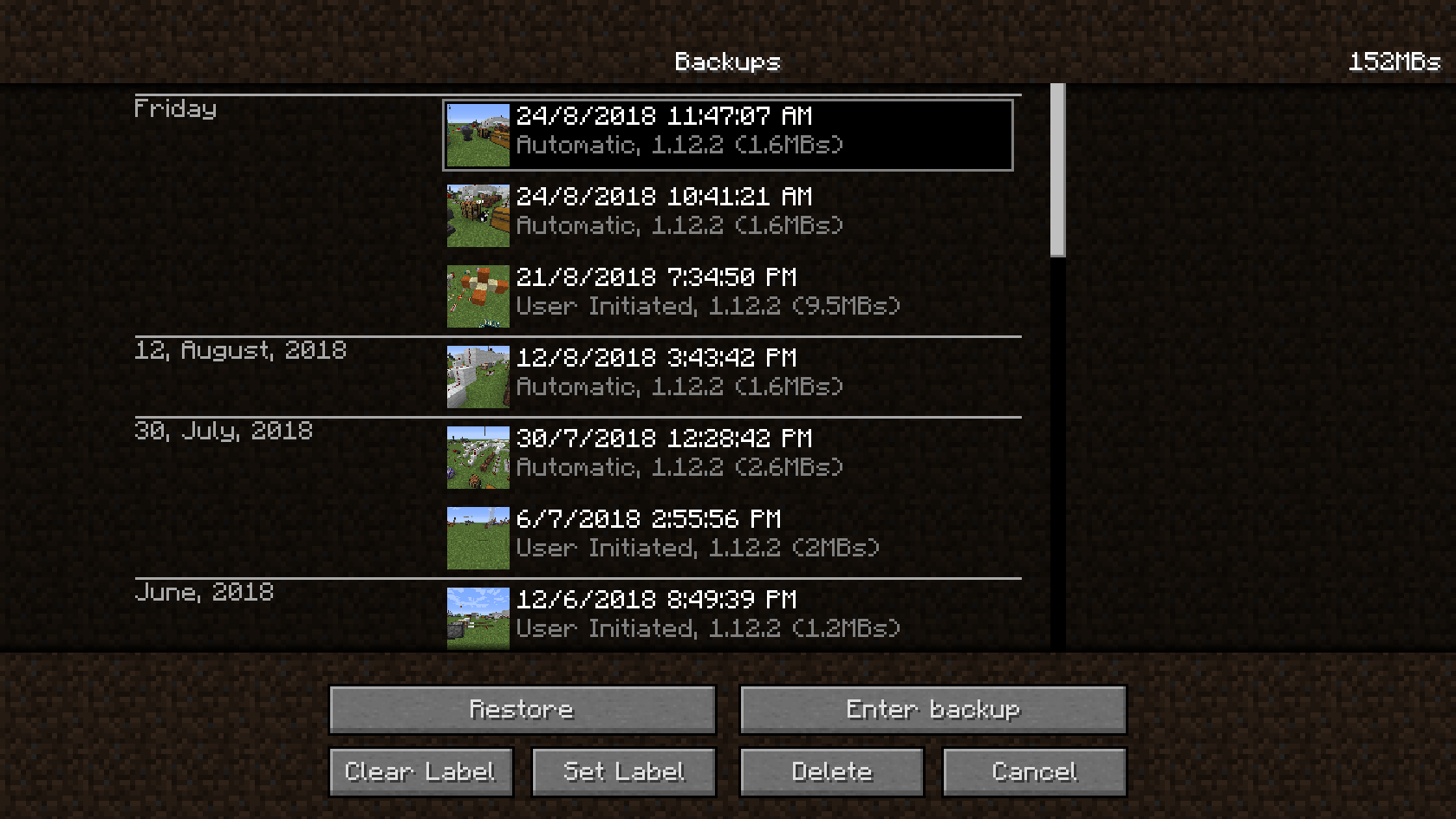 Button Key:
- Restore - Creates a backup of the world and then restores the world from the selected backup.
- Enter Backup - Loads the selected backup as if it was a world. Anything you do while inside the backup isn't saved.
- Set Label - Allows you to set a label for the selected backup. Labeled backups won't be trimmed.
- Clear Label - Clears the label from the selected backup.
- Delete - Deletes the selected backups. You can shift-click to select multiple backups, or Ctrl-A to select all.
Button Key:
- Restore - Creates a backup of the world and then restores the world from the selected backup.
- Enter Backup - Loads the selected backup as if it was a world. Anything you do while inside the backup isn't saved.
- Set Label - Allows you to set a label for the selected backup. Labeled backups won't be trimmed.
- Clear Label - Clears the label from the selected backup.
- Delete - Deletes the selected backups. You can shift-click to select multiple backups, or Ctrl-A to select all.Backup Trimming - Old backups are automatically deleted based on the following rules:
- If a backup is older than a hour, only one backup per hour is kept.
- If a backup is older than three days, only one backup per day is kept.
- If a backup is older than a month, only one backup per week is kept.
Backup trimming can be configured or disabled in the config file.
Restore Command - The restore command allows you to restore a section of the world, or a player's inventory from an earlier backup. The command has two modes specifed by the first argument:
- Blocks Mode: - /bm restore blocks <x1> <y1> <z1> <x2> <y2> <z2> <backup>
Will restore all blocks from x1 y1 z1 to x2 y2 z2 to backup. The backup can be the number of backups ago, or the date and time for a specific backup. - Player Mode: - /bm restore player <player> <backup>
Will restore the inventory of player to backup. The backup can be the number of backups ago, or the date and time for a specific backup.
- Blocks Mode: - /bm restore blocks <x1> <y1> <z1> <x2> <y2> <z2> <backup>
Backup Format - Backups are incremental, which means each backup only contains the data that has changed since the last backup. This greatly decreases the amount of disk space backups take up. Backups are also compressed, which decreases disk size even futher.
Restoring on a server: To restore a backup on a server use the server restore command like this: /bm restoreworld <backup>
Backup can be a date (The same date shown by /bm listbackups) or a number. If it's a number then the nth backup with be used. This command will close the server and then restore the backup. If you can't open the server (if the world's corrupted for example) then you can restore a backup from your computer's command line using the command java -jar <path to mod file> <backup dir> <world dir>. You can find all of the backups directories under backupsmod/<world name>/.
You can also use this batch script made by xJon which will automatically find the most recent backup. Just download it, place it in your server dir, and run it to restore the latest backup.
You can include this mod in any modpacks, as long as you give credit to me.
Project description from CurseForge.
Pick your setup
Backups by Minecraft version and loader
Choose the version and loader you play, then open the matching release.
Minecraft version
1.8.9
1 loader buildCheck the dependencies, then try the file in a copied instance before changing a world you care about.
Recent files
Backups versions and loaders
Backups-1.12.2-1.5.7.jar
28 Jul 2021
Client Source doesn’t say Server Source doesn’t say Dependencies No extras listed Listed on Release listing
Check the 1.12.2 · Forge setup Forge1.12.2 release
Backups-1.12.2-1.5.6.jar
17 Jun 2020
Client Source doesn’t say Server Source doesn’t say Dependencies No extras listed Listed on Release listing
Check the 1.12.2 · Forge setup Forge1.12.2 release
Backups-1.12.2-1.5.5.jar
9 Apr 2020
Client Source doesn’t say Server Source doesn’t say Dependencies No extras listed Listed on Release listing
Check the 1.12.2 · Forge setup Forge1.12.2 release
Backups-1.12.2-1.5.4.jar
19 Feb 2020
Client Source doesn’t say Server Source doesn’t say Dependencies No extras listed Listed on Release listing
Check the 1.12.2 · Forge setup Forge1.12.2 release
Backups-1.12.2-1.5.3.jar
23 Jan 2020
Client Source doesn’t say Server Source doesn’t say Dependencies No extras listed Listed on Release listing
Check the 1.12.2 · Forge setup Forge1.12.2 release
Backups-1.12.2-1.5.2.jar
17 Jan 2020
Client Source doesn’t say Server Source doesn’t say Dependencies No extras listed Listed on Release listing
Check the 1.12.2 · Forge setup Forge1.12.2 release
Backups-1.12.2-1.5.1.jar
21 Dec 2019
Client Source doesn’t say Server Source doesn’t say Dependencies No extras listed Listed on Release listing
Check the 1.12.2 · Forge setup Forge1.12.2 release
Backups-1.12.2-1.5.0.jar
18 Dec 2019
Client Source doesn’t say Server Source doesn’t say Dependencies No extras listed Listed on Release listing
Check the 1.12.2 · Forge setup Forge1.12.2 release
Backups-1.12.2-1.4.9.jar
9 Dec 2019
Client Source doesn’t say Server Source doesn’t say Dependencies No extras listed Listed on Release listing
Check the 1.12.2 · Forge setup Forge1.12.2 release
Backups-1.12.2-1.4.8.jar
15 Nov 2019
Client Source doesn’t say Server Source doesn’t say Dependencies No extras listed Listed on Release listing
Check the 1.12.2 · Forge setup Forge1.12.2 release
Backups-1.12.2-1.4.7.jar
4 Oct 2019
Client Source doesn’t say Server Source doesn’t say Dependencies No extras listed Listed on Release listing
Check the 1.12.2 · Forge setup Forge1.12.2 release
Backups-1.12.2-1.4.6.jar
24 Aug 2019
Client Source doesn’t say Server Source doesn’t say Dependencies No extras listed Listed on Release listing
Check the 1.12.2 · Forge setup Forge1.12.2 release
Looking for an older file? The official CurseForge project page is in Resources.
 mod
mod CurseForge · Minecraft
Timo's Nation Addon: Jobs & Skills
This is another addon for the nation mod series to expand further on its content. It will feature jobs and skills specific to those jobs.
 mod
mod CurseForge · Minecraft
RpgMounts for servers
Utility mod for servers that makes it easy to add a mount system using existing in-game entities.
 mod
mod CurseForge + Modrinth · Minecraft
Integrated API
The library mod for the Integrated Structures series