CoFH Core Needed by CoFH: Vanilla+ Tools VanillaTools-1.12.2-1.1.0.2-universal.jar
requiredMatching file found Matched file: CoFHCore-1.12.2-4.6.6.1-universal.jar

CurseForge · Minecraft mod
Adds a variety of vanilla Minecraft-styled tools to the game, similar to those in Thermal Foundation.
Quick answer
CoFH: Vanilla+ Tools VanillaTools-1.12.2-1.1.0.2-universal.jar targets 1.12.2. The project page does not say whether this file belongs on the client, dedicated server, or both. All 1 required mods have matching files.
Where it goes
The project page does not say whether this file belongs on the client, dedicated server, or both.
The source does not explicitly classify this release as client-only or server-only.
VanillaTools-1.12.2-1.1.0.2-universal.jar. Change the file and its required mods may change too.
Install CoFH Core first. We found matching files for this game-version and loader setup.
We only count dependency files that match this setup. A file for another loader does not fill the gap.
Before you install it
Built for CoFH: Vanilla+ Tools VanillaTools-1.12.2-1.1.0.2-universal.jar. Pick another file and the loader, install side or required mods may change.
Use VanillaTools-1.12.2-1.1.0.2-universal.jar. It targets 1.12.2; another release may have different loader, side or dependency requirements.
Install CoFH Core first. We found matching files for this game-version and loader setup.
The project page does not say whether this file belongs on the client, dedicated server, or both.
Use the “Get this file” button beside VanillaTools-1.12.2-1.1.0.2-universal.jar. It opens that exact file at the source.
About this project
This mod is part of CoFH's "Vanilla+" series, a group of lightweight mods intended for use in lightly modded or low-technology modpacks.
NOTE: If you have Thermal Foundation, then you do not need this mod!
It adds additional tools in vanilla materials - Wood, Stone Iron, Gold, and Diamond.
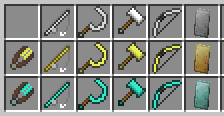
By default, only Iron, Gold, and Diamond tools are added. Wood and Stone tools can be enabled in the config options. (config/cofh/vanillaplus/tools.cfg)
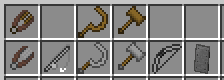
The tools are the additional types as found in Thermal Foundation, but in vanilla materials:
CoFH Core is required to play this mod! It can be found here: CoFH Core
For more detailed information on the mod, please visit the website at TeamCoFH!
Project description from CurseForge.
Pick your setup
Choose the version and loader you play, then open the matching release.
Check the dependencies, then try the file in a copied instance before changing a world you care about.
Recent files
1 Oct 2018
31 May 2018
Looking for an older file? The official CurseForge project page is in Resources.
 mod
Mod that adds feature not used in Unbound series.
 mod
The mod has blocks to decorate, it has the character of mactonight who is the protagonist of this mod
 mod
Bring the holy grail war to minecraft