Minecraft version
Back to mods 
CurseForge · Minecraft mod
Hex Lands
Hex tile styled terrain generation
Choose a version Pick your version below, then grab the matching file.
Quick answer
Which Hex Lands release should I use?
Latest stable file hexlands-1.9.0.jar
Game version 1.12.2
Loader Not required
Hex Lands hexlands-1.9.0.jar targets 1.12.2. The project page does not say whether this file belongs on the client, dedicated server, or both. No extra mods listed for this file.
Where it goes
Is Hex Lands required on the client, server, or both?
The project page does not say whether this file belongs on the client, dedicated server, or both.
Client Source doesn’t say
Dedicated server Source doesn’t say
Loader for this release No loader listed
Required install it here Optional supported, not mandatory Not supported do not install here Source doesn’t say do not assume
The source does not explicitly classify this release as client-only or server-only.
What else does Hex Lands hexlands-1.9.0.jar need?
hexlands-1.9.0.jar. Change the file and its required mods may change too.
This file does not list any required mods. Do not add a library just because a different file uses it.
This file does not list any required or optional mods.
Before you install it
Add Hex Lands without breaking your instance.
Built for Hex Lands hexlands-1.9.0.jar. Pick another file and the loader, install side or required mods may change.
- 01
Stick to this file
Use hexlands-1.9.0.jar. It targets 1.12.2; another release may have different loader, side or dependency requirements.
- 02
Bring the mods it needs
This file does not list any required mods. Do not add a library just because a different file uses it.
- 03
Put it on the correct side
The project page does not say whether this file belongs on the client, dedicated server, or both.
- 04
Pick the file you checked
Use the “Get this file” button beside hexlands-1.9.0.jar. It opens that exact file at the source.
About this project
What does Hex Lands add?
Updated for 1.16.5 by AlcatrazEscapee
HexLands II
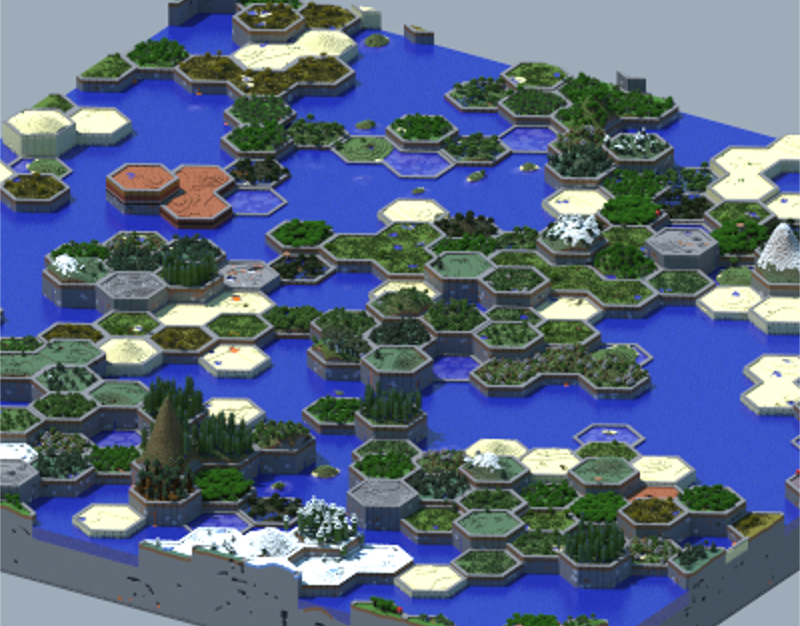
This mod changed standard world generation into a hex based tiles, similar to a board game. Each hex will contain one biome, and hexes with the same biome will connect together. Config options allow for adjustments of hex size, terrain height, changing block that outlines hexes, and more. Hex worlds are created by selecting "World Type: Hex Lands" when creating a new world. Other than changing height and shape of biome, other feature should generate normally (villages, caves, ravines, lakes, etc). This mod should also work with extra mod biomes like Traverse and Defiled Lands.
Frequently Asked Questions
Does this work with modded biomes or other mods world gen?
Yes
Can it work with Biomes O' Plenty?
Yes, select BoP Hex Lands as the world type with Biomes O' Plenty installed.
Can you change or delete the rim block?
Yes, change the config option S:rimBlock=minecraft:stonebrick to your desired block or set it to S:rimBlock=minecraft:air for no rim block
Can the borders extend down to bedrock?
Yes, set B:borderToBedrock=true
Can this work on just a server?
Yes, set the level-type in the server.properties to either hexlands or bophex for regular or biomes o' plenty worlds
Does this change the nether or end?
Not currently, no The end is not changed. As of version 1.5 nether hexes can be enabled in the config file by setting B:useNetherHexGen=true. This is compatible only with BoP nether biomes.
Does this affect ore generation?
No
Anyone trading wood for my sheep?
No, no one wants your sheep James
Project description from CurseForge.
Pick your setup
Hex Lands by Minecraft version and loader
Choose the version and loader you play, then open the matching release.
Check the dependencies, then try the file in a copied instance before changing a world you care about.
Recent files
Hex Lands versions and loaders
hexlands-1.9.0.jar
4 Mar 2019
Client Source doesn’t say Server Source doesn’t say Dependencies No extras listed Listed on Release listing
Check the 1.12.2 setup 1.12.2 release
hexlands-1.8.1.jar
18 Sept 2018
Client Source doesn’t say Server Source doesn’t say Dependencies No extras listed Listed on Release listing
Check the 1.12.2 setup 1.12.2 release
hexlands-1.8.0.jar
17 Sept 2018
Client Source doesn’t say Server Source doesn’t say Dependencies No extras listed Listed on Release listing
Check the 1.12.2 setup 1.12.2 release
hexlands-1.7.1.jar
12 Sept 2018
Client Source doesn’t say Server Source doesn’t say Dependencies No extras listed Listed on Release listing
Check the 1.12.2 setup 1.12.2 release
hexlands-1.7.0.jar
4 Sept 2018
Client Source doesn’t say Server Source doesn’t say Dependencies No extras listed Listed on Release listing
Check the 1.12.2 setup 1.12.2 release
hexlands-1.6.jar
28 Jul 2018
Client Source doesn’t say Server Source doesn’t say Dependencies No extras listed Listed on Release listing
Check the 1.12.2 setup 1.12.2 release
hexlands-1.5.jar
9 Jul 2018
Client Source doesn’t say Server Source doesn’t say Dependencies No extras listed Listed on Release listing
Check the 1.12.2 setup 1.12.2 release
hexlands-1.4.jar
21 Jun 2018
Client Source doesn’t say Server Source doesn’t say Dependencies No extras listed Listed on Release listing
Check the 1.12.2 setup 1.12.2 release
hexlands-1.3.jar
16 Jun 2018
Client Source doesn’t say Server Source doesn’t say Dependencies No extras listed Listed on Release listing
Check the 1.12.2 setup 1.12.2 release
hexlands-1.2.jar
13 Jun 2018
Client Source doesn’t say Server Source doesn’t say Dependencies No extras listed Listed on Release listing
Check the 1.12.2 setup 1.12.2 release
hexlands-1.1.jar
11 Jun 2018
Client Source doesn’t say Server Source doesn’t say Dependencies No extras listed Listed on Release listing
Check the 1.12.2 setup 1.12.2 release
hexlands-1.0.jar
11 Jun 2018
Client Source doesn’t say Server Source doesn’t say Dependencies No extras listed Listed on Release listing
Check the 1.12.2 setup 1.12.2 release
Looking for an older file? The official CurseForge project page is in Resources.