Fabric API Needed by Grid Easy grid-1.4.1+26.3
requiredMatching file found Matched file: 0.161.0+26.3

Modrinth · Minecraft mod
A lightweight 3D grid overlay for precise building, alignment, and per-axis spacing control. 정밀한 건축과 축별 간격 조절을 위한 가볍고 최적화된 3D Grid Overlay 모드입니다.
Quick answer
Grid Easy grid-1.4.1+26.3 targets 26.3 with Fabric. It must be installed on the client. Do not install it on the dedicated server. All 1 required mods have matching files.
Where it goes
It must be installed on the client. Do not install it on the dedicated server.
This file is marked client-only.
grid-1.4.1+26.3. Change the file and its required mods may change too.
Install Fabric API first. We found matching files for this game-version and loader setup.
We only count dependency files that match this setup. A file for another loader does not fill the gap.
Before you install it
Built for Grid Easy grid-1.4.1+26.3. Pick another file and the loader, install side or required mods may change.
Use grid-1.4.1+26.3. It targets 26.3 with Fabric; another release may have different loader, side or dependency requirements.
Install Fabric API first. We found matching files for this game-version and loader setup.
It must be installed on the client. Do not install it on the dedicated server.
Use the “Get this file” button beside grid-1.4.1+26.3. It opens that exact file at the source.
About this project
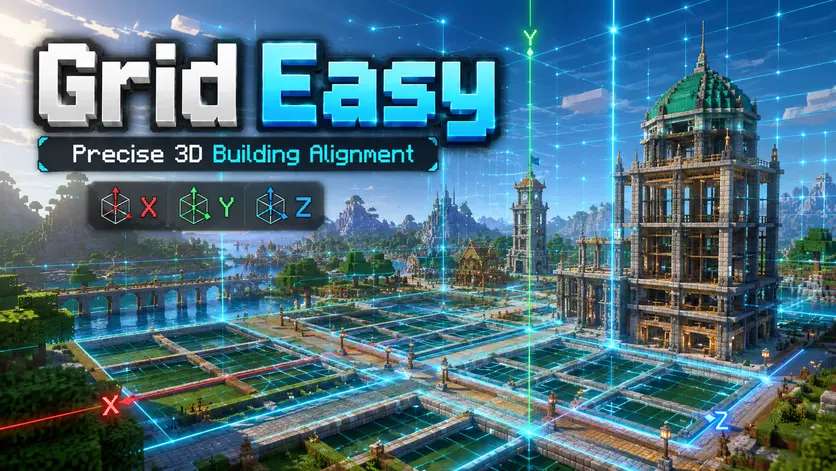
Precision 3D building grids, distance measurement, persistent markers, and reusable profiles — all in one lightweight client-side mod.
정밀한 건축을 위한 3D 격자 · 거리 측정 · 고정 마커 · 프로필 기능을 하나의 가벼운 클라이언트 모드에 담았습니다.
Grid Easy is a lightweight Fabric client-side utility designed for Minecraft builders who care about alignment, symmetry, spacing, and precise positioning.
Instead of counting blocks manually or constantly checking coordinates, place a customizable grid directly into the world, measure distances with two pins, save important positions with markers, and switch between reusable building profiles.
No server installation is required.
Configure the grid independently on the X, Y, and Z axes, with spacing from 1 to 64 blocks.
Choose between XYZ 3D, XZ horizontal, XY vertical, and YZ vertical layouts. Each axis direction can also be shown or hidden independently.
Look at a block and enable Grid Easy to use that block as the reference point, or look into the air to use your current position.
Origin offsets allow precise alignment without rebuilding your setup from scratch.
Press the distance measurement key, default N, to place Pin A.
Move to another position or target another block and press N again to place Pin B.
For straight measurements, Grid Easy shows the number of blocks between A and B.
For 3D measurements, it displays the X / Y / Z difference together with the straight-line distance.
When the measurement is completed, the result is automatically copied to your clipboard.
Press N a third time to remove both pins and return to the initial measurement state.
Pin A and Pin B colors can be customized independently from the Distance settings tab.
Press M to place a permanent marker on the block you are looking at.
When aiming into the air, the marker is placed at your current position.
Markers remain fixed even when the repeating grid is disabled and are stored locally for each world/server and dimension.
Marker names, coordinates, and colors can be edited individually, with support for up to 256 markers per world/server and dimension.
Save complete Grid Easy configurations as profiles and switch between them instantly.
Profiles store your spacing, origin offsets, grid mode, visible axes, radius, colors, opacity, and other display settings.
Press P to quickly switch to the next saved profile.
This is especially useful when moving between different building styles such as roads, interiors, farms, towers, or large-scale structures.
Choose from built-in color presets or enter your own six-digit HEX colors.
Grid color, marker defaults, individual markers, and distance measurement pins can be customized.
Overlay opacity is also adjustable, allowing the grid to remain visible without overwhelming the build itself.
Grid Easy is designed as a lightweight visual building assistant.
Grid geometry is cached where possible, duplicate lines are removed, visibility checks reduce unnecessary rendering, and markers outside useful rendering ranges are skipped.
Settings and marker data are stored locally with background saving, backup handling, and protection against accidental data loss.
The settings interface separates features into dedicated tabs:
Grid · Display · Origin · Color · Markers · Distance · Profiles
Settings include search, direct numeric input, validation, scrolling lists, color palettes, current keybinding information, and marker/profile management.
| Key | Action |
|---|---|
. |
Toggle Grid |
, |
Open Grid Easy settings |
M |
Add / remove persistent marker |
N |
Distance measurement A / B |
P |
Switch to next saved profile |
| Unbound | Reset Grid origin |
Every shortcut can be changed in Minecraft → Options → Controls → Grid Easy.
Grid Easy works especially well for large builds, symmetrical structures, city layouts, roads, towers, farms, redstone layouts, pixel art, interiors, technical builds, and any project where consistent block spacing matters.
Grid Easy requires:
Fabric Loader
Fabric API
Mod Menu is optional and provides another way to open the configuration screen.
Install Grid Easy on the client only. The server does not need the mod.
Choose the file matching your Minecraft version from the Versions tab.
Grid Easy는 마인크래프트 건축에서 필요한 정렬, 대칭, 간격, 위치 측정을 더 쉽고 정확하게 만들어주는 Fabric 클라이언트 전용 유틸리티 모드입니다.
블록 수를 직접 세거나 계속 좌표를 계산하지 않아도 됩니다.
월드에 정밀한 격자를 표시하고, 두 개의 핀으로 거리를 측정하고, 중요한 위치에는 마커를 남기고, 자주 사용하는 설정은 프로필로 저장할 수 있습니다.
서버에는 별도로 설치할 필요가 없습니다.
X · Y · Z축의 간격을 각각 1~64블록 범위에서 독립적으로 설정할 수 있습니다.
XYZ 3D / XZ 수평 / XY 수직 / YZ 수직 배치를 지원하며 각 축 방향의 선도 개별적으로 표시하거나 숨길 수 있습니다.
블록을 바라보고 Grid를 켜면 해당 블록이 기준점이 되고, 허공을 바라보고 켜면 현재 플레이어 위치를 기준으로 사용합니다.
X · Y · Z 기준점 오프셋을 이용해 원하는 위치에 정확하게 Grid를 맞출 수 있습니다.
기본 N 키를 누르면 A핀이 설치됩니다.
다른 블록이나 위치에서 다시 N을 누르면 B핀이 설치되고 두 지점 사이의 거리를 즉시 계산합니다.
한 축으로 직선 측정할 경우 A핀과 B핀 사이에 존재하는 칸 수를 표시합니다.
3차원 방향으로 측정하면 X · Y · Z 차이와 직선거리도 함께 표시합니다.
측정이 완료되면 결과가 자동으로 클립보드에 복사됩니다.
N을 세 번째로 누르면 A핀과 B핀이 모두 제거되고 완전한 초기 상태로 돌아갑니다.
설정의 거리 측정 탭에서 A핀과 B핀의 색상을 각각 변경할 수도 있습니다.
기본 M 키로 바라보는 블록에 고정 마커를 만들 수 있습니다.
허공을 바라보고 사용할 경우 현재 플레이어 위치에 마커가 생성됩니다.
마커는 반복 Grid를 꺼도 사라지지 않으며 월드/서버 및 차원별로 로컬에 저장됩니다.
각 마커의 이름, 좌표, 색상을 개별적으로 변경할 수 있으며 월드/서버·차원별 최대 256개까지 관리할 수 있습니다.
현재 Grid 설정 전체를 프로필로 저장할 수 있습니다.
축별 간격, 기준점 오프셋, Grid 배치 방식, 표시 축, 반경, 색상, 불투명도 등의 설정을 저장하고 필요할 때 다시 불러올 수 있습니다.
기본 P 키를 누르면 저장된 다음 프로필로 빠르게 전환됩니다.
도로, 인테리어, 농장, 타워, 대형 건축처럼 작업마다 다른 간격을 사용하는 경우 특히 편리합니다.
기본 색상 프리셋 또는 6자리 HEX 색상을 사용할 수 있습니다.
Grid, 새 마커 기본 색상, 개별 마커, 거리 측정 A/B핀 색상을 각각 설정할 수 있습니다.
전체 선의 불투명도도 조절할 수 있어 건축물을 가리지 않으면서 필요한 기준선만 확인할 수 있습니다.
Grid Easy는 가벼운 건축 보조 도구를 목표로 제작되었습니다.
Grid 좌표 캐싱, 중복 선 제거, 불필요한 렌더링 생략 등의 최적화를 적용했으며 설정과 마커 데이터도 백그라운드 저장과 백업 처리를 사용합니다.
기능별로 다음 탭을 제공합니다.
격자 · 표시 · 기준점 · 색상 · 마커 · 거리 측정 · 프로필
설정 검색, 숫자 직접 입력, 입력값 확인, 색상 팔레트, 현재 단축키 표시, 마커 및 프로필 관리 기능을 제공합니다.
| 키 | 기능 |
|---|---|
. |
Grid 켜기 / 끄기 |
, |
Grid Easy 설정 열기 |
M |
고정 마커 생성 / 제거 |
N |
거리 측정 A / B |
P |
다음 저장 프로필로 전환 |
| 미지정 | Grid 기준점 재설정 |
모든 단축키는 마인크래프트 → 설정 → 조작 → Grid Easy에서 변경할 수 있습니다.
대형 건축, 대칭 건축, 도시 설계, 도로 배치, 타워, 농장, 레드스톤 구조, 픽셀 아트, 인테리어, 기술 건축 등 일정한 블록 간격과 정확한 정렬이 필요한 모든 작업에 활용할 수 있습니다.
Fabric Loader와 Fabric API가 필요합니다.
Mod Menu는 선택 사항입니다.
Grid Easy는 클라이언트에만 설치하면 되며 서버에는 설치할 필요가 없습니다.
Versions 탭에서 사용 중인 Minecraft 버전에 맞는 파일을 설치해 주세요.
Project description from Modrinth.
Pick your setup
Choose the version and loader you play, then open the matching release.
Showing the newest 12 of 24 game versions. Older files are in the list below.
Check the dependencies, then try the file in a copied instance before changing a world you care about.
Recent files
grid-easy-1.4.1-mc26.3.jar
2 Oct 2026
grid-easy-1.4.1-mc26.2.jar
2 Oct 2026
grid-easy-1.4.1-mc26.1.2.jar
2 Oct 2026
grid-easy-1.4.1-mc26.1.1.jar
2 Oct 2026
grid-easy-1.4.1-mc26.1.jar
2 Oct 2026
grid-easy-1.4.1-mc1.21.11.jar
2 Oct 2026
grid-easy-1.4.1-mc1.21.10.jar
2 Oct 2026
grid-easy-1.4.1-mc1.21.9.jar
2 Oct 2026
grid-easy-1.4.1-mc1.21.8.jar
2 Oct 2026
grid-easy-1.4.1-mc1.21.7.jar
2 Oct 2026
grid-easy-1.4.1-mc1.21.6.jar
2 Oct 2026
grid-easy-1.4.1-mc1.21.5.jar
2 Oct 2026
Looking for an older file? The official Modrinth project page is in Resources.