Fabric API Needed by Filled Map Coordinates 0.2.0
requiredNo matching file
Modrinth · Minecraft mod
A small mod that records where an empty map is filled and uses that to show coordinates of the area a filled map is covering.
Quick answer
Filled Map Coordinates 0.2.0 targets 1.21.2, 1.21.3, 1.21.4 with Fabric, Quilt. Installation on the client is optional. Installation on the dedicated server is optional. 1 required mod needs a matching file.
Where it goes
Installation on the client is optional. Installation on the dedicated server is optional.
The source marks this as usable on both the client and server.
0.2.0 on 1.21.2. Every mod below is checked against that same setup.
Install Fabric API first, but 1 required mod has no matching file for this setup. Do not mix loader builds to force a match.
We only count dependency files that match this setup. A file for another loader does not fill the gap.
Before you install it
Built for Filled Map Coordinates 0.2.0 on 1.21.2. Pick another file and the loader, install side or required mods may change.
Use 0.2.0. It targets 1.21.2, 1.21.3, 1.21.4 with Fabric, Quilt; another release may have different loader, side or dependency requirements.
Install Fabric API first, but 1 required mod has no matching file for this setup. Do not mix loader builds to force a match.
Installation on the client is optional. Installation on the dedicated server is optional.
Use the “Get this file” button beside 0.2.0. It opens that exact file at the source.
About this project
A small mod that records where an empty map is filled and uses that to show coordinates of the area a filled map is covering.
With advanced tooltips disabled: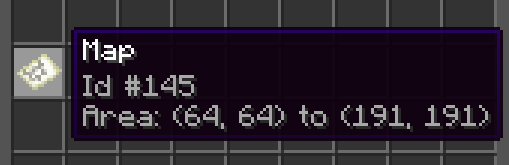
With advanced tooltips enabled: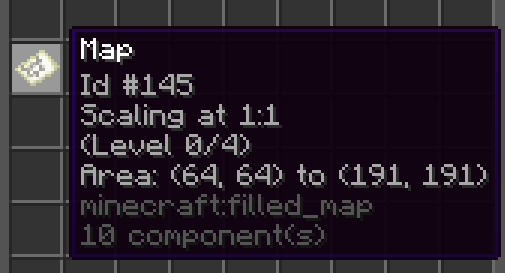
There's just a single config value, and… you could just not install the mod if you're inclined to change it:
# If enabled, the mod stores coordinate data on the map item when creating a new filled map
enabled: true
You can manage config in-game with the command /mapcoordinates <config-value> true/false.
Alternatively, you can edit it manually in config/FilledMapCoordinates/config.yml.
When enabled, simply use maps like you always would.
Whenever you create a new filled map, Minecraft will now store the exact coordinates where
you did so in custom component data on the map item itself. The mod then uses that data to
calculate the coordinates of the top-left and bottom-right corners of the area that this map
covers.
It will also record the scaling level of a map, and update it if you zoom the map out
on a cartography table. You can read up on the Wiki
zoom level / scale works with regard to the coordinates a map covers.
The mod needs to be present both on the server (for storing the data) and the client
(for showing the data). Note that already existing maps will not show the new tooltip
information as they do not have the required coordinates metadata present on the item.
If uninstalling the mod later, the metadata stored by the mod should not have any impact.
I was only able to get this mod done by building on somyk's mod Map Art Copyright. Thank you!
Project description from Modrinth.
Pick your setup
Choose the version and loader you play, then open the matching release.
Check the dependencies, then try the file in a copied instance before changing a world you care about.
Recent files
FilledMapCoordinates-0.2.0-sources.jar
22 Oct 2024
Looking for an older file? The official Modrinth project page is in Resources.
 mod
Press Ctrl+Z to immediately undo the previous operation
 mod
Fully configurable Ore Detectors that do not break the balance of the game, and still make prospecting a challenge, without forcing you to hollow out the entire world.
 mod
Create signs in all colors of Minecraft.