Minecraft version
Back to mods 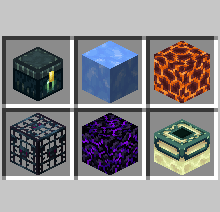
Modrinth · Minecraft mod
Luminous No Shading
No shading for world and inventory forms of luminous objects.
Choose a version Pick your version below, then grab the matching file.
Quick answer
Which Luminous No Shading release should I use?
Latest stable file 0.2.6+mc26.1-snapshot-6
Game version 26.1-snapshot-6
Loader Fabric
Luminous No Shading 0.2.6+mc26.1-snapshot-6 targets 26.1-snapshot-6 with Fabric. It must be installed on the client. Do not install it on the dedicated server. No extra mods listed for this file.
Where it goes
Is Luminous No Shading required on the client, server, or both?
It must be installed on the client. Do not install it on the dedicated server.
Client Required
Dedicated server Not supported
Loader for this release Fabric
Required install it here Optional supported, not mandatory Not supported do not install here Source doesn’t say do not assume
This file is marked client-only.
What else does Luminous No Shading 0.2.6+mc26.1-snapshot-6 need?
0.2.6+mc26.1-snapshot-6. Change the file and its required mods may change too.
This file does not list any required mods. Do not add a library just because a different file uses it.
This file does not list any required or optional mods.
Before you install it
Add Luminous No Shading without breaking your instance.
Built for Luminous No Shading 0.2.6+mc26.1-snapshot-6. Pick another file and the loader, install side or required mods may change.
- 01
Stick to this file
Use 0.2.6+mc26.1-snapshot-6. It targets 26.1-snapshot-6 with Fabric; another release may have different loader, side or dependency requirements.
- 02
Bring the mods it needs
This file does not list any required mods. Do not add a library just because a different file uses it.
- 03
Put it on the correct side
It must be installed on the client. Do not install it on the dedicated server.
- 04
Pick the file you checked
Use the “Get this file” button beside 0.2.6+mc26.1-snapshot-6. It opens that exact file at the source.
About this project
What does Luminous No Shading add?
Luminous No Shading is a Minecraft mod that makes luminous light-emitting blocks and entities to render more brighter comparable to how it renders on Minecraft: Bedrock Edition.
Features
Luminous No Shading removes directional shading for the following:
- Light-emitting blocks and their item forms (e.g. Enchanting Table and End Portal Frame)
- Vanilla block entities and their item forms (e.g. Conduit)
- Blaze, Magma Cube, Glow Squid
Luminous No Shading will also render items at their default light level, making them brighter even on dark environments.
Luminous No Shading with Simply No Shading#120, an enhancement issue to bring Bedrock Edition-like shading for light-emitting blocks in the inventory, and is now a separate mod and changes the ones in the world as well.
Project description from Modrinth.
Pick your setup
Luminous No Shading by Minecraft version and loader
Choose the version and loader you play, then open the matching release.
Minecraft version
26.1-snapshot-5
1 loader buildMinecraft version
26.1-snapshot-4
1 loader buildMinecraft version
26.1-snapshot-3
1 loader buildMinecraft version
26.1-snapshot-2
1 loader buildMinecraft version
26.1-snapshot-1
1 loader buildMinecraft version
25w36b
1 loader buildMinecraft version
25w36a
1 loader buildMinecraft version
25w35a
1 loader buildMinecraft version
25w34b
1 loader buildMinecraft version
25w34a
1 loader buildMinecraft version
25w33a
1 loader buildShowing the newest 12 of 77 game versions. Older files are in the list below.
Check the dependencies, then try the file in a copied instance before changing a world you care about.
Recent files
Luminous No Shading versions and loaders
0.2.6+mc26.1-snapshot-6
luminous-no-shading-0.2.6+mc26.1-snapshot-6.jar
19 Feb 2026
Client Required Server Not supported Dependencies No extras listed Listed on Release listing
Check the 26.1-snapshot-6 · Fabric setup 26.1-snapshot-6Fabric release
0.2.6+mc26.1-snapshot-5
luminous-no-shading-0.2.6+mc26.1-snapshot-5.jar
19 Feb 2026
Client Required Server Not supported Dependencies No extras listed Listed on Release listing
Check the 26.1-snapshot-5 · Fabric setup 26.1-snapshot-5Fabric release
0.2.6+mc26.1-snapshot-4
luminous-no-shading-0.2.6+mc26.1-snapshot-4.jar
19 Feb 2026
Client Required Server Not supported Dependencies No extras listed Listed on Release listing
Check the 26.1-snapshot-4 · Fabric setup 26.1-snapshot-4Fabric release
0.2.6+mc26.1-snapshot-3
luminous-no-shading-0.2.6+mc26.1-snapshot-3.jar
19 Feb 2026
Client Required Server Not supported Dependencies No extras listed Listed on Release listing
Check the 26.1-snapshot-3 · Fabric setup 26.1-snapshot-3Fabric release
0.2.6+mc26.1-snapshot-2
luminous-no-shading-0.2.6+mc26.1-snapshot-2.jar
19 Feb 2026
Client Required Server Not supported Dependencies No extras listed Listed on Release listing
Check the 26.1-snapshot-2 · Fabric setup 26.1-snapshot-2Fabric release
0.2.6+mc26.1-snapshot-1
luminous-no-shading-0.2.6+mc26.1-snapshot-1.jar
18 Feb 2026
Client Required Server Not supported Dependencies No extras listed Listed on Release listing
Check the 26.1-snapshot-1 · Fabric setup 26.1-snapshot-1Fabric release
0.2.6+mc1.21.11
luminous-no-shading-0.2.6+mc1.21.11.jar
18 Feb 2026
Client Required Server Not supported Dependencies No extras listed Listed on Release listing
Check the 1.21.11 · Fabric setup 1.21.11Fabric release
0.2.5+mc1.21.11
luminous-no-shading-0.2.5+mc1.21.11.jar
18 Feb 2026
Client Required Server Not supported Dependencies No extras listed Listed on Release listing
Check the 1.21.11 · Fabric setup 1.21.11Fabric release
0.2.4+mc1.21.11
luminous-no-shading-0.2.4+mc1.21.11.jar
17 Feb 2026
Client Required Server Not supported Dependencies No extras listed Listed on Release listing
Check the 1.21.11 · Fabric setup 1.21.11Fabric release
0.2.4+mc1.21.10
luminous-no-shading-0.2.4+mc1.21.10.jar
2 Jan 2026
Client Required Server Not supported Dependencies No extras listed Listed on Release listing
Check the 1.21.10 · Fabric setup 1.21.10Fabric release
0.2.4+mc1.21.9
luminous-no-shading-0.2.4+mc1.21.9.jar
2 Jan 2026
Client Required Server Not supported Dependencies No extras listed Listed on Release listing
Check the 1.21.9 · Fabric setup 1.21.9Fabric release
0.2.3+mc25w36b
luminous-no-shading-0.2.3+mc25w36b.jar
4 Sept 2025
Client Required Server Not supported Dependencies No extras listed Listed on Release listing
Check the 25w36b · Fabric setup 25w36bFabric release
Looking for an older file? The official Modrinth project page is in Resources.
 mod
mod CurseForge + Modrinth · Minecraft
Villager Trade Reroll
Mod to instant Reroll/refresh/Recycle trade using name on sign
 mod
mod CurseForge + Modrinth · Minecraft
Iron Chests
Iron Chests mod has chests for the various metals in vanilla minecraft with varying sizes!
 mod
mod CurseForge + Modrinth · Minecraft
[Let's Do] Farm & Charm
The farm calls: Experience the art of advanced agriculture and farmhouse cuisine! Use mincers, cooking pots, as well as new grains and fruit varieties to enhance your culinary and agricultural skills.