ukulib Needed by Particle Visor 1.1
requiredMatching file found Matched file: 2.0.0+26.1-fabric

Modrinth · Minecraft mod
Removes/fades particles based on distance
Quick answer
Particle Visor 1.1 targets 26.1, 26.1.1, 26.1.2 with Fabric. It must be installed on the client. Do not install it on the dedicated server. All 1 required mods have matching files.
Where it goes
It must be installed on the client. Do not install it on the dedicated server.
This file is marked client-only.
1.1 on 26.1.2. Every mod below is checked against that same setup.
Install ukulib first. We found matching files for this game-version and loader setup.
We only count dependency files that match this setup. A file for another loader does not fill the gap.
Before you install it
Built for Particle Visor 1.1 on 26.1.2. Pick another file and the loader, install side or required mods may change.
Use 1.1. It targets 26.1, 26.1.1, 26.1.2 with Fabric; another release may have different loader, side or dependency requirements.
Install ukulib first. We found matching files for this game-version and loader setup.
It must be installed on the client. Do not install it on the dedicated server.
Use the “Get this file” button beside 1.1. It opens that exact file at the source.
About this project
Removes/fades particles based on distance
Particle Visor uses ukulib for its configuration.
You can either:
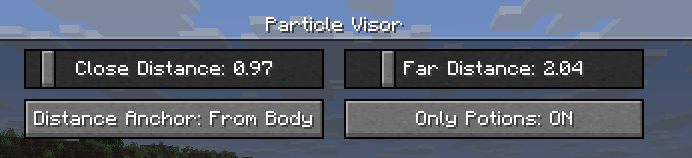
Close Distance: The farthest distance at which particles will still be visible. Anything closer than this won't render at all.Far Distance: The closest distance at which particles will be faded. Anything in between this value and Close Distance will be faded. (you can set this to be the same as Close Distance to make particles "pop in")Mod Enabled: General global toggle for the modDistance Anchor: The point on your player model where the distance will be determinedFrom Eyes: Distance determined from the "eye level"From Body: Distance will be the same regardless of whether the particle is at your eyes or your feet, like a cylinder (though anything above or below that will be accounted for)From Feet: Distance determined from the character's feetOn Camera: Distance determined from the actual camera position (so you can look through particles in third person)Only Potions: Anything not considered a "spell particle" will be unaffected by the mod.Third Person Particles: If this is ON, the mod will do nothing in third person.I've verified that the mod works with Sodium and Particle Core (and whatever else is in uku's pvp modpack), so I don't think there will be many incompatibilities. Feel free to make an issue if you find any!
This mod is under the MIT License. Feel free to include this mod in your modpack!
Project description from Modrinth.
Pick your setup
Choose the version and loader you play, then open the matching release.
Check the dependencies, then try the file in a copied instance before changing a world you care about.
Recent files
particle-visor-1.1.jar
14 Apr 2026
Looking for an older file? The official Modrinth project page is in Resources.
 mod
Well-rounded client-side optimization mod. Extremely compatible Vulkan backend for 1.21.11-26.1.2. By Polyfrost, best with OneClient.
 mod
A simple mod that adds a speedometer to your GUI
 mod
Inventory utilities for creative mode