Cloth Config API (Fabric/Forge/NeoForge) Optional for FPShud FPS hud 1.1.3+26.2
optionalMatching file found Matched file: [Fabric 26.2] v26.2.155

CurseForge · Minecraft mod
High precision FPS displaying mod with a customizable HUD
Quick answer
FPShud FPS hud 1.1.3+26.2 targets 26.2 with Fabric, Quilt. The project page does not say whether this file belongs on the client, dedicated server, or both. All 1 required mods have matching files.
Where it goes
The project page does not say whether this file belongs on the client, dedicated server, or both.
The source does not explicitly classify this release as client-only or server-only.
FPS hud 1.1.3+26.2. Change the file and its required mods may change too.
Install Fabric API first. We found matching files for this game-version and loader setup. 2 come through another mod in the chain.
2 extra mods were pulled in by other dependencies. Indented rows show who needs each one. We only count dependency files that match this setup. A file for another loader does not fill the gap.
Before you install it
Built for FPShud FPS hud 1.1.3+26.2. Pick another file and the loader, install side or required mods may change.
Use FPS hud 1.1.3+26.2. It targets 26.2 with Fabric, Quilt; another release may have different loader, side or dependency requirements.
Install Fabric API first. We found matching files for this game-version and loader setup. 2 come through another mod in the chain.
The project page does not say whether this file belongs on the client, dedicated server, or both.
Use the “Get this file” button beside FPS hud 1.1.3+26.2. It opens that exact file at the source.
About this project
a mod that displays FPS with high precision on a customizable HUD
Main FPS is the main FPS value, regulated by the Main Update IntervalAvererage FPS is the average FPS value from all the values took in Average Update IntervalMax FPS is the maximum FPS value from all the values took in Min Update IntervalMin FPS is the minimum FPS value from all the values took in Max Update Interval

FPShud with default settings
HUD Features:
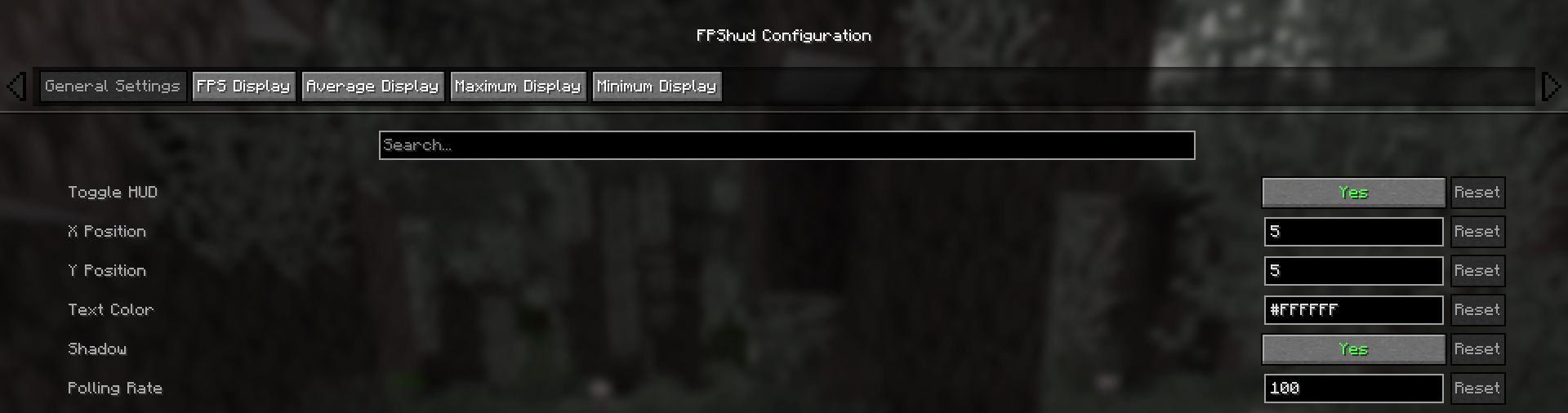
Toggle HUDtoggles the entire HUDX Positionchanges the X position of the HUD on the screenY Positionchanges the Y position of the HUD on the screenText Colorchanges the color of the entire HUDShadowenables or disables the text shadow on the HUDPolling Rateindicates how frequently the mod should poll FPS
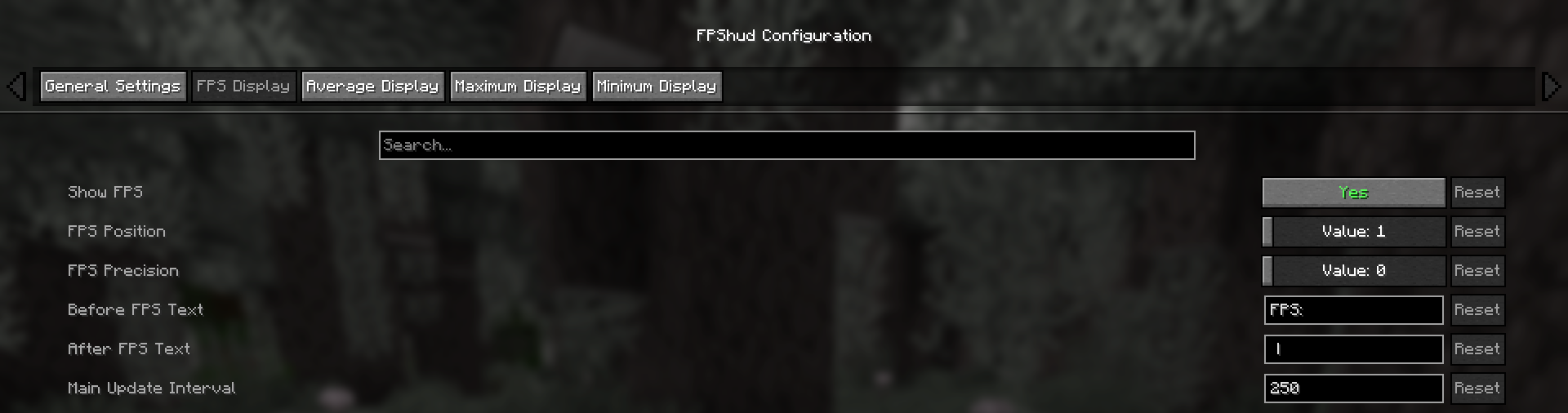
Those settings can be changed for every one of the 4 fields:
Show FPStoggles the FPS fieldFPS Positionindicates the position of the field (first, second, third, fourth)FPS Precisionindicates how many points of precision the field haveBefore FPS Textchanges the text displayed before the specific field FPS valueAfter FPS Textchanges the text displayed after the specific field FPS value
The config screen is divided into 5 categories:
- General Settings:
- FPS Display, Average Display, Maximum Display, Minimum display:
Highly precise:
FPShud uses time elapsed from frame to frame for the FPS value calculation; This method of sampling elevates precision and customization, permitting millisecond precise calculations and FPS displaying
FPShud works with a
Polling Ratealgorithm; samples are taken every frame, then smoothen every poll-time and finally processed to make them match the requiredMain Update Interval,Average Update Interval,Maximum Update IntervalandMinimum Update IntervalrequirementsFor those reasons, it is not recommended to set
Polling RateandUpdate Intervalto low values because results may appear very fluctuating
Highly customizable:
You can customize the HUD to match every style:

only showing Avr and Max, modified 'Before Text', changed 'Text Color', removed 'Shadow', changed 'Precision' and modified 'Update Intervals'
If you are using ModMenu install ClothConfigAPI to access the config screen
Don't want ModMenu? The config file is accessible and editable in your config directory, changes apply after a game restart
Settings will be saved in your config folder and updated at runtime
The mod is client side (works on multiplayer)
Project description from CurseForge.
Pick your setup
Choose the version and loader you play, then open the matching release.
Showing the newest 12 of 16 game versions. Older files are in the list below.
Check the dependencies, then try the file in a copied instance before changing a world you care about.
Recent files
fpshud-1.1.3+26.2.jar
3 Jul 2026
fpshud-1.1.3+26.1-26.1.2.jar
3 Jul 2026
fpshud-1.1.3+1.21-1.21.5.jar
21 Jun 2026
fpshud-1.1.3+1.21.9-1.21.10.jar
21 Jun 2026
fpshud-1.1.3+1.21.11.jar
21 Jun 2026
fpshud-1.1.2+1.21.9-1.21.11.jar
11 Feb 2026
fpshud-1.1.2_1.21.9-1.21.10.jar
21 Oct 2025
fpshud-1.1.2_1.21.6-1.21.8.jar
26 Jul 2025
fpshud-1.1.2_1.21-1.21.5.jar
26 Jul 2025
fpshud-1.1.1.jar
18 Jun 2025
fpshud-1.1.0.jar
19 Jan 2025
fpshud-1.0.0.jar
27 Dec 2024
Looking for an older file? The official CurseForge project page is in Resources.
 mod
modTurn Blockbench models into simple Minecraft entities without writing Java code.
 mod
modEvery so often, you’re forced to choose between two permanent trade-offs. Stats change, controls shift, and visuals glitch. Both halves take effect immediately and neither wears off. How long can you survive the mess you build?
 mod
modUse leads on fences