Forge Config API Port Needed by The Plopper theplopper-fabric-26.3-1.5.jar
requiredMatching file found Matched file: [FABRIC] [26.3.x] v26.3.1
CurseForge · Minecraft mod
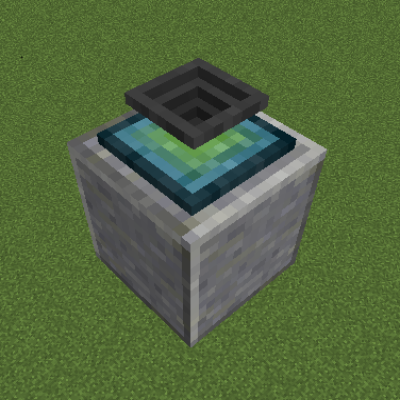
A block that picks up items that are about to despawn.
Quick answer
The Plopper theplopper-fabric-26.3-1.5.jar targets 26.3 with Fabric, Quilt. The project page does not say whether this file belongs on the client, dedicated server, or both. All 2 required mods have matching files.
Where it goes
The project page does not say whether this file belongs on the client, dedicated server, or both.
The source does not explicitly classify this release as client-only or server-only.
theplopper-fabric-26.3-1.5.jar. Change the file and its required mods may change too.
Install Forge Config API Port, Fabric API first. We found matching files for this game-version and loader setup. 2 come through another mod in the chain.
2 extra mods were pulled in by other dependencies. Indented rows show who needs each one. We only count dependency files that match this setup. A file for another loader does not fill the gap.
Before you install it
Built for The Plopper theplopper-fabric-26.3-1.5.jar. Pick another file and the loader, install side or required mods may change.
Use theplopper-fabric-26.3-1.5.jar. It targets 26.3 with Fabric, Quilt; another release may have different loader, side or dependency requirements.
Install Forge Config API Port, Fabric API first. We found matching files for this game-version and loader setup. 2 come through another mod in the chain.
The project page does not say whether this file belongs on the client, dedicated server, or both.
Use the “Get this file” button beside theplopper-fabric-26.3-1.5.jar. It opens that exact file at the source.
About this project
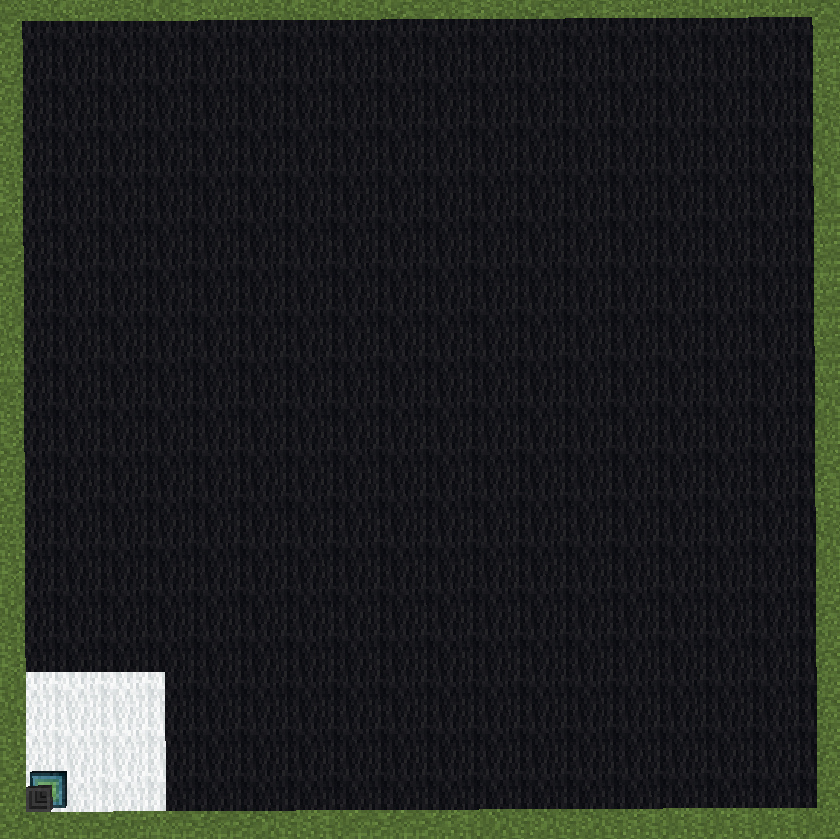
The Plopper is a block that will pick up any items in its general vicinity that are about to despawn. It will do so at a set range, which is 2 by default, but can be changed by adding upgrades. Each upgrade will add 2 blocks to the range, with a maximum of 16 blocks in total (7 upgrades). The range affects all directions (north, south, east, west, up, and down) and is cubical. Here's an image showing a cross-section of the plopper's range (white is default, black is fully upgraded):
You can access the picked up items by rightclicking the block, or piping items out of the bottom. But do note, that you can only pull items out of the plopper, and not put any into it. It's not supposed to be a storage solution :)
Here is a video showing off the block. The birch planks represent the area in which the plopper in the video can pick up the items (note that the items dropped outside of the range don't disappear with smoke particles).
As you can see, the block comes with a sound and particles. Both can be turned off via the configuration file.
Like previously mentioned, the plopper works with pipes (in this example, Itemducts from Thermal Expansion)! By default, you can only extract from the bottom of the block, but that's toggleable as well. (The lever is not required for the plopper)
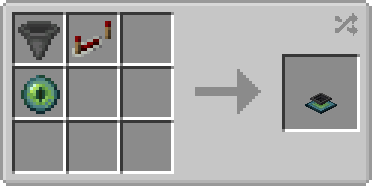
The Plopper is crafted like shown (shapeless):
The Range Upgrade is crafted like shown (shapeless):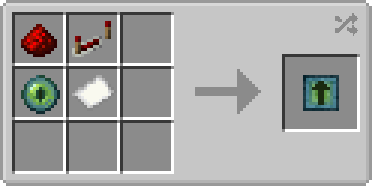
bypassOutputSide - If set to true, the plopper will output items to e.g. pipes at all sides instead of just the bottom (Default: false)
displayParticles - Whether particles should show up every time the plopper picks up an item (Default: true)
playSound - Whether a sound should be played when an item gets picked up by the plopper (Default: true)
You are allowed to use this mod in any modpack.


Come join me on Discord! https://discord.gg/kgZUAxK
 Follow me on Twitter for mod updates and other shenanigans! [https://twitter.com/bl4ckscor3](https://twitter.com/bl4ckscor3)
Project description from CurseForge.
Pick your setup
Choose the version and loader you play, then open the matching release.
Showing the newest 12 of 44 game versions. Older files are in the list below.
Check the dependencies, then try the file in a copied instance before changing a world you care about.
Recent files
19 Sept 2026
19 Sept 2026
21 Jun 2026
21 Jun 2026
16 May 2026
16 May 2026
11 Dec 2025
12 Oct 2025
theplopper-1.21.7-1.4.jar
16 Jul 2025
16 Jul 2025
16 Jul 2025
theplopper-1.21.6-1.3.9.jar
20 Jun 2025
Looking for an older file? The official CurseForge project page is in Resources.
 mod
modBetterLinkPartyClaim (BLPC) is a Minecraft 1.12.2 Forge mod that adds party-based chunk claiming and protection, with a chunk map UI, role/trust-based permissions, ally/enemy parties, and optional BetterQuesting integration.
 mod
modOffering more tools and methods to automate food processing of other mod in Create.
 mod
modAn addon for Create: Aeronautics that adds a way to hide Sable sublevels and entities from plain view.