CraftTweaker Needed by WorldGen Indicators WorldGenIndicators-1.12.2-1.1.0-6.jar
requiredMatching file found Matched file: CraftTweaker2-1.12-4.1.20.715.jar
CurseForge · Minecraft mod
Add worldgen depending of another worldgen, like ore samples (Using craftweaker)
Quick answer
WorldGen Indicators WorldGenIndicators-1.12.2-1.1.0-6.jar targets 1.12.2. The project page does not say whether this file belongs on the client, dedicated server, or both. All 1 required mods have matching files.
Where it goes
The project page does not say whether this file belongs on the client, dedicated server, or both.
The source does not explicitly classify this release as client-only or server-only.
WorldGenIndicators-1.12.2-1.1.0-6.jar. Change the file and its required mods may change too.
Install CraftTweaker first. We found matching files for this game-version and loader setup.
We only count dependency files that match this setup. A file for another loader does not fill the gap.
Before you install it
Built for WorldGen Indicators WorldGenIndicators-1.12.2-1.1.0-6.jar. Pick another file and the loader, install side or required mods may change.
Use WorldGenIndicators-1.12.2-1.1.0-6.jar. It targets 1.12.2; another release may have different loader, side or dependency requirements.
Install CraftTweaker first. We found matching files for this game-version and loader setup.
The project page does not say whether this file belongs on the client, dedicated server, or both.
Use the “Get this file” button beside WorldGenIndicators-1.12.2-1.1.0-6.jar. It opens that exact file at the source.
About this project

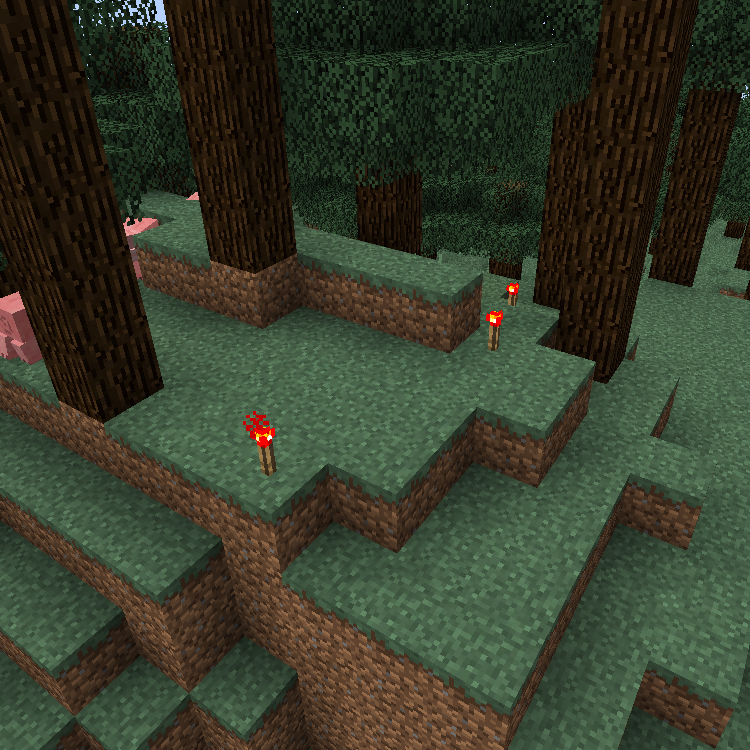
WorldGen indicators allows you to generate extra blocks depending of existing worldgen. One of the common uses is adding prospecting flowers for ores that generate in the chunk. It uses craftweaker to make it possible.



First you need to create a BlockChecker by BlockChecker.create(1) where the number is the chance of getting triggered. Then you can add block to check to it with addValid(IBlock block) and Indicators with addIndicator(IIndicator indicator). The indicator can have multiple blocks added by the method add(IBlock block). (The indicators in the block checkers and the blocks inside of the indicators will be choosen at random)

The following script adds a 10% chance of adding a redstone torch in the surface when it finds a redstone ore:
import mods.worldgenindicators.BlockChecker;
import mods.worldgenindicators.WorldGenManager;
import mods.worldgenindicators.SurfaceIndicator;
import crafttweaker.block.IBlock;

var redstoneOre = <minecraft:redstone_ore>.asBlock();
var redstoneTorch = <minecraft:redstone_torch>.asBlock();
var surfaceIndicator = SurfaceIndicator.create().add(redstoneTorch);
var blockChecker = BlockChecker.create(0.1).addValid(redstoneOre).addIndicator(surfaceIndicator);
WorldGenManager.addChecker(blockChecker);
The relative surface indicator needs a parameter in the create that is how many blocks above the surface will generate the blocks.
import mods.worldgenindicators.BlockChecker;
import mods.worldgenindicators.WorldGenManager;
import mods.worldgenindicators.RelativeSurfaceIndicator;
import crafttweaker.block.IBlock;

var grass = <minecraft:grass>.asBlock();
var glass = <minecraft:glass>.asBlock();
var surfaceIndicator = RelativeSurfaceIndicator.create(20).add(glass);
var blockChecker = BlockChecker.create(1).addValid(grass).addIndicator(surfaceIndicator);
WorldGenManager.addChecker(blockChecker);
import mods.worldgenindicators.BlockChecker;
import mods.worldgenindicators.WorldGenManager;
import mods.worldgenindicators.SurfaceIndicator;
import mods.worldgenindicators.RelativeSurfaceIndicator;
import crafttweaker.block.IBlock;
import crafttweaker.item.IItemStack;

WorldGenManager.addChecker(
    BlockChecker.create(0.5d)
        .addWhitelistEntry(<minecraft:sand>.asBlock())
        .addValid(<minecraft:gold_ore>.asBlock())
        .addIndicator(SurfaceIndicator.create().add( <minecraft:gold_block>.asBlock()) )
);

WorldGenManager.addChecker(
    BlockChecker.create(0.5d)
        .addBlacklistEntry(<minecraft:grass>.asBlock())
        .addBlacklistEntry(<blockstate:minecraft:air>.block)
        .addValid(<minecraft:iron_ore>.asBlock())
        .addIndicator(RelativeSurfaceIndicator.create(2).add(<minecraft:diamond_block>.asBlock()))
);
 Discord {width=32 height=32} Patreon
  Twitter

Project description from CurseForge.
Pick your setup
Choose the version and loader you play, then open the matching release.
Check the dependencies, then try the file in a copied instance before changing a world you care about.
Recent files
3 Mar 2019
17 Nov 2018
11 Nov 2018
8 Nov 2018
16 Sept 2018
Looking for an older file? The official CurseForge project page is in Resources.
 mod
modA large, exploration-themed mod adding biomes, mobs, weapons, and a new dimension: the Stellar Hollow.
 mod
modAdds cool items like wireless redstone, logic gates, magic staffs, tools and more.. beyond normal ores mod with just armours and weapons.
 mod
modTurn the enchanted books you find into permanent villager trades. Hand a villager a book and it learns that enchantment, priced in emeralds. Give it a matching book later and the trade levels up by anvil rules. Works with modded enchantments.