Minecraft version
Back to mods 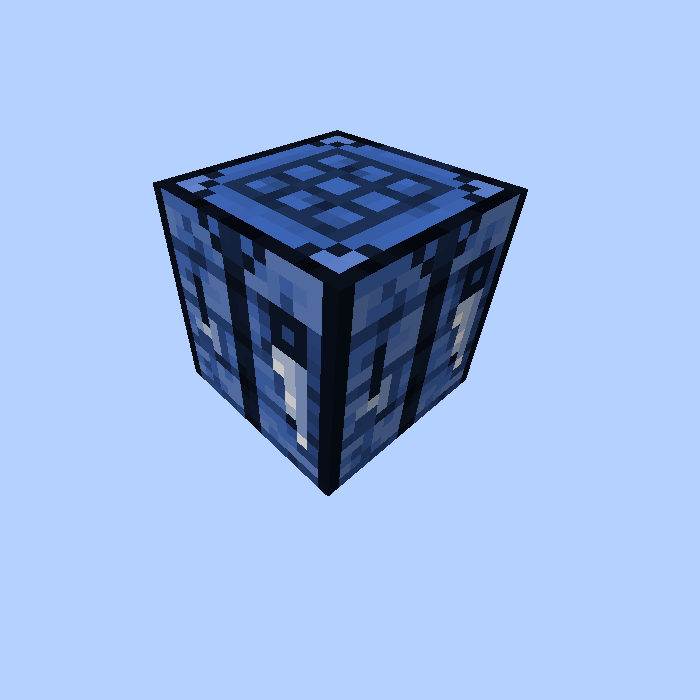
CurseForge · Minecraft mod
Low Tech Crafting
Adds a version of the vanilla Crafting Table that can be accessed by automation
Choose a version Pick your version below, then grab the matching file.
Quick answer
Which Low Tech Crafting release should I use?
Latest stable file lowtechcrafting-1.19.2-0.2.0.jar
Game version 1.19.2
Loader Forge
Low Tech Crafting lowtechcrafting-1.19.2-0.2.0.jar targets 1.19.2 with Forge. The project page does not say whether this file belongs on the client, dedicated server, or both. No extra mods listed for this file.
Where it goes
Is Low Tech Crafting required on the client, server, or both?
The project page does not say whether this file belongs on the client, dedicated server, or both.
Client Source doesn’t say
Dedicated server Source doesn’t say
Loader for this release Forge
Required install it here Optional supported, not mandatory Not supported do not install here Source doesn’t say do not assume
The source does not explicitly classify this release as client-only or server-only.
What else does Low Tech Crafting lowtechcrafting-1.19.2-0.2.0.jar need?
lowtechcrafting-1.19.2-0.2.0.jar. Change the file and its required mods may change too.
This file does not list any required mods. Do not add a library just because a different file uses it.
This file does not list any required or optional mods.
Before you install it
Add Low Tech Crafting without breaking your instance.
Built for Low Tech Crafting lowtechcrafting-1.19.2-0.2.0.jar. Pick another file and the loader, install side or required mods may change.
- 01
Stick to this file
Use lowtechcrafting-1.19.2-0.2.0.jar. It targets 1.19.2 with Forge; another release may have different loader, side or dependency requirements.
- 02
Bring the mods it needs
This file does not list any required mods. Do not add a library just because a different file uses it.
- 03
Put it on the correct side
The project page does not say whether this file belongs on the client, dedicated server, or both.
- 04
Pick the file you checked
Use the “Get this file” button beside lowtechcrafting-1.19.2-0.2.0.jar. It opens that exact file at the source.
About this project
What does Low Tech Crafting add?
Description
Low Tech Crafting adds just one new block: a "Better Crafting Table".
It's very similar to the vanilla Crafting Table, with the main differences being that it has a persistent inventory (ie. it uses a TileEntity to store the inventory), and it can be interacted with by "automation", meaning Hoppers, pipes etc.
A couple of notable things:
- While it has the normal maximum stack sizes when used by a player, the maximum stack size for automation (inserting by Hoppers etc.) is 1 item per crafting grid slot
- The output slot is the first slot for automation, so pulling out items happens from the output slot first. So it's not necessary to filter for the output item type.
This makes it possible to automatically fill the grid for each recipe, then suck out the "filler items" that should be empty slots in the final recipe, and then suck out the crafting result items.
The mod was started by Xcom6000, and the idea was to demonstrate to Mojang how the vanilla Crafting Table could be enhanced, so that it would also work for automated crafting contraptions.
Project description from CurseForge.
Pick your setup
Low Tech Crafting by Minecraft version and loader
Choose the version and loader you play, then open the matching release.
Minecraft version
1.18.2
1 loader buildMinecraft version
1.18.1
1 loader buildMinecraft version
1.17.1
1 loader buildMinecraft version
1.16.5
1 loader buildMinecraft version
1.16.4
1 loader buildMinecraft version
1.16.3
1 loader buildMinecraft version
1.16.2
1 loader buildMinecraft version
1.16.1
1 loader buildMinecraft version
1.15.2
1 loader buildMinecraft version
1.15.1
1 loader buildMinecraft version
1.15
1 loader buildShowing the newest 12 of 14 game versions. Older files are in the list below.
Check the dependencies, then try the file in a copied instance before changing a world you care about.
Recent files
Low Tech Crafting versions and loaders
lowtechcrafting-1.19.2-0.2.0.jar
6 Dec 2022
Client Source doesn’t say Server Source doesn’t say Dependencies No extras listed Listed on Release listing
Check the 1.19.2 · Forge setup Forge1.19.2 release
lowtechcrafting-1.18.1-0.2.1.jar
30 Dec 2021
Client Source doesn’t say Server Source doesn’t say Dependencies No extras listed Listed on Release listing
Check the 1.18.2 · Forge setup 1.18.11.18.2Forge release
lowtechcrafting-1.18.1-0.2.0.jar
28 Dec 2021
Client Source doesn’t say Server Source doesn’t say Dependencies No extras listed Listed on Release listing
Check the 1.18.1 · Forge setup 1.18.1Forge release
lowtechcrafting-1.17.1-0.2.0.jar
28 Dec 2021
Client Source doesn’t say Server Source doesn’t say Dependencies No extras listed Listed on Release listing
Check the 1.17.1 · Forge setup 1.17.1Forge release
lowtechcrafting-1.16.3-0.2.0.jar
13 Oct 2020
Client Source doesn’t say Server Source doesn’t say Dependencies No extras listed Listed on Release listing
Check the 1.16.5 · Forge setup 1.16.31.16.5Forge1.16.4 release
lowtechcrafting-1.16.2-0.2.0.jar
26 Aug 2020
Client Source doesn’t say Server Source doesn’t say Dependencies No extras listed Listed on Release listing
Check the 1.16.2 · Forge setup Forge1.16.2 release
lowtechcrafting-1.16.1-0.2.0.jar
8 Jul 2020
Client Source doesn’t say Server Source doesn’t say Dependencies No extras listed Listed on Release listing
Check the 1.16.1 · Forge setup 1.16.1Forge release
lowtechcrafting-1.15.2-0.2.2.jar
31 May 2020
Client Source doesn’t say Server Source doesn’t say Dependencies No extras listed Listed on Release listing
Check the 1.15.2 · Forge setup 1.15.2Forge release
lowtechcrafting-1.14.4-0.2.2.jar
31 May 2020
Client Source doesn’t say Server Source doesn’t say Dependencies No extras listed Listed on Release listing
Check the 1.14.4 · Forge setup 1.14.4Forge release
lowtechcrafting-1.15.1-0.2.1.jar
29 Dec 2019
Client Source doesn’t say Server Source doesn’t say Dependencies No extras listed Listed on Release listing
Check the 1.15.2 · Forge setup 1.151.15.2Forge1.15.1 release
lowtechcrafting-1.14.4-0.2.1.jar
29 Dec 2019
Client Source doesn’t say Server Source doesn’t say Dependencies No extras listed Listed on Release listing
Check the 1.14.4 · Forge setup 1.14.4Forge release
lowtechcrafting-1.15.1-0.2.0.jar
19 Dec 2019
Client Source doesn’t say Server Source doesn’t say Dependencies No extras listed Listed on Release listing
Check the 1.15.1 · Forge setup 1.15Forge1.15.1 release
Looking for an older file? The official CurseForge project page is in Resources.