Fabric API Needed by snowmancy-fabric-26.2-1.2.jar
requiredMatching file found Matched file: [26.2] Fabric API 0.161.0+26.2
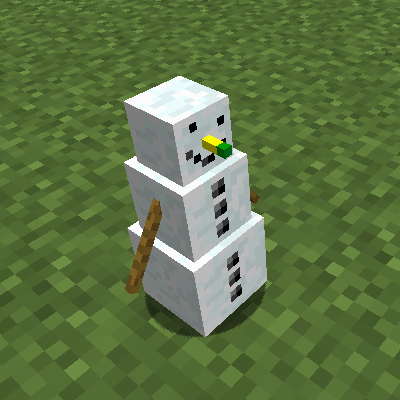
CurseForge · Minecraft mod
Little snowman companions fighting on your side!
Quick answer
snowmancy-fabric-26.2-1.2.jar targets 26.2 with Fabric, Quilt. The project page does not say whether this file belongs on the client, dedicated server, or both. All 1 required mods have matching files.
Where it goes
The project page does not say whether this file belongs on the client, dedicated server, or both.
The source does not explicitly classify this release as client-only or server-only.
snowmancy-fabric-26.2-1.2.jar. Change the file and its required mods may change too.
Install Fabric API first. We found matching files for this game-version and loader setup.
We only count dependency files that match this setup. A file for another loader does not fill the gap.
Before you install it
Built for snowmancy-fabric-26.2-1.2.jar. Pick another file and the loader, install side or required mods may change.
Use snowmancy-fabric-26.2-1.2.jar. It targets 26.2 with Fabric, Quilt; another release may have different loader, side or dependency requirements.
Install Fabric API first. We found matching files for this game-version and loader setup.
The project page does not say whether this file belongs on the client, dedicated server, or both.
Use the “Get this file” button beside snowmancy-fabric-26.2-1.2.jar. It opens that exact file at the source.
About this project
This mod was made during the MMD WinterJam 2018!
Snowmancy adds little snowman companions who fight on your side and are customizeable.
To start off in the mod, you first have to craft the Snowman Builder. This block is used to assemble your snowmen.
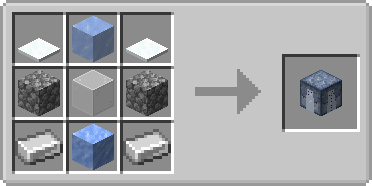
The Snowman Builder will only work in cold biomes (usually biomes with snow). It will not work at high altitudes (even if there's snow) because the biome is not cold enough. If you place the block in a biome it can not work in, a text will appear at the top of the GUI telling you so. It is possible to use the builder in other climates, see the section on evercold ice below.
Upon rightclicking the block, you will be present with aforementioned GUI. It might seem intimidating at first, but it's laid out like a snowman's body and face. The big slots are for the three snow blocks, the slots above are the snowman's face. The slot to the right is for a weapon, the slot in the bottom corner is the output slot.
Each snowman has to have three snow blocks, a carrot (can be a golden or a normal one), and coal. Shiftclicking in the items will automatically put the items in the correct slots. The slot at the very top is the helmet slot. It can accept any helmet, although there won't be any difference between different helmets.
The weapon slot can accept four types of weapons: Eggs, snowballs, a bow or any type of sword. Which one you choose will decide with what the snowman attacks monsters. If you choose to go for a sword, the snowman will deal its normal damage with each hit.
Once you have filled all slots, a Frozen Snowman will appear in the output slot. You might notice a red dot above, which dictates the crafting progress. To progress in the crafting process, you need to physically throw eight snowballs at the snowman builder (keep in mind that you might have to sneak in order to not open the GUI when throwing the snowballs). An audio cue will help you identify once the process is done (or you could look at the progress bar). You can then extract the frozen snowman from the output slot. The item will show all information about your snowman in the tooltip. Note, that damage will only show a value above 0, if you chose to use a sword as a weapon. Also note, that you cannot modify your snowman after it has been built.
Once you have your frozen snowman, you can rightclick it on the ground to spawn it in. The snowman companion will not follow you around (they're not as loyal as dogs), but you are able to pick it back up by either killing or shift-rightclicking it.
However, snowman companions prove to be a nice addition in combat. Whenever they come close to a monster, they will try to attack the enemy with the weapon you gave it in the snowman builder. Please keep in mind that due to their weak arms, their aiming skills are...not that good.
Be careful, though, snowmen do not like warmer biomes, they will start to die once they are no longer in a cold biome. This can be counteracted with evercold ice.
Due to its high density of different ice forms, evercold ice does not melt and actually helps to improve the heat sensitivity of the builder or your companion.
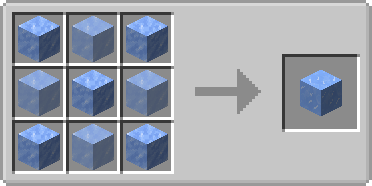
If you want to use the snowman builder in warmer climates, such as plains or deserts, you will need to directly surround it with evercold ice (the ice has to touch the builder). If there is enough evercold ice around the builder, the text in the GUI will disappear.
If you don't want your little companion to miserably melt, simply use evercold ice instead of a helmet when building your snowman.
You are allowed to use this mod in any modpack.


Come join me on Discord! https://discord.gg/kgZUAxK
 Follow me on Twitter for mod updates and other shenanigans! [https://twitter.com/bl4ckscor3](https://twitter.com/bl4ckscor3)
Project description from CurseForge.
Pick your setup
Choose the version and loader you play, then open the matching release.
Showing the newest 12 of 40 game versions. Older files are in the list below.
Check the dependencies, then try the file in a copied instance before changing a world you care about.
Recent files
21 Jun 2026
21 Jun 2026
10 May 2026
10 May 2026
11 Dec 2025
12 Oct 2025
snowmancy-1.21.6-1.1.4.jar
20 Jun 2025
17 Jun 2025
2 Apr 2025
10 Dec 2024
28 Oct 2024
14 Jun 2024
Looking for an older file? The official CurseForge project page is in Resources.
 mod
modMakes it so boats don't go extra fast on ice.
 mod
modPlants vs. Zombies, PvZ, zombis, Minecraft
 mod
modiChun Gravity Gun revival is a port of iChun's original Gravity Gun mod from version 1.12.2 for modern versions (optional colored gravity guns for playing paintball with Paintball Revival Mod if you have it installed).