Minecraft version
Back to mods 
CurseForge · Minecraft mod
WatchDog Anti Cheat
This is a mod for modpack creators/server owners to use to protect their servers against mods that use hacks
Choose a version Pick your version below, then grab the matching file.
Quick answer
Which WatchDog Anti Cheat release should I use?
Latest stable file WatchDog-AntiCheat-1.20.1-0.1
Game version 1.20.1
Loader NeoForge
WatchDog Anti Cheat WatchDog-AntiCheat-1.20.1-0.1 targets 1.20.1 with NeoForge. The project page does not say whether this file belongs on the client, dedicated server, or both. No extra mods listed for this file.
Where it goes
Is WatchDog Anti Cheat required on the client, server, or both?
The project page does not say whether this file belongs on the client, dedicated server, or both.
Client Source doesn’t say
Dedicated server Source doesn’t say
Loader for this release NeoForge
Required install it here Optional supported, not mandatory Not supported do not install here Source doesn’t say do not assume
The source does not explicitly classify this release as client-only or server-only.
What else does WatchDog Anti Cheat WatchDog-AntiCheat-1.20.1-0.1 need?
WatchDog-AntiCheat-1.20.1-0.1. Change the file and its required mods may change too.
This file does not list any required mods. Do not add a library just because a different file uses it.
This file does not list any required or optional mods.
Before you install it
Add WatchDog Anti Cheat without breaking your instance.
Built for WatchDog Anti Cheat WatchDog-AntiCheat-1.20.1-0.1. Pick another file and the loader, install side or required mods may change.
- 01
Stick to this file
Use WatchDog-AntiCheat-1.20.1-0.1. It targets 1.20.1 with NeoForge; another release may have different loader, side or dependency requirements.
- 02
Bring the mods it needs
This file does not list any required mods. Do not add a library just because a different file uses it.
- 03
Put it on the correct side
The project page does not say whether this file belongs on the client, dedicated server, or both.
- 04
Pick the file you checked
Use the “Get this file” button beside WatchDog-AntiCheat-1.20.1-0.1. It opens that exact file at the source.
About this project
What does WatchDog Anti Cheat add?
New Discord Server: https://discord.gg/SdkMsaQU5u
What is Watchdog AntiCheat?
WatchDog AntiCheat is a mod that helps mod pack authors and other people who want to protect their servers from hackers and mods that shouldn't be on the client to join the server. This mod protects servers from any mods that are not on the whitelist config on the server. This mod needs to be on the client and server. This means joining the server you will need this mod.
How to use WAC:
- Guide for 1.7.10 & 1.12.2 versions:
- Guide for 1.7.10 & 1.12.2 versions:
Step #1: Put the mod on your mod pack/client pack in the mods folder. (No further installation or setup involving client-side configs or anything is needed.)
Step #2: Put the mod in your server's mods folder.
Step #3: Start the server and let the mod generate its configs, folders, and files. (All files and etc. will be located in config/WatchDogAC on the server.)
Step #4: Open the generated-mods-list.txt file and copy the second line where it tells you to copy. (Make sure you only copy the line and nothing else. Also please try not to include spaces in the copy.)
Step #5: Open the watchdog-ac-common.cfg file and paste what you copied into the "whitelistModsMD5=" config value. (Now restart the server.)
Step #6: Now join the server and you should be all good!
- Guide for 1.16.5, 1.18.2, 1.19.3 versions:
- Guide for 1.16.5, 1.18.2, 1.19.3 versions:
Step #1: Put the mod on your mod pack/client pack in the mods folder. (No further installation or setup involving client-side configs or anything is needed.)
Step #2: Put the mod in your server's mods folder.
Step #3: Start the server and let the mod generate its configs, folders, and files. (All files and etc. will be located in config/WatchDogAC on the server.)
Step #4: Open the generated-mods-list.txt file and copy the second line where it tells you to copy. (Make sure you only copy the line and nothing else. Also please try not to include spaces in the copy.)
Step #5: Open the watchdog-ac-common.toml file and paste what you copied into the "Whitelisted Mods" config value. (Now restart the server.)
Step #6: Now join the server and you should be all good!
- Guide for whitelisting client-side-only mods:
Step #1: Open the config/WatchDogAC/ClientMods folder and put all the "client-side" mods into this folder. (The same as what the client has.)
Step #2: Start or restart the server and allow the generated-mods-list.txt file to re-generate its data for you to copy. (Wait until the server is fully started before you copy.)
Step #3: Copy the new data and paste it into the "Whitelisted Mods" config value. This config is located in config/WatchDogAC/watchdog-ac-common.toml
- Commands:
/wacchat (This is for admins with OP and allows them to enable or disable chat messages for when a user gets kicked by the anticheat)
/wacwhitelistmods (You can use this command to automatically update the server config whitelisted mods value from all your client's mods. To use the command just whitelist your playername in the server config and use the command. This command was created to help with faster whitelisting.)
/wacwhitelisttp (You can use this command to automatically update the server config whitelisted texture packs value from all your client's texture packs. To use the command just whitelist your playername in the server config and use the command. This command was created to help with faster whitelisting.)
Now you are all good!
Features:
Mod whitelisting.
Auto Click Checker & Gamma Checker. (1.16.5+ versions)
Discord webhook integration.
The best way to protect your modded server from cheaters.
How to use Discord Webhook integration:
How to use Discord Webhook integration:
(Check in your config if this is even supported if not then your version does not have this supported!)
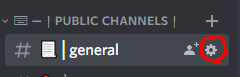
- Step 1: Go to your discord server and click on the settings of a channel you want to messages to be sent to.
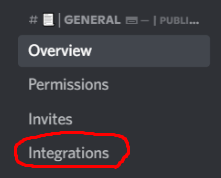
- Step 2: Click on the "Integrations" tab.
- Step 3: Click "Create Webhook" where it displays the webhooks.

Step 4: Edit the webhook's name and you could change the channel as well if needed.
Step 5: Copy the "Webhook URL" and paste it into the server config located in config/WatchdogAC-server.json on the server and paste the link in "DISCORD_WEBHOOK_LINK"
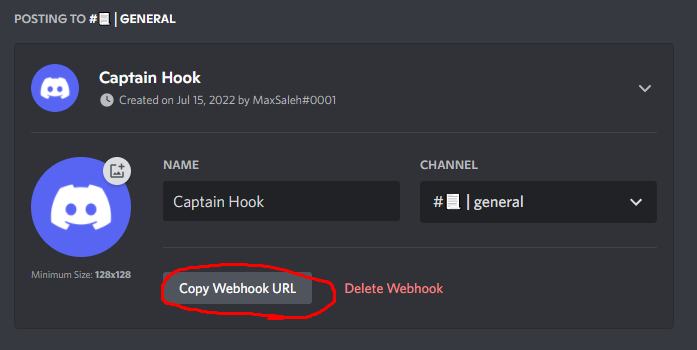
You are all good now! Every time a player joins the server with un-whitelisted mods they will get kicked and a message will get sent to the discord channel.
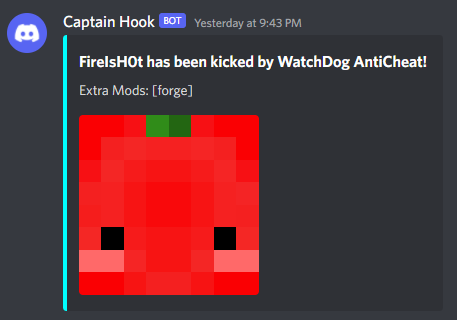
FAQ:
What MC versions will stay updated? (1.7.10, 1.12.2, 1.16.5, 1.18.2, 1.19.3+)
My server is not letting me join why is this? (Make sure you are using the same forge version as the client mod pack and the server. Any changes to the file or anything will change the value for the whitelist and will not allow you to join.)
Permissions:
You may use this mod in your modpacks and servers but as long as you give credit back to me (MaxIsH0t)
Project description from CurseForge.
Pick your setup
WatchDog Anti Cheat by Minecraft version and loader
Choose the version and loader you play, then open the matching release.
Minecraft version
1.19.3
1 loader buildMinecraft version
1.19.2
1 loader buildMinecraft version
1.19
1 loader buildMinecraft version
1.18.2
2 loader buildsMinecraft version
1.17.1
2 loader buildsMinecraft version
1.16.5
2 loader buildsMinecraft version
1.16.2
1 loader buildMinecraft version
1.16.1
1 loader buildMinecraft version
1.15.2
1 loader buildMinecraft version
1.12.2
2 loader buildsMinecraft version
1.7.10
2 loader buildsCheck the dependencies, then try the file in a copied instance before changing a world you care about.
Recent files
WatchDog Anti Cheat versions and loaders
WatchDog-AntiCheat-1.20.1-0.1
WatchDog-AntiCheat-1.20.1-0.1.jar
4 Sept 2023
Client Source doesn’t say Server Source doesn’t say Dependencies No extras listed Listed on Release listing
Check the 1.20.1 · NeoForge setup NeoForge1.20.1 release
WatchDog-AntiCheat-1.18.2-0.7
WatchDog-AntiCheat-1.18.2-0.7.jar
24 Jan 2023
Client Source doesn’t say Server Source doesn’t say Dependencies No extras listed Listed on Release listing
Check the 1.18.2 · Forge setup 1.18.2Forge release
WatchDog-AntiCheat-1.19.3-0.3
WatchDog-AntiCheat-1.19.3-0.3.jar
24 Jan 2023
Client Source doesn’t say Server Source doesn’t say Dependencies No extras listed Listed on Release listing
Check the 1.19.3 · Forge setup 1.19.3Forge release
WatchDog-AntiCheat-1.12.2-2.0
WatchDog-AntiCheat-1.12.2-2.0.jar
21 Jan 2023
Client Source doesn’t say Server Source doesn’t say Dependencies No extras listed Listed on Release listing
Check the 1.12.2 · Forge setup Forge1.12.2 release
WatchDog-AntiCheat-1.19.3-0.2
WatchDog-AntiCheat-1.19.3-0.2.jar
8 Jan 2023
Client Source doesn’t say Server Source doesn’t say Dependencies No extras listed Listed on Release listing
Check the 1.19.3 · Forge setup 1.19.3Forge release
WatchDog-AntiCheat-1.16.5-0.9
WatchDog-AntiCheat-1.16.5-0.9.jar
8 Jan 2023
Client Source doesn’t say Server Source doesn’t say Dependencies No extras listed Listed on Release listing
Check the 1.16.5 · Forge setup 1.16.5Forge release
WatchDog-AntiCheat-1.7.10-1.0.1
WatchDog-AntiCheat-1.7.10-1.0.1.jar
8 Jan 2023
Client Source doesn’t say Server Source doesn’t say Dependencies No extras listed Listed on Release listing
Check the 1.7.10 · Forge setup Forge1.7.10 release
WatchDog-AntiCheat-1.16.5-0.8
WatchDog-AntiCheat-1.16.5-0.8.jar
3 Jan 2023
Client Source doesn’t say Server Source doesn’t say Dependencies No extras listed Listed on Release listing
Check the 1.16.5 · Forge setup 1.16.5Forge release
WatchDog-AntiCheat-1.19.3-0.1
WatchDog-AntiCheat-1.19.3-0.1.jar
3 Jan 2023
Client Source doesn’t say Server Source doesn’t say Dependencies No extras listed Listed on Release listing
Check the 1.19.3 · Forge setup 1.19.3Forge release
WatchDog-AntiCheat-1.18.2-0.6
WatchDog-AntiCheat-1.18.2-0.6.jar
27 Nov 2022
Client Source doesn’t say Server Source doesn’t say Dependencies No extras listed Listed on Release listing
Check the 1.18.2 · Forge setup 1.18.2Forge release
WatchDog-AntiCheat-1.19.2-0.4
WatchDog-AntiCheat-1.19.2-0.4.jar
23 Oct 2022
Client Source doesn’t say Server Source doesn’t say Dependencies No extras listed Listed on Release listing
Check the 1.19.2 · Forge setup 1.19.2Forge release
WatchDog-AntiCheat-1.18.2-0.5
WatchDog-AntiCheat-1.18.2-0.5.jar
23 Oct 2022
Client Source doesn’t say Server Source doesn’t say Dependencies No extras listed Listed on Release listing
Check the 1.18.2 · Forge setup 1.18.2Forge release
Looking for an older file? The official CurseForge project page is in Resources.
 mod
mod CurseForge · Minecraft
MineCoin: Economy & Trade
Complete physical economy system with tiered coins, functional wallets, lottery scratch-offs, and player-to-player auctions.
 mod
mod CurseForge · Minecraft
CullingAO
Mod that includes Battle royale like Rules
 mod
mod CurseForge · Minecraft
AscendantTreasures
Every ancient treasure you loot from chests is collected for good, granting permanent passive powers you can further upgrade with stardust.