Minecraft version
Back to mods 
CurseForge · Minecraft mod
Not Enough Keys - Voice Commands
Adds presets and voice commands to solve the keybinding problem in big modpacks
Choose a version Pick your version below, then grab the matching file.
Quick answer
Which Not Enough Keys - Voice Commands release should I use?
Latest stable file Not Enough Keys 1.2.0 Forge 1.18.2
Game version 1.18.2
Loader Forge
Not Enough Keys - Voice Commands Not Enough Keys 1.2.0 Forge 1.18.2 targets 1.18.2 with Forge. The project page does not say whether this file belongs on the client, dedicated server, or both. No extra mods listed for this file.
Where it goes
Is Not Enough Keys - Voice Commands required on the client, server, or both?
The project page does not say whether this file belongs on the client, dedicated server, or both.
Client Source doesn’t say
Dedicated server Source doesn’t say
Loader for this release Forge
Required install it here Optional supported, not mandatory Not supported do not install here Source doesn’t say do not assume
The source does not explicitly classify this release as client-only or server-only.
What else does Not Enough Keys - Voice Commands Not Enough Keys 1.2.0 Forge 1.18.2 need?
Not Enough Keys 1.2.0 Forge 1.18.2. Change the file and its required mods may change too.
This file does not list any required mods. Do not add a library just because a different file uses it.
This file does not list any required or optional mods.
Before you install it
Add Not Enough Keys - Voice Commands without breaking your instance.
Built for Not Enough Keys - Voice Commands Not Enough Keys 1.2.0 Forge 1.18.2. Pick another file and the loader, install side or required mods may change.
- 01
Stick to this file
Use Not Enough Keys 1.2.0 Forge 1.18.2. It targets 1.18.2 with Forge; another release may have different loader, side or dependency requirements.
- 02
Bring the mods it needs
This file does not list any required mods. Do not add a library just because a different file uses it.
- 03
Put it on the correct side
The project page does not say whether this file belongs on the client, dedicated server, or both.
- 04
Pick the file you checked
Use the “Get this file” button beside Not Enough Keys 1.2.0 Forge 1.18.2. It opens that exact file at the source.
About this project
What does Not Enough Keys - Voice Commands add?
Not Enough Keys aims to solve the problem of just too many keybinds in modern modpacks.
The mod currently provides two main features: Presets and Voice Commands
Presets
The mod allows you to differentiate between 10 presets. Each preset has its own set of keys that are bound to keybinds.
Editing and switching between presets can be done in Minecrafts Controls-UI. First you have to expand the presets-bar by clicking on the green plus-sign. In the appearing bar you can switch between the 10 presets. When you are changing keybinds in one preset this will have no effect on the other presets.

Voice Commands
This feature allows you to add special Voice Commands. Voice Commands can be triggered by holding down the specified Push-to-talk key and speaking the commands specific rule.
Adding/editing and removing Voice Commands can be done via a GUI. This gui can be opened in two ways:
By typing "#voice" into the chat ("/voice" in 1.12)
Or the voice-command "[open] voice".
In the gui you see the list of your Voice Commands. In the first text-field of each command stands the unique name of the command (these will be used for a search function later on). In the second text field stands the rule of the command. The function of the buttons should be clear.
Command rule
The rule is the word or phrase on which this command should be triggered.
The syntay for the rules is almost the same as the Java Speech Grammar Format (JSGF) with the difference being that you don't need to write assignment ("public <abc> =") and don't have the ability to use comments.
Here are some examples of valid rules:
"rain" -> Triggers on the word rain
"let it rain" -> Triggers on the phrase
"rain|snow" -> Triggers on the word rain or snow
"(let it rain)|(let it snow)" -> Triggers on "let it rain" or "let it snow"
"[let it] rain" -> Triggers on "rain" or "let it rain"
"let it <rule1>" -> Triggers on "let it" followed by what is specified in the rule with the name "rule1"
If you use a word that is not in the dictionary (for example "wodr") or a broken syntax the text in the text field will be marked in red. The dictionary contains around 135000 words from the english language and currently around 80 minecraft specific words.
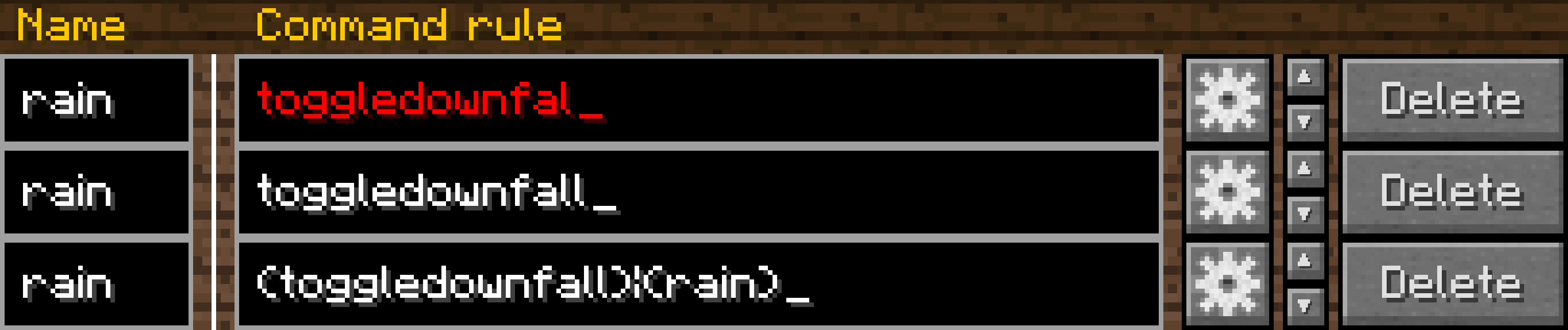
Voice Command actions
After you set a name and rule for a command you probably also want to specify the action of it. To do this you have to click on the button with the gear. In the popup that opened you can now first select the type of the action with the drop down menu at the top. After you choose the action type you can edit the settings for that type.
Heres an example for the toggledownfall command:
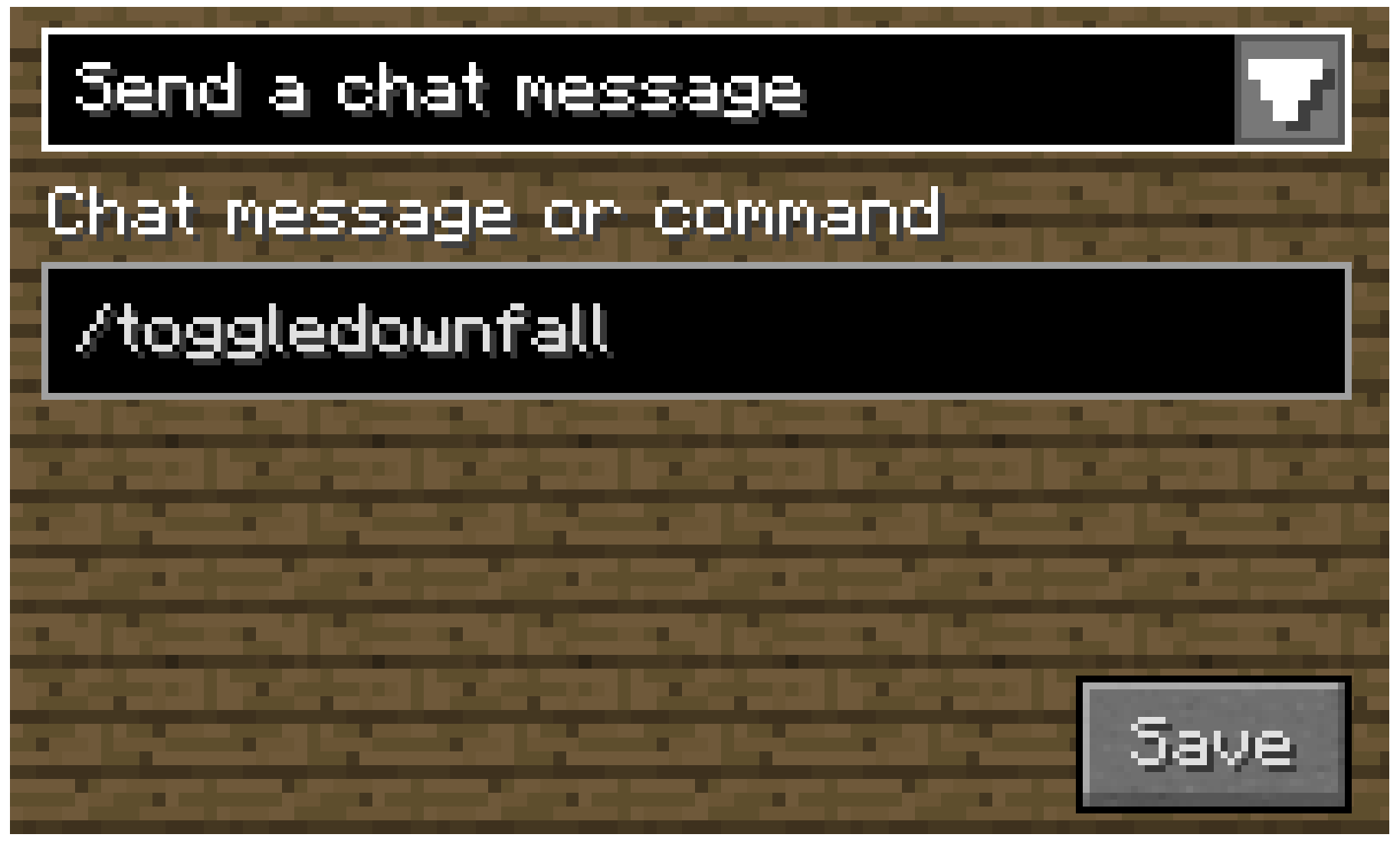
The following action types are currently implemented:
- Send a chat message / command
- Change the active controls-preset
- Press a keybinding once
- Toggle a keybinding
- Open a GUI (Inventory, Menu, Controls, Voice Commands)
- Change the selected CAD slot (Psi 1.12 and 1.16)
- Change the foci of your gauntlet (Only for Thaumcraft 1.12)
Using Voice Commands
If you now want to use a voice command you can do it like this:
- Hold down the Push-to-talk key (Left alt/option by default)
- Speak something that matches the rule of the command into your microphone
- Done
But please keep in mind that you need a somewhat decent microphone and pronounciation to get accurate results.
API
The mod also proivdes an API for other mods to add their own action types. The API not yet finished and will change in the future. Therefore a documentation of it is not yet available.
Bugs/Features
Bugs and Features request can be postet on the mods GitHub Repository issue tracker.
Please keep in mind that I can do almost nothing about inaccurate voice recognition. If you know how to improve it feel free to create a pull request.
Credits
This mod uses the open source Sphinx 4 library for the speech recognition. The source code and licence can be found on the GitHub Repository.
Project description from CurseForge.
Pick your setup
Not Enough Keys - Voice Commands by Minecraft version and loader
Choose the version and loader you play, then open the matching release.
Minecraft version
1.16.5
1 loader buildMinecraft version
1.13.2
1 loader buildMinecraft version
1.12.2
1 loader buildCheck the dependencies, then try the file in a copied instance before changing a world you care about.
Recent files
Not Enough Keys - Voice Commands versions and loaders
Not Enough Keys 1.2.0 Forge 1.18.2
Not Enough Keys-Forge-1.18.2-1.2.0.jar
15 Sept 2022
Client Source doesn’t say Server Source doesn’t say Dependencies No extras listed Listed on Release listing
Check the 1.18.2 · Forge setup 1.18.2Forge release
Not Enough Keys 1.2.0 Fabric 1.18.2
Not Enough Keys-Fabric-1.18.2-1.2.0.jar
15 Sept 2022
Client Source doesn’t say Server Source doesn’t say Dependencies No extras listed Listed on Release listing
Check the 1.18.2 · Fabric setup Fabric1.18.2 release
NotEnoughKeys-1.16.5-1.1.0.jar
18 Sept 2021
Client Source doesn’t say Server Source doesn’t say Dependencies No extras listed Listed on Release listing
Check the 1.16.5 · Forge setup 1.16.5Forge release
Not Enough Keys-0.1.0 for 1.13.2
Not Enough Keys-1.13.2-0.1.0.jar
19 Feb 2019
Client Source doesn’t say Server Source doesn’t say Dependencies No extras listed Listed on Release listing
Check the 1.13.2 setup 1.13.2 beta
Not Enough Keys-0.1.0 for 1.12.2
NotEnoughKeys-0.1.0.jar
17 Feb 2019
Client Source doesn’t say Server Source doesn’t say Dependencies No extras listed Listed on Release listing
Check the 1.12.2 setup 1.12.2 release
Looking for an older file? The official CurseForge project page is in Resources.
 mod
CurseForge · Minecraft
Nicktale FX
Combat effects and animated Blockbench models library for Nicktale mods.
 mod
CurseForge · Minecraft
Biju Transformations Unleashing || AHZNB's Naruto Addon
Cinematic jinchuriki transformations for AHZNB's Naruto mod and Biju Unleashing: tails grow one by one, bone forms take shape, and the host grows into Biju.
 mod
GitHub · Minecraft
modpacks-ch-github-test
Disposable public fixture for testing the Modpacks.ch GitHub catalogue flow