CurseForge · Minecraft mod
Large Ore Deposits
Adds exceedingly rare, supermassive ore deposits that make mining worthwhile
Quick answer
Which Large Ore Deposits release should I use?
Large Ore Deposits AdLods-1.20.1-8.1.12.0-build.2294.jar targets 1.20.1 with Forge, NeoForge. The project page does not say whether this file belongs on the client, dedicated server, or both. All 1 required mods have matching files.
Where it goes
Is Large Ore Deposits required on the client, server, or both?
The project page does not say whether this file belongs on the client, dedicated server, or both.
The source does not explicitly classify this release as client-only or server-only.
What else does Large Ore Deposits AdLods-1.20.1-8.1.12.0-build.2294.jar need?
AdLods-1.20.1-8.1.12.0-build.2294.jar. Change the file and its required mods may change too.
Install ForgeEndertech first. We found matching files for this game-version and loader setup.
We only count dependency files that match this setup. A file for another loader does not fill the gap.
Before you install it
Add Large Ore Deposits without breaking your instance.
Built for Large Ore Deposits AdLods-1.20.1-8.1.12.0-build.2294.jar. Pick another file and the loader, install side or required mods may change.
- 01
Stick to this file
Use AdLods-1.20.1-8.1.12.0-build.2294.jar. It targets 1.20.1 with Forge, NeoForge; another release may have different loader, side or dependency requirements.
- 02
Bring the mods it needs
Install ForgeEndertech first. We found matching files for this game-version and loader setup.
- 03
Put it on the correct side
The project page does not say whether this file belongs on the client, dedicated server, or both.
- 04
Pick the file you checked
Use the “Get this file” button beside AdLods-1.20.1-8.1.12.0-build.2294.jar. It opens that exact file at the source.
About this project
What does Large Ore Deposits add?
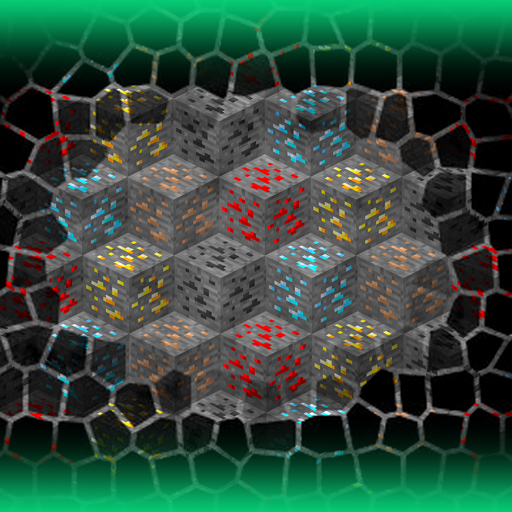
"Large Ore Deposits" transforms mining into an epic treasure hunt by introducing exceedingly rare, supermassive ore veins hidden throughout the world.
Discovering one of these legendary deposits is a momentous achievement - comparable to finding the Holy Grail - capable of making you filthy rich and fundamentally reshaping your resource economy.
Beyond the wealth, these deposits inject genuine excitement and long-term motivation into the mining process, turning routine ore gathering into a quest for fortune.
The mod combines survival challenge with the thrill of discovery: you'll spend countless hours exploring and probing the earth, scanning for subtle surface clues, only to stumble upon a deposit so vast it could supply your entire base for seasons.
Whether you're a hardcore survival player seeking a meaningful endgame goal or simply want mining to feel more rewarding, this mod delivers both the gameplay depth and the dopamine hit that comes with striking it rich.
REQUIRES ForgeEndertech library.
Struggling to locate deposits? Combine this mod with Advanced Finders for the ultimate ore-hunting experience.
Looking for better above-ground indicators? Try Surface Samples by allhailc3sar.
Key features
- Easily configurable ore deposits with simple parameters
- Predefined configs for the most common ores
- Creation of mixed ore deposits with specified ore proportions
- In-game commands for testing and tweaking
- Out-of-the-box compatibility with modded ores
- Configurable aboveground indicators of underlying deposits (by default, composite circles of Glowroses, Mystical and Vanilla flowers are used)
- Possibility to generate deposits under certain structures (use the structure name as the aboveground indicator ID in the config)
- Setting different parameters and restrictions for different dimensions and biomes
- Adding support for any ores by using in-game commands or putting custom configs to the .minecraft/config/adlods/Deposits folder
- Controlling the vanilla ore generation using configs in the .minecraft/config/adlods/VanillaOres folder
- Supported ores by default: aluminum, amethyst, ancient debris, coal, cobalt, copper, diamond, emerald, gold, iridium, iron, lapis, lead, nether gold, nether quartz, nickel, osmium, palladium, platinum, redstone, rhodium, ruby, ruthenium, sapphire, silver, tin, topaz, uranium, zinc.
Commands
- /lods reload_configs - reloads all config files for the changes to take effect (no need to restart the game every time after changing the settings)
- /lods define_deposit <name> <ore> <rarity> <size> <altitude> - defines a new deposit and creates a config for it with specified parameters
<name> - unique name of the deposit to identify it, will also be used as the name of the config file
<ore> - ID of the ore that the deposit will consist of. Example: minecraft:diamond_ore
<rarity> - a value in chunks, meaning that the deposit will spawn once every X chunks. Example: 2400
<size> - size limits (in blocks) of the deposit. Will be picked randomly within specified limits each time a deposit spawns. Example: 300..500
<altitude> - Y-coordinate limits within which the deposit will attempt to spawn. Example: -30..60 - /lods remove_deposit <deposit_name> - unloads the definition of the specified deposit and deletes its config file
- /lods list_active_deposits - shows in chat the names of all defined deposits that are loaded and active
- /lods list_all_generated - creates a list of all generated geodes/deposits for the current world with their coordinates and writes it to the latest.log file
- /lods list_generated_around - same as above, but only for surrounding chunks within line of sight
- /lods open_configs_folder - opens the mod's config folder
- /lods open_latest_log - opens the latest.log file
- /lods open_deposit_config <deposit_name> - opens the config file of the deposit with the specified name
- /lods spawn_deposit_here <deposit_name> - spawns an ore deposit at the current position, replacing air blocks as well (useful for quick testing)
- /lods spawn_deposit_underground <deposit_name> - spawns an ore deposit in the current chunk using the parameters from the config
- /lods spawn_deposit_at_chunk <deposit_name> <chunkX> <chunkZ> - spawns an ore deposit in the specified chunk (succeeding only if the chunk is loaded)
- /lods spawn_deposit_at_pos <deposit_name> <posX> <posY> <posZ> - spawns an ore deposit at the specified position (succeeding only if there is a replaceable block there)
- /lods strip_chunk - removes all blocks except ores in the chunk at the current position
- /lods strip_chunks_around - removes all blocks except ores in chunks around the current position
- /lods dress_chunk - restores removed blocks in the chunk at the current position
- /lods dress_chunks_around - restores removed blocks in chunks around the current position
- /lods dress_all_chunks - restores blocks in all chunks that were previously stripped.
Earlier versions
- /lods list deposits - shows the list of all availiable deposits in the chat (config name = deposit name)
- /lods list generated - logs the list of generated deposits with their coords (only for loaded chunks)
- /lods locate configs - opens the mod's config folder
- /lods add <deposit> <rarity> <minSize_maxSize> <minAltitude_maxAltitude> - defines a new deposit and creates a config for it (e.g. /lods add vibranium 2000 300_600 4_16). In version 1.12 use hyphen ( - ) instead of underscore ( _ )
- /lods addspec - does the same as above, but allows specifying the exact ore ID (e.g. /lods addspec amethyst 3400 200_400 4_16 oresabovediamonds:amethyst_ore)
- /lods remove <deposit> - removes definition of specified deposit and its config
- /lods reload - reloads all configs (no need to restart the game after making some changes)
- /lods gen <deposit> - generates ore deposit in the current chunk with parameters from the config
- /lods genat <posX> <posZ> <deposit> - generates ore deposit at the specified position
- /lods test <deposit> <amount> - generates ore deposit of the specified size at the current position, replacing also air blocks (usefull for quick testing without having to go underground)
- /lods strip chunk - removes all blocks in the current chunk, which are not ores
- /lods strip around - removes all blocks in surrounding chunks, which are not ores
- /lods dress <chunk | around | all> - restores removed blocks (note that removed blocks are not saved between sessions, so make sure you have restored them all before shutting down the server)
Modpacks
- Feel free to use the mod in any modpacks.
- You are allowed to use it without asking for permission.
Project description from CurseForge.
Pick your setup
Large Ore Deposits by Minecraft version and loader
Choose the version and loader you play, then open the matching release.
26.2
3 loader builds26.1.2
2 loader builds26.1.1
2 loader builds1.21.11
2 loader builds1.21.10
2 loader builds1.21.8
2 loader builds1.21.7
2 loader builds1.21.6
2 loader builds1.21.5
2 loader builds1.21.4
2 loader builds1.21.1
1 loader build1.21
1 loader buildShowing the newest 12 of 14 game versions. Older files are in the list below.
Check the dependencies, then try the file in a copied instance before changing a world you care about.
Recent files
Large Ore Deposits versions and loaders
AdLods-1.20.1-8.1.12.0-build.2294.jar
1 Aug 2026
AdLods-1.20.1-8.1.11.0-build.2241.jar
17 Jul 2026
AdLods-1.21.1-9.1.6.0-NeoForge-build.0996.jar
5 Jul 2026
adlods-26.2.0.1-fabric-build.0077.jar
1 Jul 2026
adlods-26.2.0.1-forge-build.0076.jar
1 Jul 2026
adlods-26.2.0.1-neoforge-build.0075.jar
1 Jul 2026
adlods-26.2.0.0-fabric-build.0068.jar
21 Jun 2026
adlods-26.2.0.0-forge-build.0070.jar
20 Jun 2026
adlods-26.2.0.0-neoforge-build.0066.jar
20 Jun 2026
AdLods-1.21.1-9.1.5.0-NeoForge-build.0909.jar
13 Jun 2026
AdLods-1.20.1-8.1.10.0-build.2196.jar
30 May 2026
AdLods-1.21.1-9.1.4.0-NeoForge-build.0824.jar
23 May 2026
Looking for an older file? The official CurseForge project page is in Resources.