Minecraft version
Back to mods 
CurseForge · Minecraft mod
Texture Dump
Texture Map Dumper for Minecraft Forge
Choose a version Pick your version below, then grab the matching file.
Quick answer
Which Texture Dump release should I use?
Latest stable file texturedump_1.19.2-1.19.2.jar
Game version 1.19.2
Loader Forge
Texture Dump texturedump_1.19.2-1.19.2.jar targets 1.19.2 with Forge. The project page does not say whether this file belongs on the client, dedicated server, or both. No extra mods listed for this file.
Where it goes
Is Texture Dump required on the client, server, or both?
The project page does not say whether this file belongs on the client, dedicated server, or both.
Client Source doesn’t say
Dedicated server Source doesn’t say
Loader for this release Forge
Required install it here Optional supported, not mandatory Not supported do not install here Source doesn’t say do not assume
The source does not explicitly classify this release as client-only or server-only.
What else does Texture Dump texturedump_1.19.2-1.19.2.jar need?
texturedump_1.19.2-1.19.2.jar. Change the file and its required mods may change too.
This file does not list any required mods. Do not add a library just because a different file uses it.
This file does not list any required or optional mods.
Before you install it
Add Texture Dump without breaking your instance.
Built for Texture Dump texturedump_1.19.2-1.19.2.jar. Pick another file and the loader, install side or required mods may change.
- 01
Stick to this file
Use texturedump_1.19.2-1.19.2.jar. It targets 1.19.2 with Forge; another release may have different loader, side or dependency requirements.
- 02
Bring the mods it needs
This file does not list any required mods. Do not add a library just because a different file uses it.
- 03
Put it on the correct side
The project page does not say whether this file belongs on the client, dedicated server, or both.
- 04
Pick the file you checked
Use the “Get this file” button beside texturedump_1.19.2-1.19.2.jar. It opens that exact file at the source.
About this project
What does Texture Dump add?
TextureDump
Texture Map Dumper for Minecraft Forge
Helps diagnose problems with the texture map and helps find which mods add huge or strangely-sized textures.
Instructions
Just drop the Texture Dump mod into your mods folder and start the game.
It will generate texture map images, interactive html files, and json information files in the texture_dump folder.
Generated Results
- An image of the texture map is created and saved.
- An interactive page is generated, where you can hover over textures to see which mod they came from, their name, and their size.
- A json file is created with all the texture properties in the map, for creating your own analysis.
Click to see an Example Interactive Page:
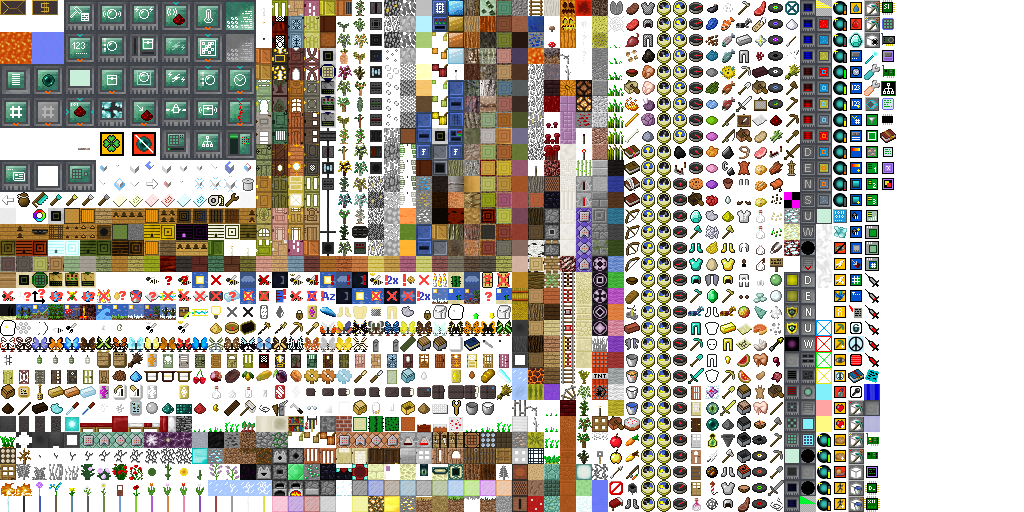
Project description from CurseForge.
Pick your setup
Texture Dump by Minecraft version and loader
Choose the version and loader you play, then open the matching release.
Minecraft version
1.18.1
1 loader buildMinecraft version
1.17.1
1 loader buildMinecraft version
1.16.5
2 loader buildsMinecraft version
1.16.4
1 loader buildMinecraft version
1.16.3
1 loader buildMinecraft version
1.16.2
1 loader buildMinecraft version
1.13.2
1 loader buildMinecraft version
1.12.2
1 loader buildMinecraft version
1.11.2
1 loader buildMinecraft version
1.10.2
1 loader buildCheck the dependencies, then try the file in a copied instance before changing a world you care about.
Recent files
Texture Dump versions and loaders
texturedump_1.19.2-1.19.2.jar
4 Sept 2022
Client Source doesn’t say Server Source doesn’t say Dependencies No extras listed Listed on Release listing
Check the 1.19.2 · Forge setup 1.19.2Forge release
texturedump_1.18.1-1.18.0.jar
20 Dec 2021
Client Source doesn’t say Server Source doesn’t say Dependencies No extras listed Listed on Release listing
Check the 1.18.1 · Forge setup 1.18.1Forge release
texturedump_1.16.5-1.15.1.jar
20 Dec 2021
Client Source doesn’t say Server Source doesn’t say Dependencies No extras listed Listed on Release listing
Check the 1.16.5 · Forge setup 1.16.5Forge release
texturedump_1.17.1-1.17.1.jar
20 Dec 2021
Client Source doesn’t say Server Source doesn’t say Dependencies No extras listed Listed on Release listing
Check the 1.17.1 · Forge setup 1.17.1Forge release
texturedump_1.17.1-1.17.0.jar
11 Oct 2021
Client Source doesn’t say Server Source doesn’t say Dependencies No extras listed Listed on Release listing
Check the 1.17.1 · Forge setup 1.17.1Forge release
texturedump_1.16.5-1.15.jar
11 Oct 2021
Client Source doesn’t say Server Source doesn’t say Dependencies No extras listed Listed on Release listing
Check the 1.16.5 setup 1.16.5 release
texturedump_1.16.5-1.14.jar
17 May 2021
Client Source doesn’t say Server Source doesn’t say Dependencies No extras listed Listed on Release listing
Check the 1.16.5 setup 1.16.5 release
texturedump_1.16.4-1.13.jar
26 Jan 2021
Client Source doesn’t say Server Source doesn’t say Dependencies No extras listed Listed on Release listing
Check the 1.16.5 setup 1.16.31.16.51.16.41.16.2 release
texturedump_1.13.2-1.11.jar
8 Apr 2019
Client Source doesn’t say Server Source doesn’t say Dependencies No extras listed Listed on Release listing
Check the 1.13.2 setup 1.13.2 release
texturedump_1.12.2-1.10.jar
8 Apr 2019
Client Source doesn’t say Server Source doesn’t say Dependencies No extras listed Listed on Release listing
Check the 1.12.2 setup 1.12.2 release
texturedump_1.11.2-1.7.jar
8 Apr 2019
Client Source doesn’t say Server Source doesn’t say Dependencies No extras listed Listed on Release listing
Check the 1.11.2 setup 1.11.2 release
texturedump_1.10.2-1.6.jar
8 Apr 2019
Client Source doesn’t say Server Source doesn’t say Dependencies No extras listed Listed on Release listing
Check the 1.10.2 setup 1.10.2 release
Looking for an older file? The official CurseForge project page is in Resources.
 mod
mod CurseForge · Minecraft
NTM: Decentralized x Sable
a few additions/changes between HBM: Decentralized and Sable
 mod
mod CurseForge · Minecraft
Tensura: Chunks
Claim personal or team territory, set access rules, protect builds and manage persistent chunk loading through a native atlas, with optional JourneyMap integration.
 mod
mod CurseForge + Modrinth · Minecraft
No Hunger
Remove hunger and enable eat to heal. Better foods give overtime healing whilest snacks instantly heal.