Minecraft version
Back to mods 
CurseForge · Minecraft mod
Autofish
Automatically reels in and recasts your fishing rod when you catch a fish.
Choose a version Pick your version below, then grab the matching file.
Quick answer
Which Autofish release should I use?
Latest stable file Autofish-0.9.8-fabric-mc1.19.3.jar
Game version 1.19.3
Loader Fabric
Autofish-0.9.8-fabric-mc1.19.3.jar targets 1.19.3 with Fabric. The project page does not say whether this file belongs on the client, dedicated server, or both. No extra mods listed for this file.
Where it goes
Is Autofish required on the client, server, or both?
The project page does not say whether this file belongs on the client, dedicated server, or both.
Client Source doesn’t say
Dedicated server Source doesn’t say
Loader for this release Fabric
Required install it here Optional supported, not mandatory Not supported do not install here Source doesn’t say do not assume
The source does not explicitly classify this release as client-only or server-only.
What else does Autofish-0.9.8-fabric-mc1.19.3.jar need?
Autofish-0.9.8-fabric-mc1.19.3.jar. Change the file and its required mods may change too.
This file does not list any required mods. Do not add a library just because a different file uses it.
This file does not list any required or optional mods.
Before you install it
Add Autofish without breaking your instance.
Built for Autofish-0.9.8-fabric-mc1.19.3.jar. Pick another file and the loader, install side or required mods may change.
- 01
Stick to this file
Use Autofish-0.9.8-fabric-mc1.19.3.jar. It targets 1.19.3 with Fabric; another release may have different loader, side or dependency requirements.
- 02
Bring the mods it needs
This file does not list any required mods. Do not add a library just because a different file uses it.
- 03
Put it on the correct side
The project page does not say whether this file belongs on the client, dedicated server, or both.
- 04
Pick the file you checked
Use the “Get this file” button beside Autofish-0.9.8-fabric-mc1.19.3.jar. It opens that exact file at the source.
About this project
What does Autofish add?
For 1.14 and later, use the Fabric Mod Loader (you must also install the Fabric API in your mods folder), or alternatively use Forge. Not all versions have a Forge equivalent. See files for version support. Forge versions will require Cloth Config to be installed. For 1.13.2, use the Rift Mod Loader. For 1.12.2 and earlier, use LiteLoader. Description
This mod will automatically reel in and recast your fishing rod when you catch a fish. Just cast the fishing rod one time into the water and let the mod do the rest.
Usage
• Very simple to use, just cast the fishing rod into the water once, and it will automatically reel in at the correct time and recast after a couple second wait.
Config
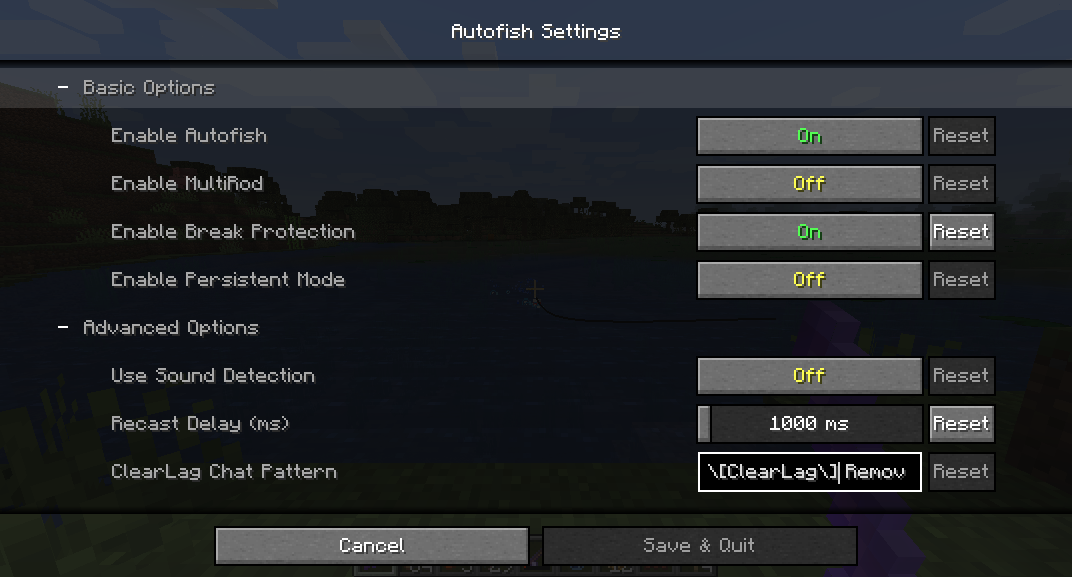
• Configurable key (V by default) to open a GUI for changing individual settings.
• Enable Autofish - Toggles the entire mod on or off.
• Enable MultiRod - After using up a rod, it will try to auto switch to the next one in your hotbar if it exists, so you can fish for extended periods of time with multiple rods. (Switches to the first rod in your hotbar after each reel)
• Enable Break Protection - Ignores fishing rods once they are almost broken. This is useful if you have an enchanted fishing rod and you don't want it to break.
• Enable Persistent Mode - Always keeps the rod casted out. Checks every 10 seconds and recasts the rod if needed. This is useful if you have server lag issues and will also recast when a server plugin clears the hook entity.
• Use Sound-Based Detection - Uses sounds to detect catches instead of motion. This only affects multiplayer, singleplayer uses its own detection. Note that you must be somewhat close to the hook for this to work, and if other players' hooks are near yours it can falsely trigger a catch.
• Recast Delay - Adjusts the amount of the the mod will wait between reeling in the rod and recasting.
• Clearlag Chat Pattern - Some servers use plugins that clear entities to reduce lag, including fish hooks, and send a chat message when doing so. As a workaround, When this regular expression pattern is matched in chat, the mod will cast the hook back out.
Installation
For 1.14 and later: **Fabric:**1. Install the Fabric Mod Loader.
2. Download the Fabric API and place the .jar file in the /.minecraft/mods/ folder.
3. Download Autofish and place the .jar file in the /.minecraft/mods/ folder.
4. Launch Minecraft using the Fabric profile.
Forge1. Install Forge.
2. Download Cloth Config and place the .jar file in the /.minecraft/mods/ folder.
3. Download Autofish and place the .jar file in the /.minecraft/mods/ folder.
4. Launch Minecraft using the Forge profile.
**For 1.13.2:**1. Install Rift Mod Loader for 1.13.2. (See under "Using the Minecraft Launcher"). Run the downloaded jar to install it.
2. Download Autofish and place the .jar file in the /.minecraft/mods/ folder.
3. Launch Minecraft using the Rift profile.
**For 1.12.2 and earlier:**1. Install LiteLoader.
Click here for LiteLoader downloads
2. Download Autofish and place the .litemod file in the /.minecraft/mods/ folder. Do not change the extension from .litemod or it will not load.
3. Launch Minecraft using the LiteLoader profile.
Project description from CurseForge.
Pick your setup
Autofish by Minecraft version and loader
Choose the version and loader you play, then open the matching release.
Minecraft version
1.19.2
1 loader buildMinecraft version
1.19.1
1 loader buildMinecraft version
1.19
1 loader buildMinecraft version
1.18.2
1 loader buildMinecraft version
1.18.1
1 loader buildMinecraft version
1.18
1 loader buildMinecraft version
1.17
1 loader buildMinecraft version
1.16.5
2 loader buildsMinecraft version
1.16.4
2 loader buildsMinecraft version
1.16.3
2 loader buildsMinecraft version
1.16.2
2 loader buildsShowing the newest 12 of 34 game versions. Older files are in the list below.
Check the dependencies, then try the file in a copied instance before changing a world you care about.
Recent files
Autofish versions and loaders
Autofish-0.9.8-fabric-mc1.19.3.jar
8 Feb 2023
Client Source doesn’t say Server Source doesn’t say Dependencies No extras listed Listed on Release listing
Check the 1.19.3 · Fabric setup 1.19.3Fabric release
Autofish-0.9.5-fabric-mc1.19(.1/.2).jar
Autofish-0.9.5-fabric-mc1.19.jar
22 Jun 2022
Client Source doesn’t say Server Source doesn’t say Dependencies No extras listed Listed on Release listing
Check the 1.19.2 · Fabric setup Fabric1.19.21.19.11.19 release
Autofish-0.9.4-fabric-mc1.18(.1/.2).jar
Autofish-0.9.4-fabric-mc1.18.jar
31 Dec 2021
Client Source doesn’t say Server Source doesn’t say Dependencies No extras listed Listed on Release listing
Check the 1.18.2 · Fabric setup 1.18.1Fabric1.18.21.18 release
Autofish-0.9.3-fabric-mc1.17.jar
11 Jun 2021
Client Source doesn’t say Server Source doesn’t say Dependencies No extras listed Listed on Release listing
Check the 1.17 · Fabric setup 1.17Fabric release
Autofish-0.9.2-forge-mc1.16(.2/.3/.4/.5).jar
Autofish-0.9.2-forge-mc1.16.4.jar
19 Jan 2021
Client Source doesn’t say Server Source doesn’t say Dependencies No extras listed Listed on Release listing
Check the 1.16.5 · Forge setup 1.16.31.16.5Forge1.16.4 release
Autofish-0.9.2-fabric-mc1.16(.2/.3/.4/.5).jar
Autofish-0.9.2-fabric-mc1.16.4.jar
16 Jan 2021
Client Source doesn’t say Server Source doesn’t say Dependencies No extras listed Listed on Release listing
Check the 1.16.5 · Fabric setup 1.16.3Fabric1.16.51.16.4 release
Autofish-0.9.0-forge-mc1.16.1.jar
1 Sept 2020
Client Source doesn’t say Server Source doesn’t say Dependencies No extras listed Listed on Release listing
Check the 1.16.1 · Forge setup 1.16.1Forge release
Autofish-0.9.0-fabric-mc1.16(.1).jar
Autofish-0.9.0-fabric-mc1.16.jar
26 Aug 2020
Client Source doesn’t say Server Source doesn’t say Dependencies No extras listed Listed on Release listing
Check the 1.16.1 · Fabric setup 1.16.11.16Fabric release
Autofish-0.8.6-fabric-mc1.16(.1).jar
Autofish-0.8.6-fabric-mc1.16.jar
27 Jun 2020
Client Source doesn’t say Server Source doesn’t say Dependencies No extras listed Listed on Release listing
Check the 1.16.1 setup 1.16.11.16 release
Autofish-0.8.5-fabric-mc1.15(.1/.2).jar
Autofish-0.8.5-fabric-mc1.15.jar
22 Dec 2019
Client Source doesn’t say Server Source doesn’t say Dependencies No extras listed Listed on Release listing
Check the 1.15.2 · Fabric setup 1.15Fabric1.15.21.15.1 release
Autofish-0.8.4-fabric-mc1.14(.1/.2/.3/.4).jar
Autofish-0.8.4-fabric-mc1.14.jar
28 May 2019
Client Source doesn’t say Server Source doesn’t say Dependencies No extras listed Listed on Release listing
Check the 1.14.4 · Fabric setup 1.14.41.14.11.14.3Fabric release
Autofish-0.8.1-rift-mc1.13.2.jar
15 Apr 2019
Client Source doesn’t say Server Source doesn’t say Dependencies No extras listed Listed on Release listing
Check the 1.13.2 setup 1.13.2 release
Looking for an older file? The official CurseForge project page is in Resources.