Fabric API Needed by wrenchest-fabric-26.3-1.1.jar
requiredMatching file found Matched file: [26.3] Fabric API 0.161.0+26.3
CurseForge · Minecraft mod
Makes it easy to connect chests together (or disconnect) without having to break them.
Quick answer
wrenchest-fabric-26.3-1.1.jar targets 26.3 with Fabric, Quilt. The project page does not say whether this file belongs on the client, dedicated server, or both. All 1 required mods have matching files.
Where it goes
The project page does not say whether this file belongs on the client, dedicated server, or both.
The source does not explicitly classify this release as client-only or server-only.
wrenchest-fabric-26.3-1.1.jar. Change the file and its required mods may change too.
Install Fabric API first. We found matching files for this game-version and loader setup.
We only count dependency files that match this setup. A file for another loader does not fill the gap.
Before you install it
Built for wrenchest-fabric-26.3-1.1.jar. Pick another file and the loader, install side or required mods may change.
Use wrenchest-fabric-26.3-1.1.jar. It targets 26.3 with Fabric, Quilt; another release may have different loader, side or dependency requirements.
Install Fabric API first. We found matching files for this game-version and loader setup.
The project page does not say whether this file belongs on the client, dedicated server, or both.
Use the “Get this file” button beside wrenchest-fabric-26.3-1.1.jar. It opens that exact file at the source.
About this project
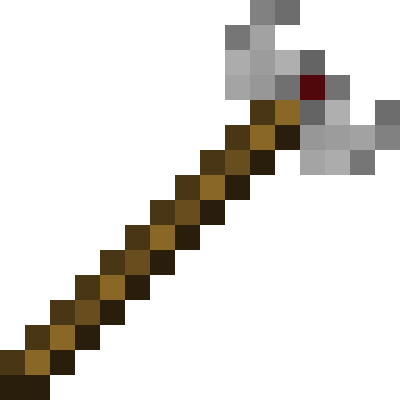
Wrenchest adds a single item, the Chest Wrench. With it you can connect and disconnect chests without having to break and place them again.
To connect two chests together, just rightclick a chest with the chest wrench on the side that is facing towards the chest you want to connect to. Both chests have to be single chests, otherwise connecting will not work. To disconnect two chests, just rightclick any of the chests with the chest wrench. Note, that you don't have to take out any items, they will stay in the chests when you dis-/connect them.
You can control which way the connected chests will be facing by clicking the corresponding area on the respective side. This is shown in the video below. Note, that when the crosshair is placed further back on the side, the chests will be facing away from the player. When the crosshair is placed further towards the front, the chests will face towards the player.
Here are two short videos of the mod in action. The texture is missing in the second video, because it was created during development. The functionality of the mod is still the same, however.
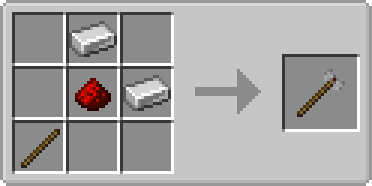
The chest wrench can be crafted as shown below. It has 256 uses and can be repaired with iron ingots in the anvil.
Q: Can you backport this to xxx?
A: No.
Q: Does this work with ender chests?
A: No, as ender chests can only be single chests.
Q: Does this work with trapped chests?
A: Yes. In fact, it should work with any chest that extends the vanilla chest.
Q: Does this work with modded chests?
A: See previous answer.
Thanks to julian on MMD for the name.
You are allowed to use this mod in any modpack.


Come join me on Discord! https://discord.gg/kgZUAxK
 Follow me on Twitter for mod updates and other shenanigans! [https://twitter.com/bl4ckscor3](https://twitter.com/bl4ckscor3)
Project description from CurseForge.
Pick your setup
Choose the version and loader you play, then open the matching release.
Showing the newest 12 of 41 game versions. Older files are in the list below.
Check the dependencies, then try the file in a copied instance before changing a world you care about.
Recent files
19 Sept 2026
19 Sept 2026
wrenchest-fabric-26.1.2-1.1.jar
17 May 2026
wrenchest-neoforge-26.1.2-1.1.jar
17 May 2026
11 Dec 2025
12 Oct 2025
wrenchest-1.21.6-1.0.4.jar
20 Jun 2025
wrenchest-1.21.4-1.0.3.jar
10 Dec 2024
28 Oct 2024
8 Jul 2024
14 Jun 2024
7 May 2024
Looking for an older file? The official CurseForge project page is in Resources.
 mod
modThis mod, when enabled, prevents mining blocks other than the initial one you clicked on. Which is pretty useful when you break blocks really fast.
 mod
modDynamically resizes and scrolls oversized tooltips while keeping the item title anchored.
 mod
modAn unofficial Create - Forge Frontier expansion that restores and expands features from earlier pack versions with new quests, integrations, recipes, world generation, and progression content.