Minecraft version
Back to mods 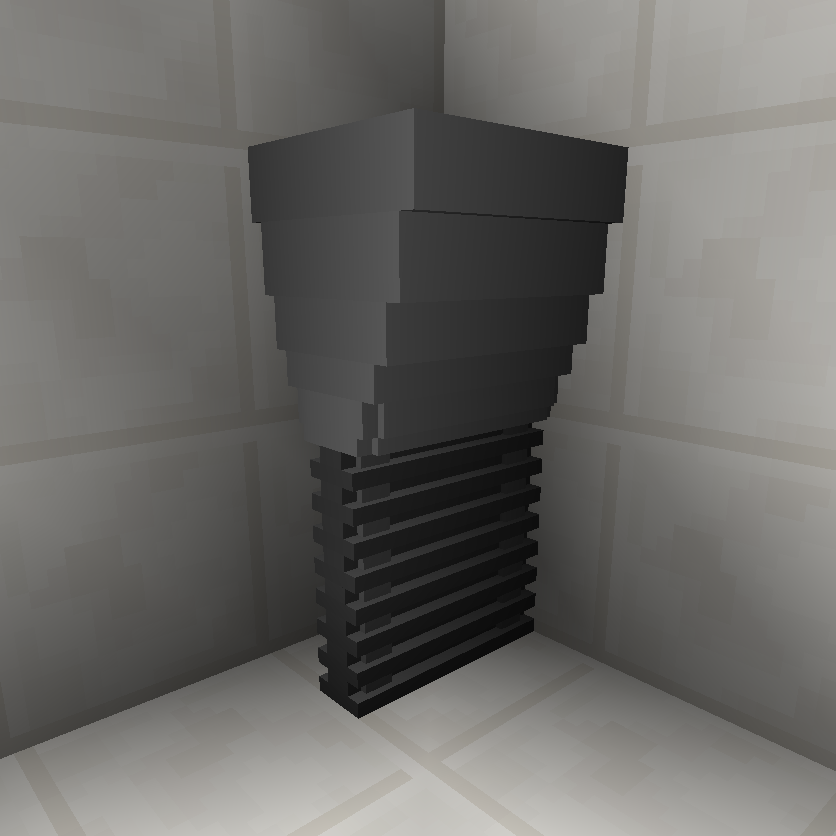
CurseForge · Minecraft mod
Shutters 2.0
Giving you the edge on other doors
Choose a version Pick your version below, then grab the matching file.
Quick answer
Which Shutters 2.0 release should I use?
Latest stable file shutters-1.12.2-1.0b.jar
Game version 1.12.2
Loader Not required
Shutters 2.0 shutters-1.12.2-1.0b.jar targets 1.12.2. The project page does not say whether this file belongs on the client, dedicated server, or both. No extra mods listed for this file.
Where it goes
Is Shutters 2.0 required on the client, server, or both?
The project page does not say whether this file belongs on the client, dedicated server, or both.
Client Source doesn’t say
Dedicated server Source doesn’t say
Loader for this release No loader listed
Required install it here Optional supported, not mandatory Not supported do not install here Source doesn’t say do not assume
The source does not explicitly classify this release as client-only or server-only.
What else does Shutters 2.0 shutters-1.12.2-1.0b.jar need?
shutters-1.12.2-1.0b.jar. Change the file and its required mods may change too.
This file does not list any required mods. Do not add a library just because a different file uses it.
This file does not list any required or optional mods.
Before you install it
Add Shutters 2.0 without breaking your instance.
Built for Shutters 2.0 shutters-1.12.2-1.0b.jar. Pick another file and the loader, install side or required mods may change.
- 01
Stick to this file
Use shutters-1.12.2-1.0b.jar. It targets 1.12.2; another release may have different loader, side or dependency requirements.
- 02
Bring the mods it needs
This file does not list any required mods. Do not add a library just because a different file uses it.
- 03
Put it on the correct side
The project page does not say whether this file belongs on the client, dedicated server, or both.
- 04
Pick the file you checked
Use the “Get this file” button beside shutters-1.12.2-1.0b.jar. It opens that exact file at the source.
About this project
What does Shutters 2.0 add?
Welcome to Shutters 2.0!
Hello and welcome! Thank you for taking the time to visit the Shutters 2.0 information and downloads page!
What is Shutters 2.0?
Shutters 2.0 is a new version of the old Shutters mod for 1.7! Finally being brought forward! The mod adds in a shutter style of door which boasts being blast proof and aesthetically pleasing design.
How to get started with Shutters 2.0?
Shutters 2.0 consists of 2 primary blocks: The Shutter Roller and the Shutter Controller. The Door Plotter item is also required!
How to craft:
Shutter Roller:

Components:
4 Redstone
3 Obsidian
1 Iron Block
1 Piston
Shutter Controller:

Components:
8 Redstone
1 Shutter Roller
Door Plotter:

Components:
1 Shutter Roller
1 Redstone
1 Iron Ingot
How to build your door:
Craft the components:
Build your Shutter Rollers (maximum of 64 per door)
Build your Shutter Controller
Build your Door Plotter
Arrange your Shutter Rollers
Place your Shutter Rollers at the top of your door frame:

Place your Shutter Controller
Position your player at the end of the row of Shutter Rollers:
(Ensuring you are looking down the row of Rollers.)

Place your Shutter Controller on the end of the row:

Place your Door Plotter in your off hand
To place the Door Plotter in your off hand, select it on your hotbar and select the 'F' key. (Unless changed)
Right Click the Shutter Controller
Right clicking the Shutter Controller will detect all of the Shutter Rollers in the row behind it.
Now you're good to go! Simply provide the Shutter Controller with some power and off you go!
Screenshots


Modpacks
I highly support everything done by the modding community, I am happy for this mod to be used in any pack, so long as:
1: There is a link back to this post.
2: I (MageProtocol) am credited as the author.
3: You do not try to make any money off the packs.
If all of these conditions are met, I am happy!
I hope you enjoy this mod, any feedback is always appreciated! Thank you!
Project description from CurseForge.
Pick your setup
Shutters 2.0 by Minecraft version and loader
Choose the version and loader you play, then open the matching release.
Check the dependencies, then try the file in a copied instance before changing a world you care about.
Recent files
Shutters 2.0 versions and loaders
shutters-1.12.2-1.0b.jar
23 May 2019
Client Source doesn’t say Server Source doesn’t say Dependencies No extras listed Listed on Release listing
Check the 1.12.2 setup 1.12.2 release
shutters-1.12.2-1.0.jar
17 May 2019
Client Source doesn’t say Server Source doesn’t say Dependencies No extras listed Listed on Release listing
Check the 1.12.2 setup 1.12.2 release
Looking for an older file? The official CurseForge project page is in Resources.
 mod
CurseForge · Minecraft
JBA: Origins
A support mod for the JBA: Origins Modpack
 mod
CurseForge · Minecraft
Minecolonies: Epicfied (Epic Colonies)
EpicColonies is a mod which not only adds support for Epic Fight & Minecolonies, but also adds life-like expressions/Models to the game! Allowing your citizens to feel more alive than ever!
 mod
CurseForge · Minecraft
Unyielding
Companion mod for Cobblemon Unyielding: ranks, gym leader tags, a spawn leaderboard with a dancing podium, a Tome of Souls, and giant items