Minecraft version
Back to mods 
CurseForge · Minecraft mod
Light The Night
Adds natural light sources to the overworld
Choose a version Pick your version below, then grab the matching file.
Quick answer
Which Light The Night release should I use?
Latest stable file Light the Night-1.2.1.jar
Game version 1.12.2
Loader Not required
Light the Night-1.2.1.jar targets 1.12.2. The project page does not say whether this file belongs on the client, dedicated server, or both. No extra mods listed for this file.
Where it goes
Is Light The Night required on the client, server, or both?
The project page does not say whether this file belongs on the client, dedicated server, or both.
Client Source doesn’t say
Dedicated server Source doesn’t say
Loader for this release No loader listed
Required install it here Optional supported, not mandatory Not supported do not install here Source doesn’t say do not assume
The source does not explicitly classify this release as client-only or server-only.
What else does Light the Night-1.2.1.jar need?
Light the Night-1.2.1.jar. Change the file and its required mods may change too.
This file does not list any required mods. Do not add a library just because a different file uses it.
This file does not list any required or optional mods.
Before you install it
Add Light The Night without breaking your instance.
Built for Light the Night-1.2.1.jar. Pick another file and the loader, install side or required mods may change.
- 01
Stick to this file
Use Light the Night-1.2.1.jar. It targets 1.12.2; another release may have different loader, side or dependency requirements.
- 02
Bring the mods it needs
This file does not list any required mods. Do not add a library just because a different file uses it.
- 03
Put it on the correct side
The project page does not say whether this file belongs on the client, dedicated server, or both.
- 04
Pick the file you checked
Use the “Get this file” button beside Light the Night-1.2.1.jar. It opens that exact file at the source.
About this project
What does Light The Night add?
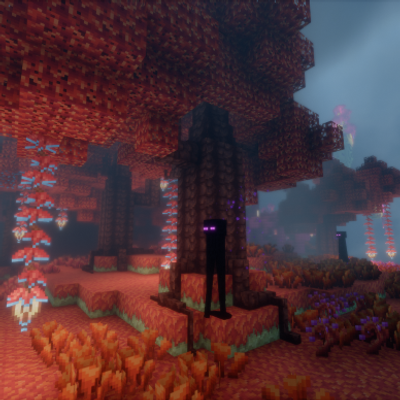
Generates various glowing things in the overworld to brighten up the dark world at night.
Features:
-Glowing trees: spawn in forests in a variety of colors (purple, red, green, blue, and yellow) and produce dripping end rod sparkles from their leaves. Their wood can be harvested to create glowing wooden blocks including planks, slabs, stairs, fences, and fence gates. Supports Dynamic Trees.
-Glowing mushrooms: found in various temperate and warmer green biomes. Can be used for decorations. May be potted. They will spread naturally by default and can be accelerated with items like watering cans.
-Foxfire: a faintly glowing log infested with green fungus that generates in oak trees, often found with mushrooms growing out of it. Does not generate in dynamic oak trees. When enabled, will spread to nearby oak logs in a 1 block radius and randomly spawn mushrooms. This can be accelerated by spamming with bonemeal. Also grows mushrooms randomly and when bonemealed.
-Rotten Planks: a prank item crafted from Foxfire logs. Crumbles into sticks when stepped on. Can be crafted into slabs and stairs that also break.
-Swamp Mud: found in swamps underwater. When spawned or placed under 1 to 2 blocks of water, it will start to bubble and make gurgling noises. At night, it will randomly spawn various colored glowing flames above it (will o' the wisps) that will vanish if approached. (Ticking tile entities warning: under normal circumstances they do not affect performance since the code running is minimal. However, placing excessive amounts may cause lag.)
-Firefly Jar: Shift right-clicking a bottle on a grass block will turn it into a glowing firefly jar with tiny yellow particles inside.
-Infernal Ice: Ice with a magical blue flame trapped inside that does not melt. Found commonly everywhere in the Ice Spikes biome where silk touch can be used to harvest it. Or it can be crafted from ice, glowstone, redstone, blaze powder, and a snowball. When broken by any means (even creative), it makes a bang and a puff of smoke. When hit by an explosion, it instantly explodes with half the power of a TNT block. It also acts like water when touching lava (turning it to obsidian and cobble) and freezes water into ice and packed ice. (Warning: Exploding way too much at once may lag or crash your game.) Explosions and block freezing can be disabled.
-Glowing Water: Bright, glowing, color shifting blue water found commonly on beach shores. Acts mostly like normal water except cannot be used with swamp mud to spawn wisps. Note: Not oreDictionaried to water so may not work with other mods. Can be configured as bright or dim (dim by default).
-Potion of Light: Creates a light block that follows the player. (Multiplayer stability unknown!)
-Glowing Goo: Crafted from glowshrooms and used to brew potions of light. totallyonlynecessarybecauseminecraftisstupidandwon'tallowyoutobrewwithblocksonlyitemshencewhybrewingstandsareSTUPID! (netherwart is an illusion, it turns into purely an item when you break it not an itemblock)
Complementary mods: Shaders, Hardcore Darkness, Dynamic Lights, Glowing Cocoa
Compatibility: Dynamic Trees
Possible Incompatibility: Klee Slabs
NOTE: This mod is susceptible to MC lighting glitches, making naturally generated light sources sometimes fail to glow (same bug as dark torches in structures). This cannot be fixed, do not report it. However, there are mods out there that fix bugs like these, please use them if you experience these issues.
Project description from CurseForge.
Pick your setup
Light The Night by Minecraft version and loader
Choose the version and loader you play, then open the matching release.
Check the dependencies, then try the file in a copied instance before changing a world you care about.
Recent files
Light The Night versions and loaders
Light the Night-1.3.0.jar
11 Jan 2020
Client Source doesn’t say Server Source doesn’t say Dependencies No extras listed Listed on Release listing
Check the 1.12.2 setup 1.12.2 beta
Light the Night-1.2.1.jar
31 Dec 2019
Client Source doesn’t say Server Source doesn’t say Dependencies No extras listed Listed on Release listing
Check the 1.12.2 setup 1.12.2 release
Light the Night-1.2.0.jar
6 Dec 2019
Client Source doesn’t say Server Source doesn’t say Dependencies No extras listed Listed on Release listing
Check the 1.12.2 setup 1.12.2 release
Looking for an older file? The official CurseForge project page is in Resources.