Minecraft version
Back to mods 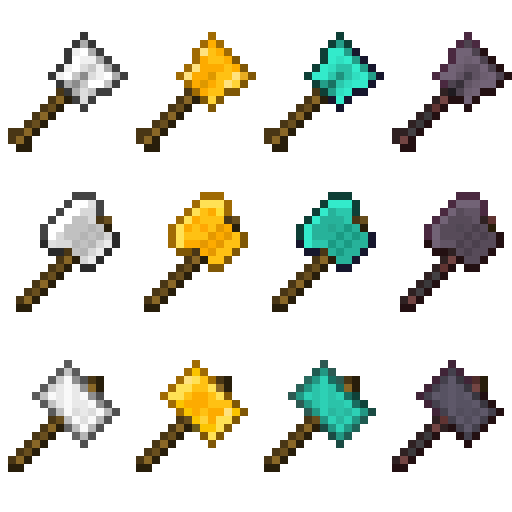
CurseForge · Minecraft mod
Practical Tools
[NOW WITH NETHERITE!] Adds three tools--the excavator, the hammer, and the greataxe. These are 3x3 versions of the shovel, pickaxe, and axe, respectively. The greataxe, when used on a tree, will fell the entire tree at once.
Choose a version Pick your version below, then grab the matching file.
Quick answer
Which Practical Tools release should I use?
Latest stable file Practical Tools v1.16.3-1.8
Game version 1.16.3
Loader Forge
Practical Tools v1.16.3-1.8 targets 1.16.3 with Forge. The project page does not say whether this file belongs on the client, dedicated server, or both. No extra mods listed for this file.
Where it goes
Is Practical Tools required on the client, server, or both?
The project page does not say whether this file belongs on the client, dedicated server, or both.
Client Source doesn’t say
Dedicated server Source doesn’t say
Loader for this release Forge
Required install it here Optional supported, not mandatory Not supported do not install here Source doesn’t say do not assume
The source does not explicitly classify this release as client-only or server-only.
What else does Practical Tools v1.16.3-1.8 need?
Practical Tools v1.16.3-1.8. Change the file and its required mods may change too.
This file does not list any required mods. Do not add a library just because a different file uses it.
This file does not list any required or optional mods.
Before you install it
Add Practical Tools without breaking your instance.
Built for Practical Tools v1.16.3-1.8. Pick another file and the loader, install side or required mods may change.
- 01
Stick to this file
Use Practical Tools v1.16.3-1.8. It targets 1.16.3 with Forge; another release may have different loader, side or dependency requirements.
- 02
Bring the mods it needs
This file does not list any required mods. Do not add a library just because a different file uses it.
- 03
Put it on the correct side
The project page does not say whether this file belongs on the client, dedicated server, or both.
- 04
Pick the file you checked
Use the “Get this file” button beside Practical Tools v1.16.3-1.8. It opens that exact file at the source.
About this project
What does Practical Tools add?
Adds three tools--the excavator, the hammer, and the greataxe. These are 3x3 versions of the shovel, pickaxe, and axe, respectively. The greataxe, when used on a tree, will fell the entire tree at once.

Each tool comes in iron, gold, and diamond variants (and now, in 1.16, Netherite! See image below for the smithing table recipe). Their recipes match their vanilla equivalents, but use blocks instead of ingots for both crafting and repair. Recipes will be added to your vanilla recipe book as you acquire the appropriate ingots.
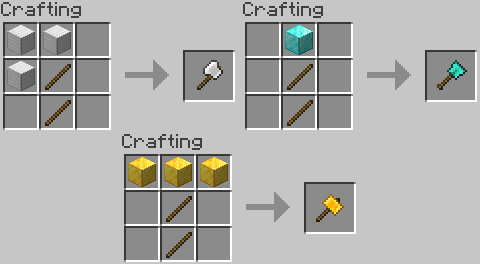
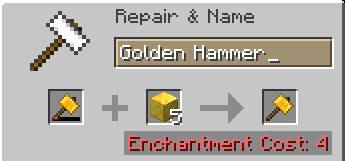
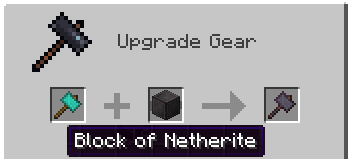
Repairing the Netherite tools also uses Netherite Blocks, not Ingots!
The greataxe boasts a more accurate tree detection method than I've seen in previous mods, and should never leave floating treetops.
Inspired by the many mods that implement these tools in previous versions of MC, my goal was to make 1.14 a little less vanilla so mod-addicts like myself can finally explore the new features added since 1.12!
NOTE: I have playtested extensively and feel that the durability on the tools is well-balanced for how powerful they are. However, if you feel that they break too quickly for your taste, the config file allows you to tweak them to break more slowly.
Project description from CurseForge.
Pick your setup
Practical Tools by Minecraft version and loader
Choose the version and loader you play, then open the matching release.
Minecraft version
1.15.2
1 loader buildMinecraft version
1.14.4
2 loader buildsMinecraft version
1.14.3
1 loader buildMinecraft version
1.14.2
1 loader buildCheck the dependencies, then try the file in a copied instance before changing a world you care about.
Recent files
Practical Tools versions and loaders
Practical Tools v1.16.3-1.8
practicaltools-1.16.3-1.8.jar
17 Sept 2020
Client Source doesn’t say Server Source doesn’t say Dependencies No extras listed Listed on Release listing
Check the 1.16.3 · Forge setup 1.16.3Forge release
Practical Tools v1.15.2-1.5b
practicaltools-1.15.2-1.5b.jar
17 Sept 2020
Client Source doesn’t say Server Source doesn’t say Dependencies No extras listed Listed on Release listing
Check the 1.15.2 · Forge setup 1.15.2Forge release
Practical Tools v1.14.4-1.4b
practicaltools-1.14.4-1.4b.jar
17 Sept 2020
Client Source doesn’t say Server Source doesn’t say Dependencies No extras listed Listed on Release listing
Check the 1.14.4 · Forge setup 1.14.4Forge release
Practical Tools v1.16.3-1.7
practicaltools-1.16.3-1.7.jar
15 Sept 2020
Client Source doesn’t say Server Source doesn’t say Dependencies No extras listed Listed on Release listing
Check the 1.16.3 · Forge setup 1.16.3Forge release
Practical Tools v1.16.3-1.6
practicaltools-1.16.3-1.6.jar
15 Sept 2020
Client Source doesn’t say Server Source doesn’t say Dependencies No extras listed Listed on Release listing
Check the 1.16.3 · Forge setup 1.16.3Forge release
Practical Tools v1.15.2-1.5
practicaltools-1.15.2-1.5.jar
14 Sept 2020
Client Source doesn’t say Server Source doesn’t say Dependencies No extras listed Listed on Release listing
Check the 1.15.2 · Forge setup 1.15.2Forge release
Practical Tools v1.14.4-1.4
practicaltools-1.14.4-1.4.jar
9 Aug 2019
Client Source doesn’t say Server Source doesn’t say Dependencies No extras listed Listed on Release listing
Check the 1.14.4 · Forge setup 1.14.4Forge release
Practical Tools v1.14.4-1.3b
practicaltools-1.14.4-1.3b.jar
23 Jul 2019
Client Source doesn’t say Server Source doesn’t say Dependencies No extras listed Listed on Release listing
Check the 1.14.4 setup 1.14.4 release
Practical Tools v1.14.3-1.3
practicaltools-1.14.3-1.3.jar
1 Jul 2019
Client Source doesn’t say Server Source doesn’t say Dependencies No extras listed Listed on Release listing
Check the 1.14.3 setup 1.14.3 release
Practical Tools v1.14.3-1.2
practicaltools-1.14.3-1.2.jar
28 Jun 2019
Client Source doesn’t say Server Source doesn’t say Dependencies No extras listed Listed on Release listing
Check the 1.14.3 setup 1.14.3 release
Practical Tools v1.14.3-1.1
practicaltools-1.14.3-1.1.jar
27 Jun 2019
Client Source doesn’t say Server Source doesn’t say Dependencies No extras listed Listed on Release listing
Check the 1.14.3 setup 1.14.3 release
Practical Tools v1.14.3-1.0b
practicaltools-1.14.3-1.0b.jar
26 Jun 2019
Client Source doesn’t say Server Source doesn’t say Dependencies No extras listed Listed on Release listing
Check the 1.14.3 setup 1.14.3 release
Looking for an older file? The official CurseForge project page is in Resources.
 mod
mod CurseForge + Modrinth · Minecraft
Safra
Don’t mess with the server Play Minecraft with your friends in 2 clicks
 mod
mod CurseForge + Modrinth · Minecraft
SuperMartijn642's Core Lib
SuperMartijn642's Core Lib adds lots of basic implementations that allow for similar code between different Minecraft versions!
 mod
mod CurseForge · Minecraft
Modular Backpacks
Adds Backpacks and Modules that can be slotted in them for different functionality.