
Minecraft version
Back to mods 
CurseForge · Minecraft mod
Mc2Discord
Link your Minecraft server chat with your Discord (integration, bridge)
Choose a version Pick your version below, then grab the matching file.
Quick answer
Which Mc2Discord release should I use?
Latest stable file [Neoforge 26.3] 4.4.0
Game version 26.3
Loader NeoForge
Mc2Discord [Neoforge 26.3] 4.4.0 targets 26.3 with NeoForge. The project page does not say whether this file belongs on the client, dedicated server, or both. No extra mods listed for this file.
Where it goes
Is Mc2Discord required on the client, server, or both?
The project page does not say whether this file belongs on the client, dedicated server, or both.
Client Source doesn’t say
Dedicated server Source doesn’t say
Loader for this release NeoForge
Required install it here Optional supported, not mandatory Not supported do not install here Source doesn’t say do not assume
The source does not explicitly classify this release as client-only or server-only.
What else does Mc2Discord [Neoforge 26.3] 4.4.0 need?
[Neoforge 26.3] 4.4.0. Change the file and its required mods may change too.
This file does not list any required mods. Do not add a library just because a different file uses it.
This file does not list any required or optional mods.
Before you install it
Add Mc2Discord without breaking your instance.
Built for Mc2Discord [Neoforge 26.3] 4.4.0. Pick another file and the loader, install side or required mods may change.
- 01
Stick to this file
Use [Neoforge 26.3] 4.4.0. It targets 26.3 with NeoForge; another release may have different loader, side or dependency requirements.
- 02
Bring the mods it needs
This file does not list any required mods. Do not add a library just because a different file uses it.
- 03
Put it on the correct side
The project page does not say whether this file belongs on the client, dedicated server, or both.
- 04
Pick the file you checked
Use the “Get this file” button beside [Neoforge 26.3] 4.4.0. It opens that exact file at the source.
About this project
What does Mc2Discord add?

Link your Minecraft server chat with your Discord
⚠️This mod needs configuration to work properly. Please take a look to the wiki: https://github.com/DenisD3D/Mc2Discord/wiki
Features
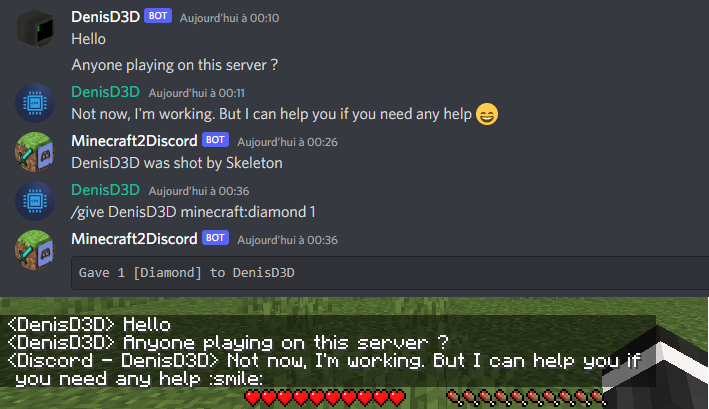
- Send Minecraft chat message to your Discord server
- Send message in your Discord server to the Minecraft chat
- Send game events message to Discord (player join, player leave, death, etc.)
- Display player's head as profile picture in Discord thanks to webhook mode
- Execute Minecraft commands on Discord
- Customize bot presence (eg: playing at xxx) and channel name / topic
- Provide an invitation link to your Discord server with the /discord command
- Forward the server console to discord (useful for admins)
- Hide player on Discord (useful for admins, integrate with VanishMod)
- Account linking (forced or optional)
- Fully customizable, easy configuration (messages, behavior, etc.)
- Relay others mods announcements
- Works with Emojiful to display emojis ingame
Try without installing
Join the official demo server hosted by MtxServ
- Join the demo discord channel #access-demo
- Start the sever with /start command (server is usually stopped)
- Connect to m2d-demo.denisd3d.fr with minecraft 1.20.2 Vanilla
Installation
A quick configuration is mandatory for the mod to work. Steps are described on the wiki: https://github.com/DenisD3D/Mc2Discord/wiki
If you need any help or want new features, you can join the Discord support server
You can also watch the video tutorial:
Misc
Links
- Discord (Support): https://discord.gg/rzzd76c
- CurseForge (Download): https://www.curseforge.com/minecraft/mc-mods/mc2discord/
- Modrinth (Download): https://modrinth.com/mod/mc2discord
- Github (Source): https://github.com/DenisD3D/Mc2Discord
- Wiki: https://github.com/DenisD3D/Mc2Discord/wiki
Project description from CurseForge.
Pick your setup
Mc2Discord by Minecraft version and loader
Choose the version and loader you play, then open the matching release.
Minecraft version
26.2
4 loader buildsMinecraft version
26.1.2
4 loader buildsMinecraft version
26.1.1
4 loader buildsMinecraft version
26.1
4 loader buildsMinecraft version
1.21.11
4 loader buildsMinecraft version
1.21.10
4 loader buildsMinecraft version
1.21.6
3 loader buildsMinecraft version
1.21.5
3 loader buildsMinecraft version
1.21.4
3 loader buildsMinecraft version
1.21.3
3 loader buildsMinecraft version
1.21.2
3 loader buildsShowing the newest 12 of 25 game versions. Older files are in the list below.
Check the dependencies, then try the file in a copied instance before changing a world you care about.
Recent files
Mc2Discord versions and loaders
[Neoforge 26.3] 4.4.0
mc2discord-neoforge-26.3-4.4.0.jar
7 Nov 2026
Client Source doesn’t say Server Source doesn’t say Dependencies No extras listed Listed on Release listing
Check the 26.3 · NeoForge setup NeoForge26.3 release
[Fabric 26.3] 4.4.0
mc2discord-fabric-26.3-4.4.0.jar
7 Nov 2026
Client Source doesn’t say Server Source doesn’t say Dependencies 2 required · 2 unchecked Listed on Release listing
Check the 26.3 · Fabric setup FabricQuilt26.3 release
[Forge 26.3] 4.4.0
mc2discord-forge-26.3-4.4.0.jar
7 Nov 2026
Client Source doesn’t say Server Source doesn’t say Dependencies No extras listed Listed on Release listing
Check the 26.3 · Forge setup Forge26.3 release
[Neoforge 26.2] 4.4.0
mc2discord-neoforge-26.2-4.4.0.jar
7 Nov 2026
Client Source doesn’t say Server Source doesn’t say Dependencies No extras listed Listed on Release listing
Check the 26.2 · NeoForge setup NeoForge26.126.1.126.1.2 release
[Fabric 26.2] 4.4.0
mc2discord-fabric-26.2-4.4.0.jar
7 Nov 2026
Client Source doesn’t say Server Source doesn’t say Dependencies 2 required · 2 unchecked Listed on Release listing
Check the 26.2 · Fabric setup FabricQuilt26.126.1.1 release
[Forge 26.2] 4.4.0
mc2discord-forge-26.2-4.4.0.jar
7 Nov 2026
Client Source doesn’t say Server Source doesn’t say Dependencies No extras listed Listed on Release listing
Check the 26.2 · Forge setup Forge26.126.1.126.1.2 release
[Neoforge 1.21.x] 4.4.0
mc2discord-neoforge-1.21.x-4.4.0.jar
7 Nov 2026
Client Source doesn’t say Server Source doesn’t say Dependencies No extras listed Listed on Release listing
Check the 1.21.11 · NeoForge setup NeoForge1.21.101.21.11 release
4.4.0
mc2discord-fabric-1.21.x-4.4.0.jar
7 Nov 2026
Client Not supported Server Required Dependencies 1 required · 1 unchecked Listed on Release listing
Check the 1.21.11 · Fabric setup 1.21.111.21.10FabricQuilt release
[Forge 1.21.x] 4.4.0
mc2discord-forge-1.21.x-4.4.0.jar
7 Nov 2026
Client Source doesn’t say Server Source doesn’t say Dependencies No extras listed Listed on Release listing
Check the 1.21.11 · Forge setup Forge1.21.101.21.11 release
[Neoforge 1.21.1] 4.4.0
mc2discord-neoforge-1.21.1-4.4.0.jar
7 Nov 2026
Client Source doesn’t say Server Source doesn’t say Dependencies No extras listed Listed on Release listing
Check the 1.21.1 · NeoForge setup 1.211.21.1NeoForge release
4.4.0
mc2discord-fabric-1.21.1-4.4.0.jar
7 Nov 2026
Client Not supported Server Required Dependencies 1 required · 1 unchecked Listed on Release listing
Check the 1.21.1 · Fabric setup 1.21.11.21FabricQuilt release
[Forge 1.21.1] 4.4.0
mc2discord-forge-1.21.1-4.4.0.jar
7 Nov 2026
Client Source doesn’t say Server Source doesn’t say Dependencies No extras listed Listed on Release listing
Check the 1.21.1 · Forge setup 1.21Forge1.21.1 release
Looking for an older file? The official CurseForge project page is in Resources.
 mod
CurseForge · Minecraft
shun-map
Exploration minimap, fullscreen maps, waypoints, and player radar with optional Alicization and Aincrad integration.
 mod
CurseForge + Modrinth · Minecraft
kogtyv-Towny and Village
Changes the generation of villages to the generation of cities.
 mod
Modrinth · Minecraft
Kabutack Essentials
A lightweight Fabric QoL mod featuring a minimal HUD, smart inventory interaction, auto-refill, hotbar presets, and one-key sorting.