Minecraft version
Back to mods 
CurseForge · Minecraft mod
Inventory Sorting
Quick, simple, and lightweight inventory sorting
Choose a version Pick your version below, then grab the matching file.
Quick answer
Which Inventory Sorting release matches 1.19?
Best match for your filters 1.8.10-1.19
Game version 1.19, 1.19.1, 1.19.2
Loader Fabric
Inventory Sorting 1.8.10-1.19 targets 1.19, 1.19.1, 1.19.2 with Fabric. Installation on the client is optional. Installation on the dedicated server is optional. No extra mods listed for this file.
Where it goes
Is Inventory Sorting required on the client, server, or both?
Installation on the client is optional. Installation on the dedicated server is optional.
Client Optional
Dedicated server Optional
Loader for this release Fabric
Required install it here Optional supported, not mandatory Not supported do not install here Source doesn’t say do not assume
The source marks this as usable on both the client and server.
What else does Inventory Sorting 1.8.10-1.19 need?
1.8.10-1.19 on 1.19. Every mod below is checked against that same setup.
This file does not list any required mods. Do not add a library just because a different file uses it.
This file does not list any required or optional mods.
Before you install it
Add Inventory Sorting without breaking your instance.
Built for Inventory Sorting 1.8.10-1.19 on 1.19. Pick another file and the loader, install side or required mods may change.
- 01
Stick to this file
Use 1.8.10-1.19. It targets 1.19, 1.19.1, 1.19.2 with Fabric; another release may have different loader, side or dependency requirements.
- 02
Bring the mods it needs
This file does not list any required mods. Do not add a library just because a different file uses it.
- 03
Put it on the correct side
Installation on the client is optional. Installation on the dedicated server is optional.
- 04
Pick the file you checked
Use the “Get this file” button beside 1.8.10-1.19. It opens that exact file at the source.
About this project
What does Inventory Sorting add?
Inventory Sorter 
Inventory Sorter is a lightweight mod that keeps your inventory clean with minimal effort.
It’s used by millions of players across Modrinth and CurseForge.
Designed to run server-side, it works out of the box, even with vanilla clients, making it perfect for modpacks, multiplayer servers, and anyone who wants frictionless sorting without needing client-side mods.
It also works perfectly in single-player, since Minecraft runs an integrated server behind the scenes.
Features
Inventory Sorter supports several ways to trigger a sort:
- Click the sort button (client mod required)
- Use the keybind (client mod required)
- Double-click an empty slot (works with vanilla client)
- Use
/invsort sortor/invsort sortmein chat (works with vanilla client)
The mod is designed to run server-side. Sorting actions like middle-click, double-click, and commands work even if the client has no mods installed. If you're using the optional client mod, you'll also get visual buttons, keybind support, and in-game configuration menus.
Compatibility and Configuration
Inventory Sorter supports all inventories, including those from other mods. You can control where sorting is enabled, customize how it behaves, and hide UI elements for specific containers.
All configuration options are documented at:
https://inventorysorter.meza.gg
Before and After
Before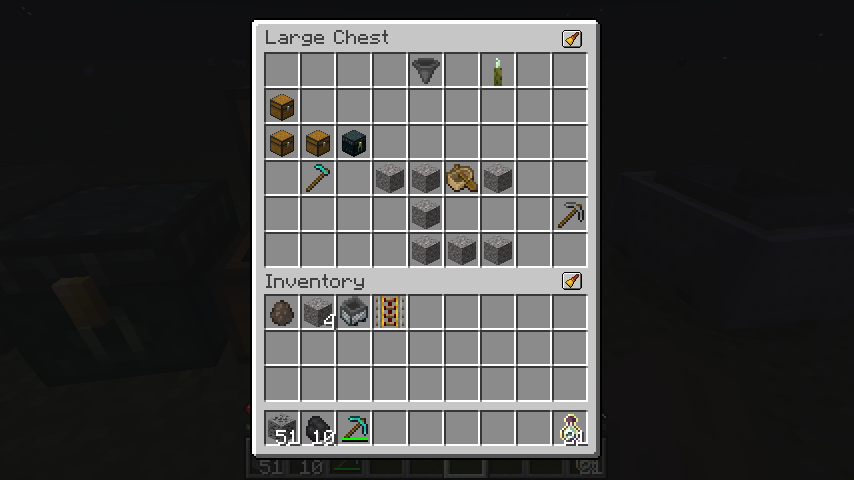
After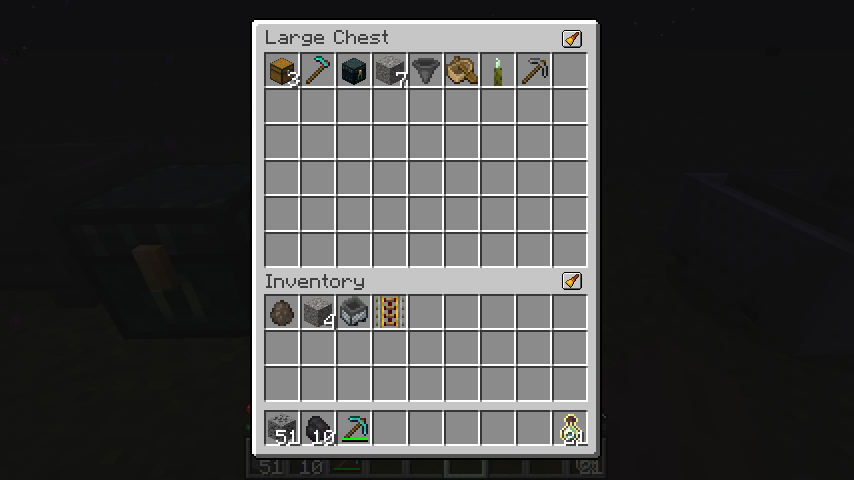
Dependencies
For client-side configuration and UI features, you’ll need:
- Cloth Config (required)
- Mod Menu (optional, for easier access to config)
The mod functions server-side without any client dependencies.
Translations
Inventory Sorter is available in multiple languages.
If you want to help translate the mod into your language, please check out the translation guide.
Project Status
Inventory Sorter is actively maintained and safe to use in modpacks and multiplayer environments. Compatibility issues with certain modded inventories can be resolved using the built-in configuration system, described in the documentation.
Project description from CurseForge.
Pick your setup
Inventory Sorting by Minecraft version and loader
Choose the version and loader you play, then open the matching release.
Minecraft version
26.2
2 loader buildsMinecraft version
26.1.2
2 loader buildsMinecraft version
26.1.1
2 loader buildsMinecraft version
26.1
2 loader buildsMinecraft version
1.21.11
1 loader buildMinecraft version
1.21.10
1 loader buildMinecraft version
1.21.9
1 loader buildMinecraft version
1.21.8
1 loader buildMinecraft version
1.21.7
1 loader buildMinecraft version
1.21.6
1 loader buildMinecraft version
1.21.5
1 loader buildShowing the newest 12 of 27 game versions. Older files are in the list below.
Check the dependencies, then try the file in a copied instance before changing a world you care about.
Recent files
Inventory Sorting versions and loaders
1.8.10-1.19
InventorySorter-1.8.10-1.19.jar
12 Dec 2022
Client Optional Server Optional Dependencies No extras listed Listed on Release listing
Check the 1.19 · Fabric setup 1.191.19.11.19.2Fabric release
Looking for an older file? The official CurseForge project page is in Resources.