Minecraft version
Back to mods 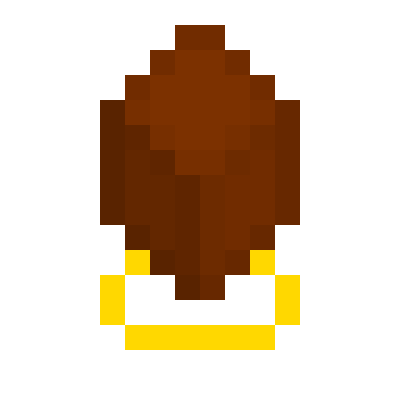
CurseForge · Minecraft mod
Gravi-dirt
Simple mod to allow placing a block in the air.
Choose a version Pick your version below, then grab the matching file.
Quick answer
Which Gravi-dirt release should I use?
Latest stable file Gravi-Dirt for Minecraft 1.12.2
Game version 1.12, 1.12.2
Loader Not required
Gravi-Dirt for Minecraft 1.12.2 targets 1.12, 1.12.2. The project page does not say whether this file belongs on the client, dedicated server, or both. No extra mods listed for this file.
Where it goes
Is Gravi-dirt required on the client, server, or both?
The project page does not say whether this file belongs on the client, dedicated server, or both.
Client Source doesn’t say
Dedicated server Source doesn’t say
Loader for this release No loader listed
Required install it here Optional supported, not mandatory Not supported do not install here Source doesn’t say do not assume
The source does not explicitly classify this release as client-only or server-only.
What else does Gravi-Dirt for Minecraft 1.12.2 need?
Gravi-Dirt for Minecraft 1.12.2. Change the file and its required mods may change too.
This file does not list any required mods. Do not add a library just because a different file uses it.
This file does not list any required or optional mods.
Before you install it
Add Gravi-dirt without breaking your instance.
Built for Gravi-Dirt for Minecraft 1.12.2. Pick another file and the loader, install side or required mods may change.
- 01
Stick to this file
Use Gravi-Dirt for Minecraft 1.12.2. It targets 1.12, 1.12.2; another release may have different loader, side or dependency requirements.
- 02
Bring the mods it needs
This file does not list any required mods. Do not add a library just because a different file uses it.
- 03
Put it on the correct side
The project page does not say whether this file belongs on the client, dedicated server, or both.
- 04
Pick the file you checked
Use the “Get this file” button beside Gravi-Dirt for Minecraft 1.12.2. It opens that exact file at the source.
About this project
What does Gravi-dirt add?
Current version is bugged and really only useful in creative mode. Not sure why it's behaving differently than it does in the dev environment.
I wanted to have something like Extra Utilities' angel block or Immersive Engineering's Balloons in my modpack, but didn't want to include those, so I slapped together Gravi-dirt in MCreator as an easy alternative. Gravi-dirt is pretty much like those, but slightly different:
Gravi-dirt is crafted with a dirt, two gold nuggets, and 4 feathers, and can be right-clicked to place dirt directly under you.
This is intended for flying out to new areas with no ground, placing a block, and building out, but if you fill up your hotbar with them, you could conceivably kinda parkour too.
It creates regular dirt, and leaves nothing else behind, so be careful about where you use it.
L.N.A.Q: (literally never asked questions:)
Q: Don't MCreator mods not work in multiplayer?
A: If you're using an MCreator version from two years ago, no they don't. This bug has been fixed for a long time, and only affected mods using custom models and mobs even when it did exist, neither of which this mod includes.
Q: Doesn't MCreator generate messy & inferior code?
A: To some extent. This mod is far too simple for such a thing to make any real difference though.
Q: Can I put this in my modpack?
A: Yes.
Obligatory Bisect Plug: https://bisecthosting.com/POTUS2048
Project description from CurseForge.
Pick your setup
Gravi-dirt by Minecraft version and loader
Choose the version and loader you play, then open the matching release.
Minecraft version
1.12
1 loader buildCheck the dependencies, then try the file in a copied instance before changing a world you care about.
Recent files
Gravi-dirt versions and loaders
Gravi-Dirt for Minecraft 1.12.2
Gravidirt v1.jar
22 Jul 2019
Client Source doesn’t say Server Source doesn’t say Dependencies No extras listed Listed on Release listing
Check the 1.12.2 setup 1.121.12.2 release
Looking for an older file? The official CurseForge project page is in Resources.
 mod
CurseForge · Minecraft
Cobblemon JEI & JourneyMap Integration
Cobblemon JEI & JourneyMap Integration is a high-performance client-side mod for Minecraft Java (NeoForge & Fabric 1.21.1), designed to seamlessly bridge the Cobblemon ecosystem with Just Enough Items (JEI) and JourneyMap.
 mod
CurseForge · Minecraft
Free Chaos
New things after chaos
 mod
CurseForge + Modrinth · Minecraft
Coal Explosion
💥 Harvesting coal should be dangerous, now it is!