Minecraft version
Back to mods 
CurseForge · Minecraft mod
Command Macros
Create keybinds for commands!
Choose a version Pick your version below, then grab the matching file.
Quick answer
Which Command Macros release should I use?
Latest stable file cmdkeybind-1.6.3-1.20.4.jar
Game version 1.20.4
Loader Fabric
Command Macros cmdkeybind-1.6.3-1.20.4.jar targets 1.20.4 with Fabric. The project page does not say whether this file belongs on the client, dedicated server, or both. No extra mods listed for this file.
Where it goes
Is Command Macros required on the client, server, or both?
The project page does not say whether this file belongs on the client, dedicated server, or both.
Client Source doesn’t say
Dedicated server Source doesn’t say
Loader for this release Fabric
Required install it here Optional supported, not mandatory Not supported do not install here Source doesn’t say do not assume
The source does not explicitly classify this release as client-only or server-only.
What else does Command Macros cmdkeybind-1.6.3-1.20.4.jar need?
cmdkeybind-1.6.3-1.20.4.jar. Change the file and its required mods may change too.
This file does not list any required mods. Do not add a library just because a different file uses it.
This file does not list any required or optional mods.
Before you install it
Add Command Macros without breaking your instance.
Built for Command Macros cmdkeybind-1.6.3-1.20.4.jar. Pick another file and the loader, install side or required mods may change.
- 01
Stick to this file
Use cmdkeybind-1.6.3-1.20.4.jar. It targets 1.20.4 with Fabric; another release may have different loader, side or dependency requirements.
- 02
Bring the mods it needs
This file does not list any required mods. Do not add a library just because a different file uses it.
- 03
Put it on the correct side
The project page does not say whether this file belongs on the client, dedicated server, or both.
- 04
Pick the file you checked
Use the “Get this file” button beside cmdkeybind-1.6.3-1.20.4.jar. It opens that exact file at the source.
About this project
What does Command Macros add?
Command Macros
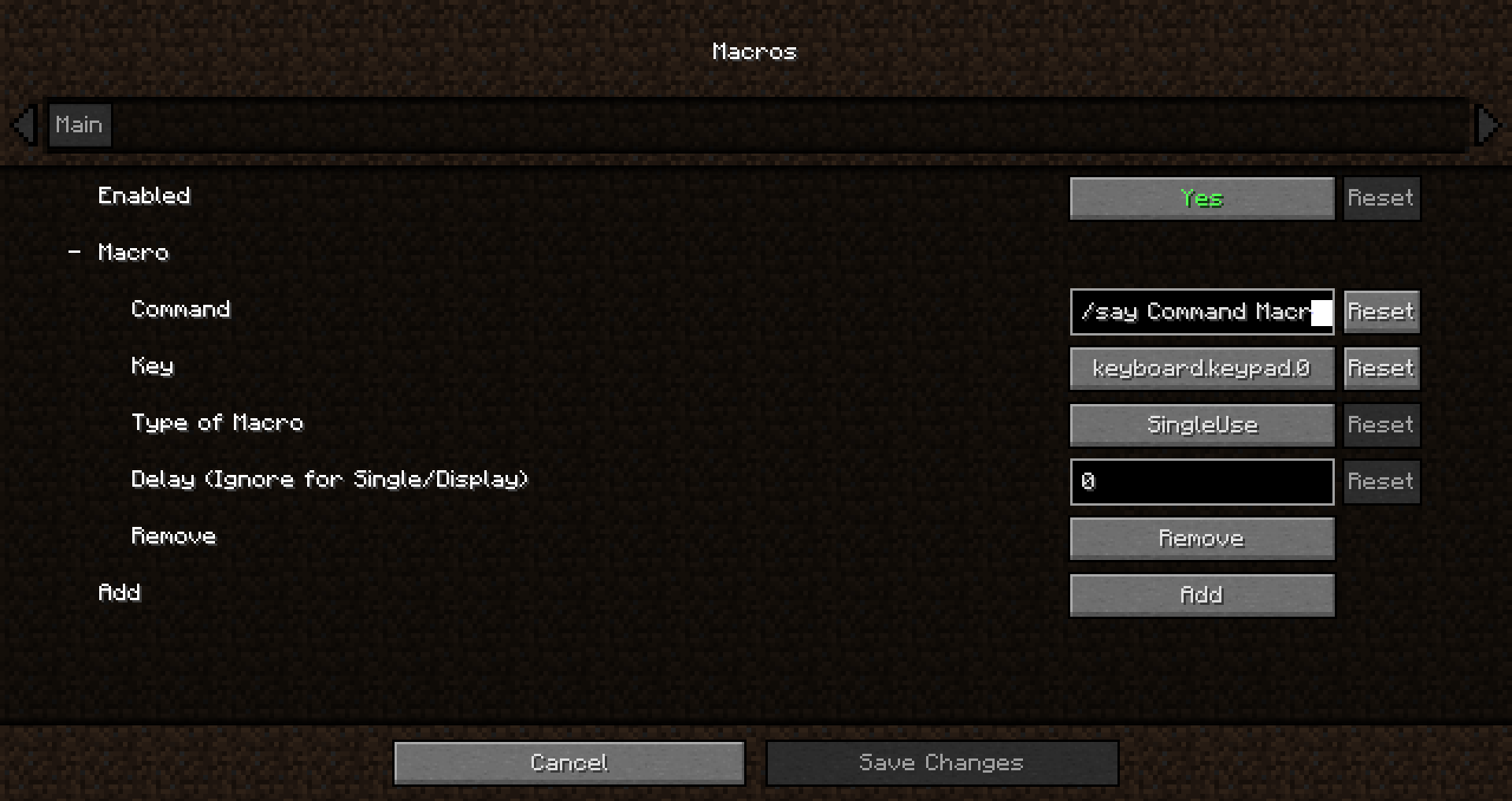
Have a command you commonly use? Tired of repeatedly typing it in over and over? Wouldn't it be easier to press a key on your keyboard to run the command?
How to add a macro:
- Edit the config
- Opening the config menu with Mod Menu.
- Typing the following command : "/Cmdkeybinds showconfig"
- Using the keybind. Editable though the controls screen or the command macros config. By default it is unbound
Command Macros provides a quick and easy method of creating and running macros.
Creating a macros is as easy as specifying the command, and the key to trigger the command.
Restart not required! Editing/Creating a macro takes effect instantly, no need to relaunch.
Keys are not limited to a single macro, multiple macros can be bound to the same key to have multiple commands run at once.
Different Types of Macros:
Delayed Macro: Command has a configurable delay between key press and execution.
Repeating Macro: Command while auto repeat while holding down the key. Delay configurable
Toggled Repeating: Same as Repeating but the key press acts as a toggle, allowing the command to repeat without holding down the key
RunNTimes(New in 1.6.0!): Command will run N times when pressed. Delay between runs is configurable
Single use Macro: Command will only execute once per key press
Display only Macro: Chat screen will be opened and command will be typed in without being executed
Project description from CurseForge.
Pick your setup
Command Macros by Minecraft version and loader
Choose the version and loader you play, then open the matching release.
Minecraft version
1.20.2
1 loader buildMinecraft version
1.20.1
1 loader buildMinecraft version
1.20
1 loader buildMinecraft version
1.19.4
1 loader buildMinecraft version
1.19.3
1 loader buildMinecraft version
1.19.2
1 loader buildMinecraft version
1.19.1
1 loader buildMinecraft version
1.19
1 loader buildMinecraft version
1.18.2
1 loader buildMinecraft version
1.18.1
1 loader buildMinecraft version
1.18
1 loader buildShowing the newest 12 of 26 game versions. Older files are in the list below.
Check the dependencies, then try the file in a copied instance before changing a world you care about.
Recent files
Command Macros versions and loaders
cmdkeybind-1.6.3-1.20.4.jar
11 Mar 2024
Client Source doesn’t say Server Source doesn’t say Dependencies No extras listed Listed on Release listing
Check the 1.20.4 · Fabric setup Fabric1.20.4 release
cmdkeybind-1.6.3-1.20.2.jar
11 Nov 2023
Client Source doesn’t say Server Source doesn’t say Dependencies No extras listed Listed on Release listing
Check the 1.20.2 · Fabric setup 1.20.2Fabric release
cmdkeybind-1.6.3-1.20.jar
19 Jun 2023
Client Source doesn’t say Server Source doesn’t say Dependencies No extras listed Listed on Release listing
Check the 1.20.1 · Fabric setup Fabric1.20.11.20 release
cmdkeybind-1.6.2-1.20.jar
17 Jun 2023
Client Source doesn’t say Server Source doesn’t say Dependencies No extras listed Listed on Release listing
Check the 1.20.1 · Fabric setup Fabric1.20.11.20 release
cmdkeybind-1.6.2-1.19.4.jar
7 Apr 2023
Client Source doesn’t say Server Source doesn’t say Dependencies No extras listed Listed on Release listing
Check the 1.19.4 · Fabric setup 1.19.4Fabric release
cmdkeybind-1.6.2-1.19.3.jar
7 Apr 2023
Client Source doesn’t say Server Source doesn’t say Dependencies No extras listed Listed on Release listing
Check the 1.19.3 · Fabric setup 1.19.3Fabric release
cmdkeybind-1.6.1-1.19.4.jar
28 Mar 2023
Client Source doesn’t say Server Source doesn’t say Dependencies No extras listed Listed on Release listing
Check the 1.19.4 · Fabric setup 1.19.4Fabric release
cmdkeybind-1.6.0-1.19.3.jar
12 Dec 2022
Client Source doesn’t say Server Source doesn’t say Dependencies No extras listed Listed on Release listing
Check the 1.19.3 · Fabric setup 1.19.3Fabric release
cmdkeybind-1.6.0-1.19.X.jar
10 Aug 2022
Client Source doesn’t say Server Source doesn’t say Dependencies No extras listed Listed on Release listing
Check the 1.19.2 · Fabric setup Fabric1.19.21.19.1 release
cmdkeybind-1.6.0-1.19.jar
10 Aug 2022
Client Source doesn’t say Server Source doesn’t say Dependencies No extras listed Listed on Release listing
Check the 1.19 · Fabric setup Fabric1.19 release
cmdkeybind-1.5.4-1.19.jar
14 Jun 2022
Client Source doesn’t say Server Source doesn’t say Dependencies No extras listed Listed on Release listing
Check the 1.19 · Fabric setup Fabric1.19 release
cmdkeybind-1.5.4-1.18.jar
14 Jun 2022
Client Source doesn’t say Server Source doesn’t say Dependencies No extras listed Listed on Release listing
Check the 1.18.2 · Fabric setup Fabric1.18.2 release
Looking for an older file? The official CurseForge project page is in Resources.