Hwyla Optional for HexWool-1.12.2-1.1.1.jar
optionalMatching file found Matched file: Hwyla-1.8.26-B41_1.12.2.jar
CurseForge · Minecraft mod
Allows coloring wool and some other blocks using any RGB color value.
Quick answer
HexWool-1.12.2-1.1.1.jar targets 1.12.2 with Forge. The project page does not say whether this file belongs on the client, dedicated server, or both. No extra mods listed for this file.
Where it goes
The project page does not say whether this file belongs on the client, dedicated server, or both.
The source does not explicitly classify this release as client-only or server-only.
HexWool-1.12.2-1.1.1.jar. Change the file and its required mods may change too.
This file does not list any required mods. Do not add a library just because a different file uses it.
We only count dependency files that match this setup. A file for another loader does not fill the gap.
Before you install it
Built for HexWool-1.12.2-1.1.1.jar. Pick another file and the loader, install side or required mods may change.
Use HexWool-1.12.2-1.1.1.jar. It targets 1.12.2 with Forge; another release may have different loader, side or dependency requirements.
This file does not list any required mods. Do not add a library just because a different file uses it.
The project page does not say whether this file belongs on the client, dedicated server, or both.
Use the “Get this file” button beside HexWool-1.12.2-1.1.1.jar. It opens that exact file at the source.
About this project
Have you ever been building pixel art and just wish you could get the exact color you need? Or maybe you just want a carpet in deep blue. Whatever you fancy, it can be done with HexWool! This mod allows you to color several blocks any color by inputting a hexadecimal color code (or using the color picker) into the Wool Colorizer, which is crafted like so (wool can be any color):

The Wool Colorizer requires cyan, magenta, yellow and black dyes, not unlike a printer. The amounts can be adjusted or dye requirements disabled in the config.
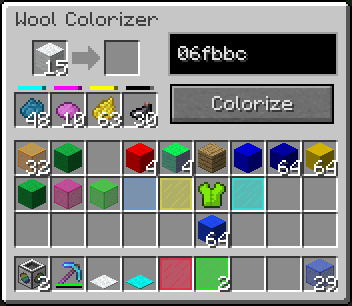
The following blocks/items are supported by default:
Colored blocks should be fully compatible with resource packs as I directly reference the vanilla textures.
Modders can add support for coloring their blocks/items by implementing the IColorizable interface on the Block or Item class.
Yes, you have permission to use this in any mod pack. Credit is appreciated but not required.
Project description from CurseForge.
Pick your setup
Choose the version and loader you play, then open the matching release.
Check the dependencies, then try the file in a copied instance before changing a world you care about.
Recent files
20 Aug 2019
26 Jul 2019
24 Jul 2019
Looking for an older file? The official CurseForge project page is in Resources.
 mod
Modern weapons. Tactical gear. A high-stakes multiplayer extraction shooter inside Minecraft.
 mod
Terralith addon: swaps Terralith's vanilla-block trees for 20+ new woods (logs, planks, doors, boats, signs, leaves with fixed colours) without touching terrain.
 mod
Terrestria is a detailed and vibrant biomes mod for Minecraft running on the Fabric mod loader.