Minecraft version
Back to mods 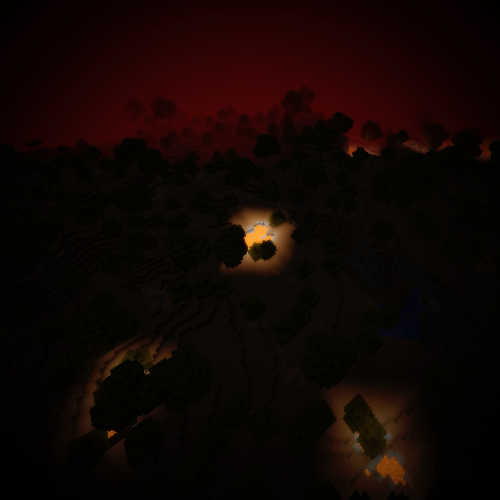
CurseForge · Minecraft mod
Indev Hell
A mod that adds the "Hell" theme from Minecraft Indev Version
Choose a version Pick your version below, then grab the matching file.
Quick answer
Which Indev Hell release should I use?
Latest stable file Indev Hell 1.12.2
Game version 1.12.2
Loader Not required
Indev Hell 1.12.2 targets 1.12.2. The project page does not say whether this file belongs on the client, dedicated server, or both. No extra mods listed for this file.
Where it goes
Is Indev Hell required on the client, server, or both?
The project page does not say whether this file belongs on the client, dedicated server, or both.
Client Source doesn’t say
Dedicated server Source doesn’t say
Loader for this release No loader listed
Required install it here Optional supported, not mandatory Not supported do not install here Source doesn’t say do not assume
The source does not explicitly classify this release as client-only or server-only.
What else does Indev Hell 1.12.2 need?
Indev Hell 1.12.2. Change the file and its required mods may change too.
This file does not list any required mods. Do not add a library just because a different file uses it.
This file does not list any required or optional mods.
Before you install it
Add Indev Hell without breaking your instance.
Built for Indev Hell 1.12.2. Pick another file and the loader, install side or required mods may change.
- 01
Stick to this file
Use Indev Hell 1.12.2. It targets 1.12.2; another release may have different loader, side or dependency requirements.
- 02
Bring the mods it needs
This file does not list any required mods. Do not add a library just because a different file uses it.
- 03
Put it on the correct side
The project page does not say whether this file belongs on the client, dedicated server, or both.
- 04
Pick the file you checked
Use the “Get this file” button beside Indev Hell 1.12.2. It opens that exact file at the source.
About this project
What does Indev Hell add?
Back in Minecraft Indev, there was a theme you could choose called Hell. The lakes were lava, there was no grass, and the sky was red. I tried to recreate the Indev scenario as best as I could in 1.12.2, even down to the excess amount of mushrooms and flowers. I'll have some links to videos as well as where you can download the Indev version for yourself. In this mod, I couldn't add a new hell theme when you create a new world, so I decided to have it be a separate dimension. The frame is made of netherrack and the igniter is Quartz and Steel, Made with 1 quartz and 1 iron. This idea was given to me by anbuotaku on minecraftforum.net. (I'll give a link to the original forum page below). I found it really interesting, as I didn't know this even existed in Minecraft Indev. Thank you for checking out my mod!
Links:
Indev Hell Video: https://www.youtube.com/watch?v=zFMD9d21aTo
________________________________________________________________
If you want to play the original Minecraft Indev, Follow the instructions below. Please be careful while moving files around to be sure not to lose anything.
Link to download Minecraft Indev (provided by MineCralex) Link Removed: http://www.mediafire.com/file/d4h0l4633sbuequ/indev.zip/file
You can watch his tutorial here: https://www.youtube.com/watch?v=wkZiW0mhWFc
Simply extract the file, and move it to your versions folder in your .minecraft folder. You have to turn on historical versions in installations before adding it. | I strongly recommend making a backup of your saves folder. (the folder with all of your worlds) Copy the folder and paste it into your desktop. Once you've done that, delete the saves in your .minecraft saves folder. (not the backup one) This should prevent Minecraft Indev from trying to read the newer version files. Once you are done playing Indev, Move the backup saves folder back into your .minecraft folder.
NOTE: If forge stops working after you've replaced the saves folder or run Indev, Just take all the mods out of your mods folder and move them somewhere else. From there just run forge without any mods. After it opens, close it down and replace the mods. It should work fine now.
________________________________________________________________
Original forum post by anbuotaku: https://www.minecraftforum.net/forums/mapping-and-modding-java-edition/minecraft-mods/requests-ideas-for-mods/2977516-minecraft-hell-mode
________________________________________________________________
Thanks again!
Project description from CurseForge.
Pick your setup
Indev Hell by Minecraft version and loader
Choose the version and loader you play, then open the matching release.
Check the dependencies, then try the file in a copied instance before changing a world you care about.
Recent files
Indev Hell versions and loaders
Indev Hell 1.12.2
IndevHell_1.12.2.jar
6 Aug 2019
Client Source doesn’t say Server Source doesn’t say Dependencies No extras listed Listed on Release listing
Check the 1.12.2 setup 1.12.2 release
Looking for an older file? The official CurseForge project page is in Resources.