SekCore Lib Needed by Re:Skin ReSkin-1.20-3.0.2-universal.jar
requiredMatching file found Matched file: SekCLib-1.20-1.0.2-universal.jar
CurseForge · Minecraft mod
ReSkin Skin changer with support for HD skins, works with Mo' Bends & most other model changing mods
Quick answer
Re:Skin ReSkin-1.20-3.0.2-universal.jar targets 1.20.1, 1.20 with NeoForge, Forge. The project page does not say whether this file belongs on the client, dedicated server, or both. All 1 required mods have matching files.
Where it goes
The project page does not say whether this file belongs on the client, dedicated server, or both.
The source does not explicitly classify this release as client-only or server-only.
ReSkin-1.20-3.0.2-universal.jar. Change the file and its required mods may change too.
Install SekCore Lib first. We found matching files for this game-version and loader setup.
We only count dependency files that match this setup. A file for another loader does not fill the gap.
Before you install it
Built for Re:Skin ReSkin-1.20-3.0.2-universal.jar. Pick another file and the loader, install side or required mods may change.
Use ReSkin-1.20-3.0.2-universal.jar. It targets 1.20.1, 1.20 with NeoForge, Forge; another release may have different loader, side or dependency requirements.
Install SekCore Lib first. We found matching files for this game-version and loader setup.
The project page does not say whether this file belongs on the client, dedicated server, or both.
Use the “Get this file” button beside ReSkin-1.20-3.0.2-universal.jar. It opens that exact file at the source.
About this project

This was made at the request of Zaromaru and Inmo. SOME OF THE SCREENSHOTS ARE TAKEN WITH MO BENDS, THIS MOD WILL ONLY AFFECT TEXTURES NOT MODELS
NOTE: There is a skin server whitelist you can change on servers to avoid user IP leaks for privacy. Only disable this if you are doing this for a private server or add servers to the whitelist if you trust the source.
Also If you are using fabric you will require the fabric API though if you are using fabric you may already have this.
Default Whitelist: https://i.imgur.com/
Forge uses an array though fabric you can split websites using semicolons ; This is to add easier support with mod menu.
If there are any other image servers you want to be whitelisted by default feel free to suggest them to me or send me a DM and I will check them out.
We are not forcing you to use imgur, it's just it's the only source we've really seen people use so thought it would make a decent default whitelist.
If you are using this to get skins for pirated Minecraft YOU WILL NOT RECEIVE ANY SUPPORT (I will not support game piracy)
Screenshot of the mod working with Mo' Bends


In 1.4.0 and above we will be changing /setskin to always be URL first and then target to match the gamemode commands.
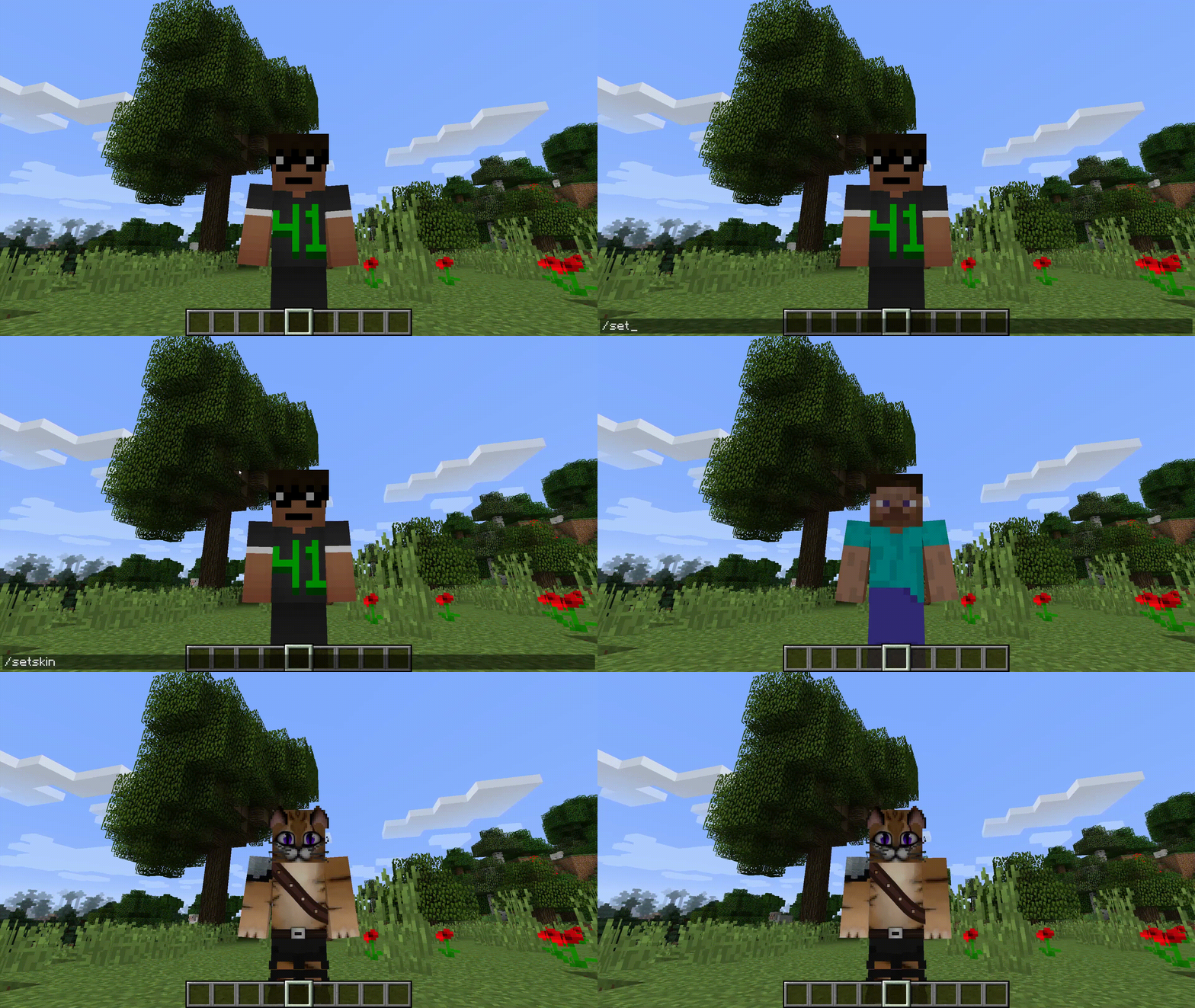
Set skins using /setskin (url) or /setskin (url) (player)
You can also switch between the models using /setmodel (slim/default)
Before 1.4.0: Targeting other players was /setskin (player) (url)
Note: Url's must directly link the image, they can't just be on the page. Example skin used in gif https://i.imgur.com/mORJxcm.png
Reset skin back to vanilla with /setskin reset (need to re-add this to 1.16.2)
Reload skins/clear the cache using /clearskincache

As long as they follow the same ratio as the default skins e.g. 64x64 or the old 32x64 then they will be supported. Though the way that minecraft handles textures the numbers will need to be powers of 2. Basically multiply the base size by 2 over and over until you get the size you want.
I have not tried going lower but theoretically that should also work.
New Skins: 64x64,128x128,256x256,512x512,1024x1024,2048x2048,4096x4096,8192x8192
Old Skins: 64x32,128x64,256x128,512x256,1024x512,2048x1024,4096x2048,8192x4096
Any versions after 2.5.0 will require the use of SekCLib. This is required for the network communication of the skins and will be used to help create some of the upcoming features e.g. removing the skin whitelist.
After 2.5.0 support will be dropped due to time constraints and deciding to switch over to my custom library to help make additional features and maintain other parts. I may take a look at making a fabric version in the future though if I support cross-loader for the library. As the project is MIT anyone is free to make forks of this project and maintain fabric versions.

If you have any issues or want to test newer versions, feel free to join the discord and send me a message. If you ask for support for offline servers without a reason you will be warned and continued pestering will get you banned. (I am asked to support offline mode far too much for my mods)
Project description from CurseForge.
Pick your setup
Choose the version and loader you play, then open the matching release.
Showing the newest 12 of 16 game versions. Older files are in the list below.
Check the dependencies, then try the file in a copied instance before changing a world you care about.
Recent files
7 Jul 2024
27 Feb 2024
22 Jun 2023
20 Jan 2023
18 Jan 2023
4 Sept 2022
4 Sept 2022
7 Dec 2021
7 Dec 2021
3 Dec 2021
2 Oct 2021
2 Oct 2021
Looking for an older file? The official CurseForge project page is in Resources.