Minecraft version
Back to mods 
CurseForge · Minecraft mod
XP Tome
Adds a book that can store a configurable amount of XP.
Choose a version Pick your version below, then grab the matching file.
Quick answer
Which XP Tome release matches 26.1.2 NeoForge?
Best match for your filters xptome-neoforge-26.x-2.5.1.jar
Game version 26.1, 26.1.1, 26.1.2
Loader NeoForge
XP Tome xptome-neoforge-26.x-2.5.1.jar targets 26.1, 26.1.1, 26.1.2 with NeoForge. The project page does not say whether it belongs on the client. The project page does not say whether it belongs on the dedicated server. No extra mods listed for this file.
Where it goes
Is XP Tome required on the client, server, or both?
The project page does not say whether it belongs on the client. The project page does not say whether it belongs on the dedicated server.
Client Source doesn’t say
Dedicated server Source doesn’t say
Loader for this release NeoForge
Required install it here Optional supported, not mandatory Not supported do not install here Source doesn’t say do not assume
The source does not explicitly classify this release as client-only or server-only.
What else does XP Tome xptome-neoforge-26.x-2.5.1.jar need?
xptome-neoforge-26.x-2.5.1.jar on 26.1.2 NeoForge. Every mod below is checked against that same setup.
This file does not list any required mods. Do not add a library just because a different file uses it.
This file does not list any required or optional mods.
Before you install it
Add XP Tome without breaking your instance.
Built for XP Tome xptome-neoforge-26.x-2.5.1.jar on 26.1.2 NeoForge. Pick another file and the loader, install side or required mods may change.
- 01
Stick to this file
Use xptome-neoforge-26.x-2.5.1.jar. It targets 26.1, 26.1.1, 26.1.2 with NeoForge; another release may have different loader, side or dependency requirements.
- 02
Bring the mods it needs
This file does not list any required mods. Do not add a library just because a different file uses it.
- 03
Put it on the correct side
The project page does not say whether it belongs on the client. The project page does not say whether it belongs on the dedicated server.
- 04
Pick the file you checked
Use the “Get this file” button beside xptome-neoforge-26.x-2.5.1.jar. It opens that exact file at the source.
About this project
What does XP Tome add?
Functionality
This mod adds a single item - the XP Tome. With the XP Tome you can store and retrieve XP. It can store up to 1395 XP by default (can be configured), which equals to having 30 levels on the XP bar.
Usage
- Sneak + right-click to store XP
- Right-click to retrieve XP
Recipe
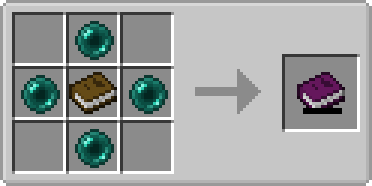
Config (v2.0+)/Item Components
Note: For item components, "true" means the component is on the item, and "false" means it isn't.
Note: If you want to change the default item components of the XP Tome you can still use the config file, however that comes with caveats explained therein. Consider creating a Data Pack and override the XP Tome's recipe with the components set as you wish. Here's an example recipe. More info about data packs and recipes on the wiki!
max_xp - The maximum amount of XP points that the XP Tome can hold. The default value (1395) represents having 30 levels on the XP bar.
retrieval_percentage - The percentage of XP that the book will give back, as a sort of cost of using it. Example: If this config value is set to 0.75, and an XP Tome has 100 XP stored, attempting to retrieve these 100 XP will give back 75 XP. Note: This will not be 100% accurate, as Minecraft's XP does not use decimals.
retrieve_until_next_level - Setting this to true will remove only as much XP from the book at a time as is needed for the player to reach their next level.
retrieve_xp_orbs - Setting this to true will remove XP from the book in XP orb form. This is useful if you want to use XP from the book for tools enchanted with Mending.
store_until_previous_level - Setting this to true will store only as much XP from the player's XP bar until reaching the previous level, meaning only one level at maximum will be added to the book's storage at a time.
The configuration file for Minecraft versions 1.14.4-1.20.1 can be found in the serverconfig folder of your world.
Further Info
This mod was created by me, following a request by Shivaxi. It is based off of XP Book and was recreated due to a duplication bug in the original mod, as well as a bug which causes the enchanting table to reset each time the book is used. As this mod uses the same modid and item id as the original, the two mods can not be installed at the same time and switching between them will not lose you any items. I did not take any code or assets from the original mod. Yes, v2.0 is still compatible with the "XP Book" mod.
You are allowed to use this mod in any modpack.


Come join me on Discord! https://discord.gg/kgZUAxK

Follow me on Twitter for mod updates and other shenanigans! https://twitter.com/bl4ckscor3
Project description from CurseForge.
Pick your setup
XP Tome by Minecraft version and loader
Choose the version and loader you play, then open the matching release.
Minecraft version
26.1.2
3 loader buildsMinecraft version
26.1.1
3 loader buildsMinecraft version
26.1
3 loader buildsMinecraft version
1.21.11
1 loader buildMinecraft version
1.21.10
1 loader buildMinecraft version
1.21.8
1 loader buildMinecraft version
1.21.7
1 loader buildMinecraft version
1.21.6
1 loader buildMinecraft version
1.21.5
1 loader buildMinecraft version
1.21.4
1 loader buildMinecraft version
1.21.3
1 loader buildShowing the newest 12 of 35 game versions. Older files are in the list below.
Check the dependencies, then try the file in a copied instance before changing a world you care about.
Recent files
XP Tome versions and loaders
xptome-neoforge-26.x-2.5.1.jar
xptome-neoforge-26.1.2-2.5.1.jar
28 Apr 2026
Client Source doesn’t say Server Source doesn’t say Dependencies No extras listed Listed on Release listing
Check the 26.1.2 · NeoForge setup NeoForge26.126.1.126.1.2 release
xptome-neoforge-26.1.2-2.5.jar
11 Apr 2026
Client Source doesn’t say Server Source doesn’t say Dependencies No extras listed Listed on Release listing
Check the 26.1.2 · NeoForge setup NeoForge26.1.2 release
Looking for an older file? The official CurseForge project page is in Resources.