Minecraft version
Back to mods 
CurseForge · Minecraft mod
Debark
Debark logs, even modded logs!
Choose a version Pick your version below, then grab the matching file.
Quick answer
Which Debark release should I use?
Latest stable file Debark 0.1.3
Game version 1.12.2
Loader Forge
Debark 0.1.3 targets 1.12.2 with Forge. The project page does not say whether this file belongs on the client, dedicated server, or both. No extra mods listed for this file.
Where it goes
Is Debark required on the client, server, or both?
The project page does not say whether this file belongs on the client, dedicated server, or both.
Client Source doesn’t say
Dedicated server Source doesn’t say
Loader for this release Forge
Required install it here Optional supported, not mandatory Not supported do not install here Source doesn’t say do not assume
The source does not explicitly classify this release as client-only or server-only.
What else does Debark 0.1.3 need?
Debark 0.1.3. Change the file and its required mods may change too.
This file does not list any required mods. Do not add a library just because a different file uses it.
This file does not list any required or optional mods.
Before you install it
Add Debark without breaking your instance.
Built for Debark 0.1.3. Pick another file and the loader, install side or required mods may change.
- 01
Stick to this file
Use Debark 0.1.3. It targets 1.12.2 with Forge; another release may have different loader, side or dependency requirements.
- 02
Bring the mods it needs
This file does not list any required mods. Do not add a library just because a different file uses it.
- 03
Put it on the correct side
The project page does not say whether this file belongs on the client, dedicated server, or both.
- 04
Pick the file you checked
Use the “Get this file” button beside Debark 0.1.3. It opens that exact file at the source.
About this project
What does Debark add?
This mod adds decorative debarked logs - similar to the Stripped Logs from 1.13+, they are essentially logs without the bark!
In order to craft them, you can perform one of two (configurable) interactions:
- right-click an in-world log with an axe,
- craft a log and an axe together.
Thanks to the usage of procedural texture generation, it's trivial to add mod support! As such, the following mods are already supported:
- Aether Legacy
- Atum
- Bewitchment
- Binnie's Mods (Extra Trees)
- Biomes o' Plenty
- Climatic Biomes
- Forestry
- Natura
- Project: Vibrant Journeys
- Rockhounding: Surface
- Rustic
- TerraFirmaCraft
- Traverse
- Twilight Forest
with many more to come!
If you'd like to add support for additional logs, it's very easy! As a mod author, you can send an IMC message to the mod "debark", key "register_log"; as a modpack developer, you can add entries to the config/debark.cfg file. In either case, the value "block ID[,state to permute by,another state...]", for example "minecraft:log,variant" or "traverse:fir_log" or "natura:overworld_logs,type".
If you'd like to tweak the looks of the mod in a resource pack, it's also easy! For each log type, the following textures will be used, if found:
debark:blocks/debark_top_minecraft_log_0.png (for the first variant of minecraft:log's top),
- debark:blocks/debark_side_minecraft_log_0.png (for the first variant of minecraft:log's side),
debark:blocks/debark_top.png (generic grayscale top, where 50%-100% luminance matches the log's middle's color range),
debark:blocks/debark_side.png (generic grayscale side, as above).
Project icon derived from the Unity resource pack by CyanideX.
Project description from CurseForge.
Pick your setup
Debark by Minecraft version and loader
Choose the version and loader you play, then open the matching release.
Check the dependencies, then try the file in a copied instance before changing a world you care about.
Recent files
Debark versions and loaders
Debark 0.1.3
Debark-0.1.3.jar
31 Aug 2022
Client Source doesn’t say Server Source doesn’t say Dependencies No extras listed Listed on Release listing
Check the 1.12.2 · Forge setup Forge1.12.2 release
Debark 0.1.2
Debark-0.1.2.jar
15 Dec 2019
Client Source doesn’t say Server Source doesn’t say Dependencies No extras listed Listed on Release listing
Check the 1.12.2 · Forge setup Forge1.12.2 release
Debark 0.1.1
Debark-0.1.1.jar
8 Oct 2019
Client Source doesn’t say Server Source doesn’t say Dependencies No extras listed Listed on Release listing
Check the 1.12.2 · Forge setup Forge1.12.2 release
Debark 0.1.0
Debark-0.1.0.jar
8 Oct 2019
Client Source doesn’t say Server Source doesn’t say Dependencies No extras listed Listed on Release listing
Check the 1.12.2 · Forge setup Forge1.12.2 release
Looking for an older file? The official CurseForge project page is in Resources.
 mod
CurseForge · Minecraft
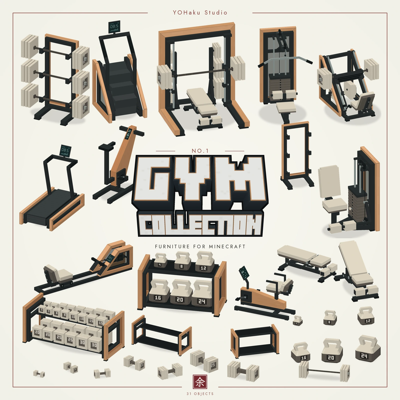
Gym Furniture Collection
Build a cozy gym with 31 furniture designs in warm wood and matcha finishes, free for personal and commercial use.
 mod
CurseForge · Minecraft
Overgrown: Flowers
Adds new flowers to spice up existing biomes
 mod
CurseForge · Minecraft
Nostalgic Trees
Grow resource trees that produce materials progress from dirt to netherite through crafting, bee pollination mutations, and tiered processing!