Minecraft version
Back to mods 
CurseForge · Minecraft mod
Universal Clock HUD
Client-side mod that adds basic clock to the overlay
Choose a version Pick your version below, then grab the matching file.
Quick answer
Which Universal Clock HUD release matches 1.19.1 Forge?
Best match for your filters UniversalClockHUD-FORGE-1.19.2-v1.6.0.jar
Game version 1.19.2, 1.19.1, 1.19
Loader Forge
Universal Clock HUD UniversalClockHUD-FORGE-1.19.2-v1.6.0.jar targets 1.19.2, 1.19.1, 1.19 with Forge. The project page does not say whether this file belongs on the client, dedicated server, or both. No extra mods listed for this file.
Where it goes
Is Universal Clock HUD required on the client, server, or both?
The project page does not say whether this file belongs on the client, dedicated server, or both.
Client Source doesn’t say
Dedicated server Source doesn’t say
Loader for this release Forge
Required install it here Optional supported, not mandatory Not supported do not install here Source doesn’t say do not assume
The source does not explicitly classify this release as client-only or server-only.
What else does Universal Clock HUD UniversalClockHUD-FORGE-1.19.2-v1.6.0.jar need?
UniversalClockHUD-FORGE-1.19.2-v1.6.0.jar on 1.19.1 Forge. Every mod below is checked against that same setup.
This file does not list any required mods. Do not add a library just because a different file uses it.
This file does not list any required or optional mods.
Before you install it
Add Universal Clock HUD without breaking your instance.
Built for Universal Clock HUD UniversalClockHUD-FORGE-1.19.2-v1.6.0.jar on 1.19.1 Forge. Pick another file and the loader, install side or required mods may change.
- 01
Stick to this file
Use UniversalClockHUD-FORGE-1.19.2-v1.6.0.jar. It targets 1.19.2, 1.19.1, 1.19 with Forge; another release may have different loader, side or dependency requirements.
- 02
Bring the mods it needs
This file does not list any required mods. Do not add a library just because a different file uses it.
- 03
Put it on the correct side
The project page does not say whether this file belongs on the client, dedicated server, or both.
- 04
Pick the file you checked
Use the “Get this file” button beside UniversalClockHUD-FORGE-1.19.2-v1.6.0.jar. It opens that exact file at the source.
About this project
What does Universal Clock HUD add?
Simple and completely client-sided mod that renders vanilla clock and system time in the game overlay:

Previously was a part of Enigmatic Legacy. I mainly made this for myself, as one of few people who prefer to play in fullscreen mode (because of resolution issues), where you can't easily see the time, which for me is absolutely required to be easily visible.
There is also a config file (UniversalClockHUD.toml) located in the config folder, where you can make following adjustments:
- Set the clock to be only visible in fullscreen mode;
- Set whether or not the clock is hidden when chat is opened;
- Enable or disable background behind the clock;
- Choose where the clock is positioned among multiple presets;
- Enable 12-hour time format if you're not a fan of standard 24-hour option;
- If default presets aren't enough, define custom preset with adjustable anchor point and X/Y position on the screen;
- Stop the numbers on the clock from spinning uncontrollably in the Nether or The End (which they do, by default);
- Require vanilla clock to be present in player's inventory in order for them to see the HUD;
- Make the clock display in-game time instead of system time;
- Enable or disable the clock entirely.
By default, the clock is located in left-bottom corner of the screen, but you can freely adjust it to be anywhere on your screen by editing X and Y position in the config file. Notice, however, that if you change those values, they might behave differently with different gui scales and on different screen resolutions. You will have to create personal adjustments that will work perfectly with your resolution and GUI scale.

The default appearance of Universal Clock:
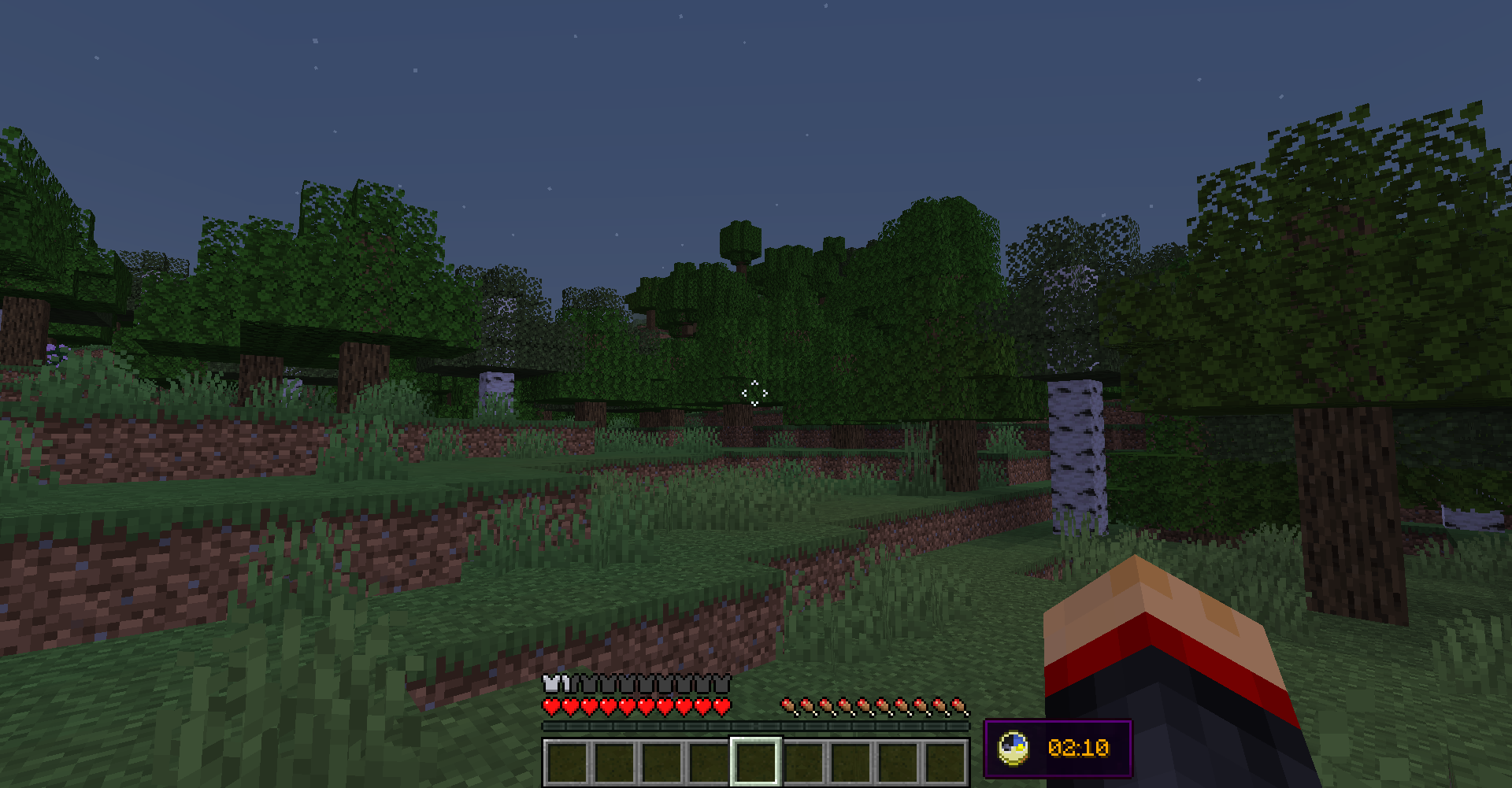
Project description from CurseForge.
Pick your setup
Universal Clock HUD by Minecraft version and loader
Choose the version and loader you play, then open the matching release.
Minecraft version
1.19.1
1 loader buildMinecraft version
1.19
1 loader buildMinecraft version
1.18.2
1 loader buildMinecraft version
1.18.1
1 loader buildMinecraft version
1.18
1 loader buildMinecraft version
1.17.1
1 loader buildMinecraft version
1.16.4
1 loader buildMinecraft version
1.16.3
1 loader buildMinecraft version
1.16.2
1 loader buildMinecraft version
1.16.1
1 loader buildMinecraft version
1.14.4
1 loader buildCheck the dependencies, then try the file in a copied instance before changing a world you care about.
Recent files
Universal Clock HUD versions and loaders
UniversalClockHUD-FORGE-1.19.2-v1.6.0.jar
8 Nov 2022
Client Source doesn’t say Server Source doesn’t say Dependencies No extras listed Listed on Release listing
Check the 1.19.1 · Forge setup 1.19.2Forge1.19.11.19 release
Looking for an older file? The official CurseForge project page is in Resources.