Mystical World Needed by Mystical Machinery mysticalmachinery-1.16.5-0.0.3.10.jar
requiredMatching file found Matched file: mysticalworld-1.16.5-0.3.6.27.jar
CurseForge · Minecraft mod
Provides machines and devices utilising metals, gems & blocks from Mystical World.
Quick answer
Mystical Machinery mysticalmachinery-1.16.5-0.0.3.10.jar targets 1.16.5, 1.16.4 with Forge. The project page does not say whether this file belongs on the client, dedicated server, or both. All 2 required mods have matching files.
Where it goes
The project page does not say whether this file belongs on the client, dedicated server, or both.
The source does not explicitly classify this release as client-only or server-only.
mysticalmachinery-1.16.5-0.0.3.10.jar. Change the file and its required mods may change too.
Install Mystical World, Patchouli first. We found matching files for this game-version and loader setup.
We only count dependency files that match this setup. A file for another loader does not fill the gap.
Before you install it
Built for Mystical Machinery mysticalmachinery-1.16.5-0.0.3.10.jar. Pick another file and the loader, install side or required mods may change.
Use mysticalmachinery-1.16.5-0.0.3.10.jar. It targets 1.16.5, 1.16.4 with Forge; another release may have different loader, side or dependency requirements.
Install Mystical World, Patchouli first. We found matching files for this game-version and loader setup.
The project page does not say whether this file belongs on the client, dedicated server, or both.
Use the “Get this file” button beside mysticalmachinery-1.16.5-0.0.3.10.jar. It opens that exact file at the source.
About this project
Mystical Machinery is a mod that takes metals, blocks & other features of Mystical World and makes machines out of them. Previously, this mod contained a number of Forge Energy-related devices, but these are now in Mystical Powers.
The first and most basic machine is the Kiln. This will bake cobblestone, clay, terracotta, glass, and similar materials, at a much faster rate than a furnace.
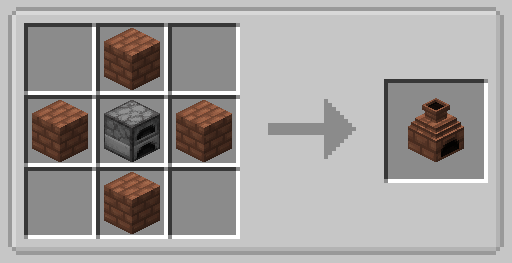
It requires Terracotta Bricks from Mystical World to craft, and accepts any fuel that a furnace will.
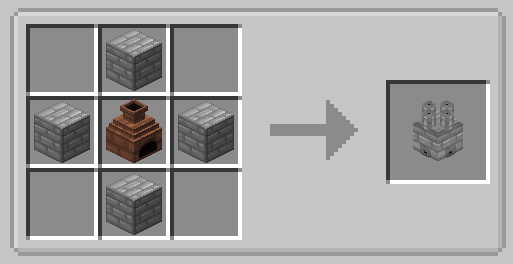
Created from a kiln combined with Mystical World's iron bricks, this converts wood logs to charcoal en masse, with a chance to produce additional charcoal. It requires being lit with a flint and steel (or anything defined in the firelighter's tag).
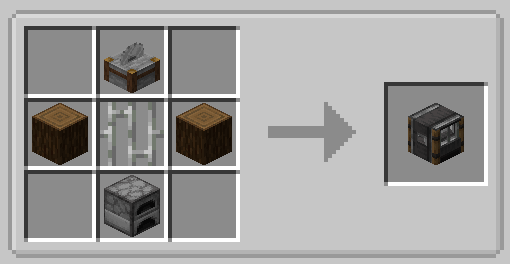
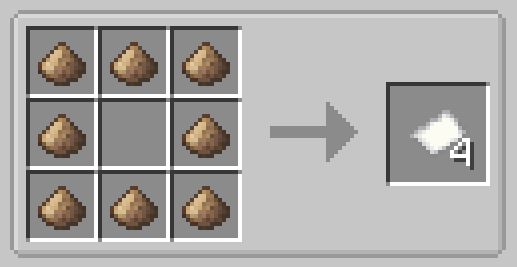
This machine will rapidly convert logs into planks, planks into sticks, and sticks into sawdust. It can also be used to recycle most wooden materials into sawdust.
Sawdust can be used to craft paper:
You can support me on Patreon!
All support for this mod is available on my Discord. Youcan also keep up with what I'm doing and get notifications streams!
For all other support, please hit "Issues" at the top of this page.
Project description from CurseForge.
Pick your setup
Choose the version and loader you play, then open the matching release.
Check the dependencies, then try the file in a copied instance before changing a world you care about.
Recent files
20 Jun 2021
30 Dec 2020
23 Aug 2020
21 Aug 2020
9 Apr 2020
9 Apr 2020
13 Jan 2020
13 Jan 2020
17 Nov 2019
17 Nov 2019
Looking for an older file? The official CurseForge project page is in Resources.
 mod
modBlast Clay, Clay Balls and Stained Terracotta, fully configurable
 mod
modMinecraft Fabric mod that enables ultra-high-resolution resource packs by transparently distributing oversized texture atlases across multiple physical atlas pages.
 mod
modA mod that adds a variety of customizable clothing and accessories