Serene Seasons Optional for Simple World Timer SimpleWorldTimer-1.12.2-1.1.3.2.jar
optionalMatching file found Matched file: SereneSeasons-1.12.2-1.2.18-universal.jar
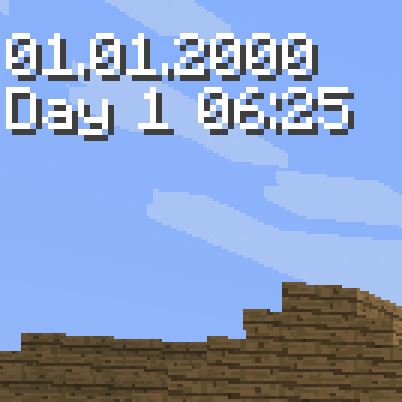
CurseForge · Minecraft mod
Minecraft mod of configurable timer for displaying world, in-game or system time.
Quick answer
Simple World Timer SimpleWorldTimer-1.12.2-1.1.3.2.jar targets 1.12.2 with Forge. The project page does not say whether this file belongs on the client, dedicated server, or both. No extra mods listed for this file.
Where it goes
The project page does not say whether this file belongs on the client, dedicated server, or both.
The source does not explicitly classify this release as client-only or server-only.
SimpleWorldTimer-1.12.2-1.1.3.2.jar. Change the file and its required mods may change too.
This file does not list any required mods. Do not add a library just because a different file uses it.
We only count dependency files that match this setup. A file for another loader does not fill the gap.
Before you install it
Built for Simple World Timer SimpleWorldTimer-1.12.2-1.1.3.2.jar. Pick another file and the loader, install side or required mods may change.
Use SimpleWorldTimer-1.12.2-1.1.3.2.jar. It targets 1.12.2 with Forge; another release may have different loader, side or dependency requirements.
This file does not list any required mods. Do not add a library just because a different file uses it.
The project page does not say whether this file belongs on the client, dedicated server, or both.
Use the “Get this file” button beside SimpleWorldTimer-1.12.2-1.1.3.2.jar. It opens that exact file at the source.
About this project
This configurable timer will let you display:
It could be useful for speedrun measurements or just as reminder of current real life time if you are in fullscreen mode and don't want to Alt-TAB.
You can choose what source of time is used and setup patterns for date/time formatting. Or use preconfigured presets.
On-screen position of timer can be freely adjusted.
There is in-game configuration screen bound to H key by default. Or you can alter SimpleWorldTimer.cfg file. Sneaking + H key toggles timer visibility. The chat command /swt is also available in case you want to free the key binding.
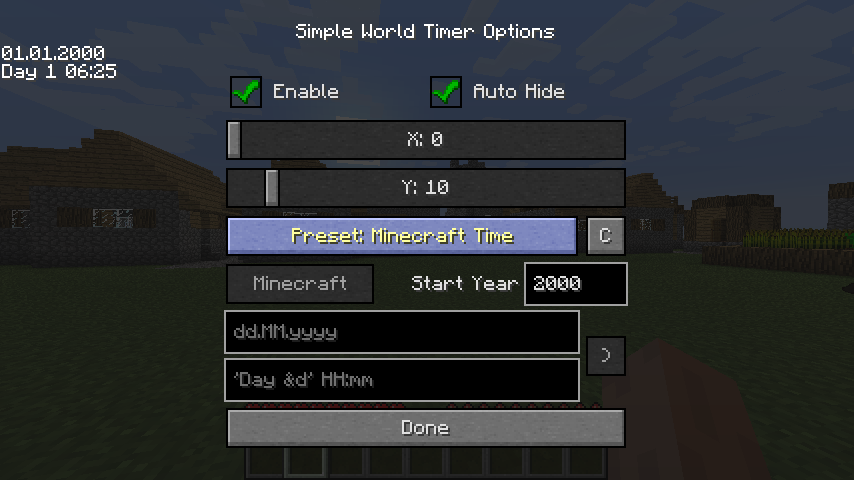
Simple syntax of java.text.SimpleDateFormat class used.
https://docs.oracle.com/javase/7/docs/api/java/text/SimpleDateFormat.html
Additional syntax take effect after:
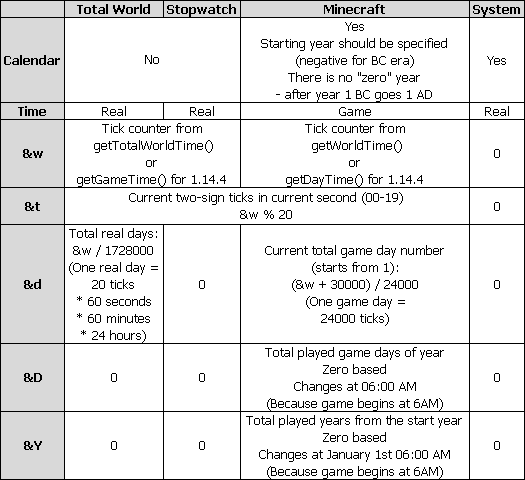
&w - total ticks
&t - current two-sign ticks in current second (00-19)
&d - total days
&D - Total played game days of year. Zero based. Changes at 06:00 AM (because game begins at 6AM). Relevant only for Minecraft time. Should be used in conjunction with &Y.
&Y - Total played game years from the start year. Zero based. Changes at January 1st 06:00 AM (because game begins at 6AM). Relevant only for Minecraft time.
If you additionally put it in [ square brackets ] then everything within will output only if included values are non-zero
All this additions should be quoted using ' single quotes ' to avoid initial interpretation by SimpleDateFormatHere is comparison table:
Examples:
dd MMMM yyyy
'[&dd ]'HH:mm:ss
'Year &Y, day &D'
Disclaimers:
Please note that some parameters do not make sense in certain configurations. For example, it makes no sense to display a month or year for the total world time. Because it is uncertain how much days are in one month and what year it is. To avoid this uncertainty for Minecraft time the start year is specified. In this way Minecraft time can have clear calendar representation.
This mod is currently for 1.6.4, 1.7.10, 1.8.9, 1.10.2, 1.12.2, 1.14.4, 1.15.2, 1.16.5, 1.18.1, 1.19.2, 1.19.3, 1.20.1 and 1.20.2 versions. But if players are interested I could try to port it to other game versions.
Serene Seasons mod support (only 1.12.2)
Since version 1.12.2-1.1.3 it is possible to display some information from Serene Season mod. Two more parameters added:
&S - season name
&B - subseason name
They are available in all clockType modes.
Additionally with clockType = Serene, date and time are set according to Serene Seasons internal timer with respect to mods settings: Day Duration in ticks and Sub Season Duration in days. This is a simple approximation without calendar restrictions. So here you can achieve 30 of February or even more, depending on the settings in seasons.cfg.
There is no years in Serene Seasons, so it will always be 1.
Project description from CurseForge.
Pick your setup
Choose the version and loader you play, then open the matching release.
Showing the newest 12 of 13 game versions. Older files are in the list below.
Check the dependencies, then try the file in a copied instance before changing a world you care about.
Recent files
14 May 2024
21 Oct 2023
21 Aug 2023
2 Mar 2023
23 Jan 2022
28 Sept 2021
8 Feb 2021
15 Dec 2020
19 Feb 2020
12 Jan 2020
12 Jan 2020
12 Jan 2020
Looking for an older file? The official CurseForge project page is in Resources.
 mod
modDecorative and mechanical additions to create!
 mod
modA lightweight Tinkers' Construct addon featuring tools, new materials, and exclusive projectile traits.
 mod
modOverhaul survival with many changes to existing mechanics. Weapon rebalance, enchanting rework, and much more