Fabric API Needed by AuroraKeystrokes v1.3.0 (1.18.2)
requiredMatching file found Matched file: [1.18.2] Fabric API 0.77.0+1.18.2

CurseForge · Minecraft mod
A Fabric mod which displays the movement keys and mouse clicks on screen.
Quick answer
AuroraKeystrokes v1.3.0 (1.18.2) targets 1.18.2 with Fabric. The project page does not say whether this file belongs on the client, dedicated server, or both. All 1 required mods have matching files.
Where it goes
The project page does not say whether this file belongs on the client, dedicated server, or both.
The source does not explicitly classify this release as client-only or server-only.
AuroraKeystrokes v1.3.0 (1.18.2) on Fabric. Every mod below is checked against that same setup.
Install Fabric API first. We found matching files for this game-version and loader setup.
We only count dependency files that match this setup. A file for another loader does not fill the gap.
Before you install it
Built for AuroraKeystrokes v1.3.0 (1.18.2) on Fabric. Pick another file and the loader, install side or required mods may change.
Use AuroraKeystrokes v1.3.0 (1.18.2). It targets 1.18.2 with Fabric; another release may have different loader, side or dependency requirements.
Install Fabric API first. We found matching files for this game-version and loader setup.
The project page does not say whether this file belongs on the client, dedicated server, or both.
Use the “Get this file” button beside AuroraKeystrokes v1.3.0 (1.18.2). It opens that exact file at the source.
About this project
A Fabric mod which displays the movements keys and mouse clicks on the screen.
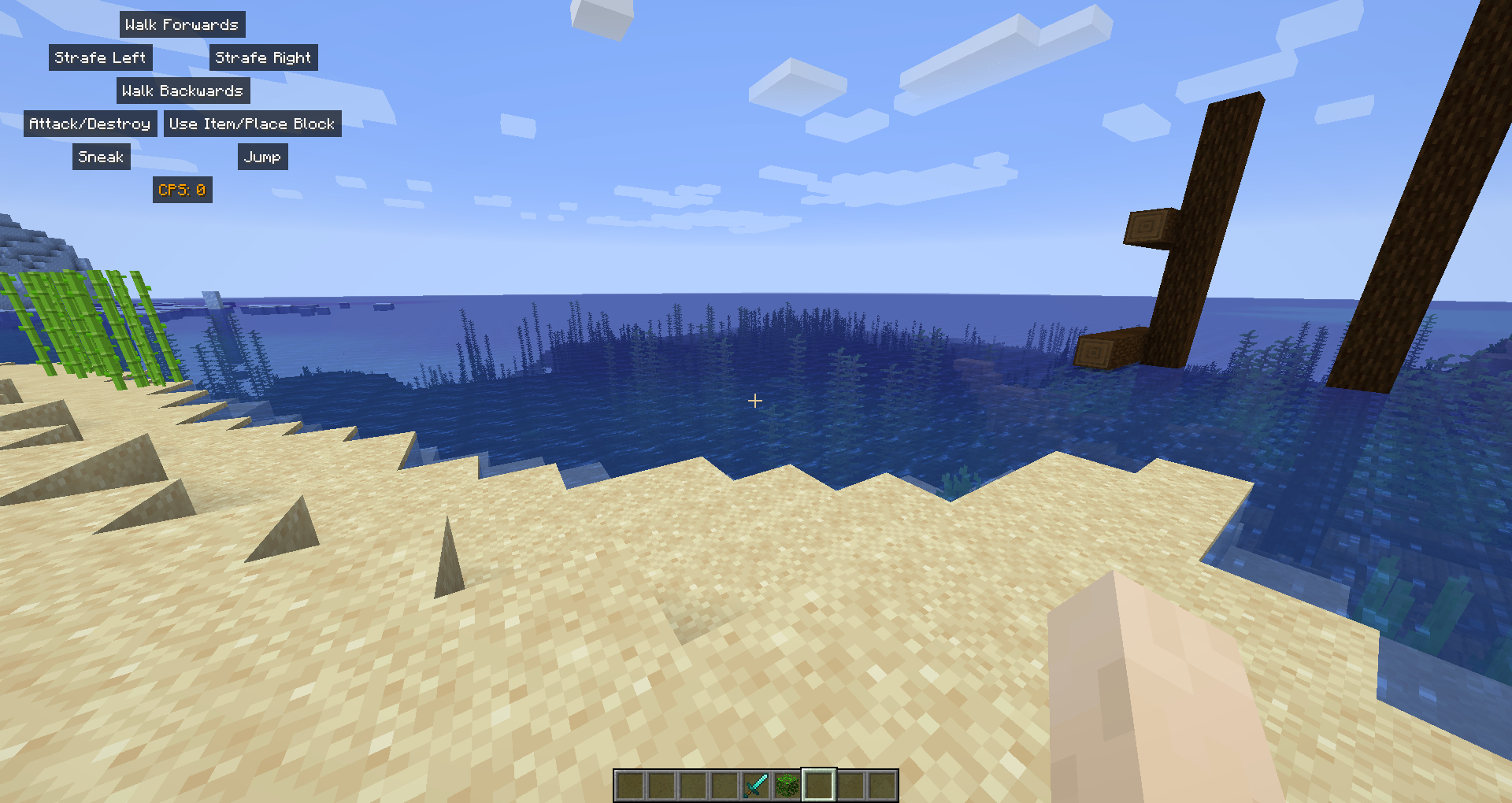
Well, it's very simple. It shows which keys/buttons you are pressing on the screen, it also displays the CPS.
It's fully customizable: colors, which buttons to show, where to put the HUD.
To use this mod it's very simple!
Install it in your mods folder along with Fabric API (and Cotton Client Commands for before v1.2.0).
While in-game you will notice a new HUD: the AuroraKeystrokes' HUD!
To customize it you get two options:
config/keystrokes.toml which isn't recommended because you might crash your game./keystrokesOther commands available:
/keystrokes: Open the configuration GUI/keystrokes reload: Reload the configuration file./keystrokes save: Save the configuration file.Project description from CurseForge.
Pick your setup
Choose the version and loader you play, then open the matching release.
Check the dependencies, then try the file in a copied instance before changing a world you care about.
Recent files
aurorakeystrokes-fabric-1.3.0+1.18.2.jar
6 Mar 2022
aurorakeystrokes-fabric-1.2.4+1.16.2.jar
21 Aug 2020
aurorakeystrokes-fabric-1.2.3+1.16.1.jar
31 Jul 2020
aurorakeystrokes-1.2.1-fabric1.16.jar
26 Jun 2020
aurorakeystrokes-1.2.0-fabric1.16.jar
26 Jun 2020
aurorakeystrokes-1.0.2.jar
31 Jan 2020
aurorakeystrokes-1.0.1-fabric1.15.jar
11 Dec 2019
aurorakeystrokes-1.0.0-fabric1.14.4.jar
25 Nov 2019
Looking for an older file? The official CurseForge project page is in Resources.
 mod
Adds a craftable Pasito pod device with 10 craftable liquids. Hold right-click to puff: longer puffs mean thicker vapor in your look direction and longer buffs, but hold past 3 seconds and you get dizzy and slow. Recharge it in a furnace.
 mod
Compare armor, weapons and tools with your equipped gear right in the tooltip: stat changes, damage per second, durability and enchantments.
 mod
Turn FTB Essentials teleport requests into items.
