Minecraft version
Back to mods ![Game Menu Mod Option [Forge] project artwork](https://media.forgecdn.net/avatars/667/419/638061485254285617.png)
CurseForge · Minecraft mod
Game Menu Mod Option [Forge]
MOD settings to the game menu as before 1.12.2
Choose a version Pick your version below, then grab the matching file.
Quick answer
Which Game Menu Mod Option [Forge] release should I use?
Latest stable file GameMenuModOption-1.20.2-2.3.0-NeoForge
Game version 1.20.2, 1.20.4
Loader NeoForge
Game Menu Mod Option [Forge] GameMenuModOption-1.20.2-2.3.0-NeoForge targets 1.20.2, 1.20.4 with NeoForge. The project page does not say whether this file belongs on the client, dedicated server, or both. No extra mods listed for this file.
Where it goes
Is Game Menu Mod Option [Forge] required on the client, server, or both?
The project page does not say whether this file belongs on the client, dedicated server, or both.
Client Source doesn’t say
Dedicated server Source doesn’t say
Loader for this release NeoForge
Required install it here Optional supported, not mandatory Not supported do not install here Source doesn’t say do not assume
The source does not explicitly classify this release as client-only or server-only.
What else does Game Menu Mod Option [Forge] GameMenuModOption-1.20.2-2.3.0-NeoForge need?
GameMenuModOption-1.20.2-2.3.0-NeoForge. Change the file and its required mods may change too.
This file does not list any required mods. Do not add a library just because a different file uses it.
This file does not list any required or optional mods.
Before you install it
Add Game Menu Mod Option [Forge] without breaking your instance.
Built for Game Menu Mod Option [Forge] GameMenuModOption-1.20.2-2.3.0-NeoForge. Pick another file and the loader, install side or required mods may change.
- 01
Stick to this file
Use GameMenuModOption-1.20.2-2.3.0-NeoForge. It targets 1.20.2, 1.20.4 with NeoForge; another release may have different loader, side or dependency requirements.
- 02
Bring the mods it needs
This file does not list any required mods. Do not add a library just because a different file uses it.
- 03
Put it on the correct side
The project page does not say whether this file belongs on the client, dedicated server, or both.
- 04
Pick the file you checked
Use the “Get this file” button beside GameMenuModOption-1.20.2-2.3.0-NeoForge. It opens that exact file at the source.
About this project
What does Game Menu Mod Option [Forge] add?
Game Menu Mod Option
Added MOD settings to the game menu as before 1.12.2
This is Forge MOD
Forge update notification function has been added as a change from the MOD button before 1.12.2
This function can be switched from the config.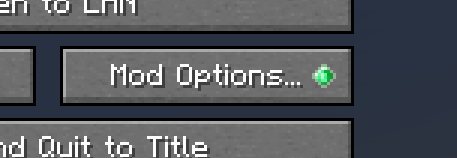
Added ModMenu Style since v2.0.0
It can be enabled in the config
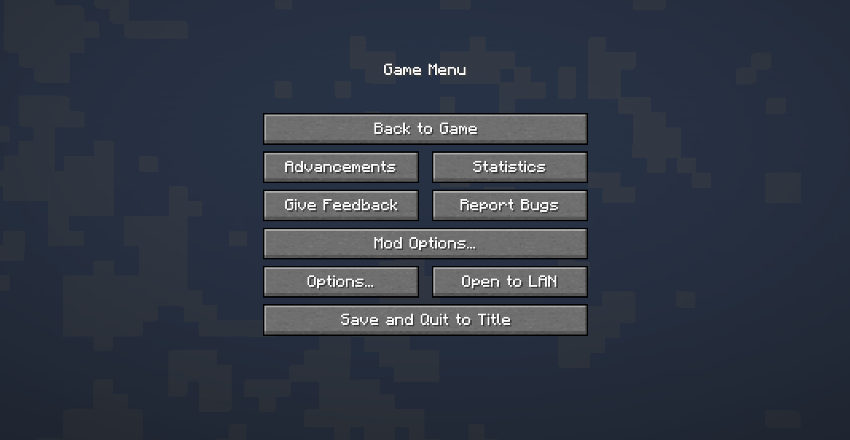
Forge will add the mod button without installing this mod after the following versions.
MC1.20.1 - 47.1.25
MC1.19.4 - 45.1.15
MC1.19.2 - 43.2.20
The main functionality of this mod is no longer needed, but the mod update notification display and the ability to return the mod button to the same location as before exist, so we will continue to update it.
ModPack
Please use it freely.
Project description from CurseForge.
Pick your setup
Game Menu Mod Option [Forge] by Minecraft version and loader
Choose the version and loader you play, then open the matching release.
Minecraft version
1.20.2
2 loader buildsMinecraft version
1.20.1
1 loader buildMinecraft version
1.20
1 loader buildMinecraft version
1.19.4
1 loader buildMinecraft version
1.19.3
1 loader buildMinecraft version
1.19.2
1 loader buildMinecraft version
1.19.1
1 loader buildMinecraft version
1.19
1 loader buildMinecraft version
1.18.2
1 loader buildMinecraft version
1.18.1
1 loader buildMinecraft version
1.18
1 loader buildShowing the newest 12 of 22 game versions. Older files are in the list below.
Check the dependencies, then try the file in a copied instance before changing a world you care about.
Recent files
Game Menu Mod Option [Forge] versions and loaders
GameMenuModOption-1.20.2-2.3.0-NeoForge
gamemenumodoption-neoforge-mc1.20.2-2.3.0.jar
10 Feb 2024
Client Source doesn’t say Server Source doesn’t say Dependencies No extras listed Listed on Release listing
Check the 1.20.4 · NeoForge setup 1.20.2NeoForge1.20.4 release
GameMenuModOption-1.20.2-2.3.0-Forge
gamemenumodoption-forge-mc1.20.2-2.3.0.jar
10 Feb 2024
Client Source doesn’t say Server Source doesn’t say Dependencies No extras listed Listed on Release listing
Check the 1.20.4 · Forge setup 1.20.2Forge1.20.4 release
GameMenuModOption-1.20.1-2.2.1
gamemenumodoption-mc1.20.1-2.2.1.jar
22 Jul 2023
Client Source doesn’t say Server Source doesn’t say Dependencies No extras listed Listed on Release listing
Check the 1.20.4 · Forge setup 1.20.21.20.1Forge1.20.4 release
GameMenuModOption-1.19.4-2.1.2
gamemenumodoption-mc1.19.4-2.1.2.jar
22 Jul 2023
Client Source doesn’t say Server Source doesn’t say Dependencies No extras listed Listed on Release listing
Check the 1.19.4 · Forge setup 1.19.4Forge release
GameMenuModOption-1.19.2-1.18.1
gamemenumodoption-mc1.19.2-1.18.1.jar
22 Jul 2023
Client Source doesn’t say Server Source doesn’t say Dependencies No extras listed Listed on Release listing
Check the 1.19.2 · Forge setup 1.19.2Forge release
GameMenuModOption-1.20-2.2.0
gamemenumodoption-mc1.20-2.2.0.jar
12 Jun 2023
Client Source doesn’t say Server Source doesn’t say Dependencies No extras listed Listed on Release listing
Check the 1.20.1 · Forge setup 1.20.1Forge1.20 release
GameMenuModOption-1.19.4-2.1.1
gamemenumodoption-mc1.19.4-2.1.1.jar
16 Mar 2023
Client Source doesn’t say Server Source doesn’t say Dependencies No extras listed Listed on Release listing
Check the 1.19.4 · Forge setup 1.19.4Forge release
GameMenuModOption-1.19.4-2.1.0
gamemenumodoption-mc1.19.4-2.1.0.jar
15 Mar 2023
Client Source doesn’t say Server Source doesn’t say Dependencies No extras listed Listed on Release listing
Check the 1.19.4 · Forge setup 1.19.4Forge release
GameMenuModOption-1.19.3-2.0.0
gamemenumodoption-mc1.19.3-2.0.0.jar
9 Dec 2022
Client Source doesn’t say Server Source doesn’t say Dependencies No extras listed Listed on Release listing
Check the 1.19.3 · Forge setup 1.19.3Forge release
GameMenuModOption-1.18-1.14.2-Forge
GameMenuModOption-1.18-Forge-1.14.2.jar
5 Nov 2022
Client Source doesn’t say Server Source doesn’t say Dependencies No extras listed Listed on Release listing
Check the 1.18.2 · Forge setup 1.18.11.18.2Forge1.18 release
GameMenuModOption-1.18-1.14.1-Forge
GameMenuModOption-1.18-Forge-1.14.1.jar
16 Aug 2022
Client Source doesn’t say Server Source doesn’t say Dependencies No extras listed Listed on Release listing
Check the 1.18.2 · Forge setup 1.18.11.18.2Forge1.18 release
GameMenuModOption-1.19.1-1.18
GameMenuModOption-1.19-1.18.jar
28 Jul 2022
Client Source doesn’t say Server Source doesn’t say Dependencies No extras listed Listed on Release listing
Check the 1.19.2 · Forge setup 1.19.2Forge1.19.1 release
Looking for an older file? The official CurseForge project page is in Resources.
 mod
mod CurseForge · Minecraft
One Sleeper
A lightweight server-side Forge mod that instantly skips the night and clears bad weather when just a single player sleeps! 🌙⚡
 mod
mod CurseForge + Modrinth · Minecraft
Armor Hider
Hide or adjust the transparency of armor, glint, and offhand items - with full multiplayer sync. No dependencies required.
 mod
mod CurseForge + Modrinth · Minecraft
ColonyRank | Minecolonies Addon
ColonyRank ranks MineColonies colonies by progression stats with two scoring systems, six presets, in-game commands, ignored-colonies management, and Discord webhook posting. NeoForge 1.21.1 & Forge 1.20.1.