Minecraft version
Back to mods 
CurseForge · Minecraft mod
Bluestone
Wireless Redstone Made Easy
Choose a version Pick your version below, then grab the matching file.
Quick answer
Which Bluestone release should I use?
beta file 1.1.2
Game version 1.14.4
Loader Forge
Bluestone 1.1.2 targets 1.14.4 with Forge. The project page does not say whether this file belongs on the client, dedicated server, or both. No extra mods listed for this file.
Where it goes
Is Bluestone required on the client, server, or both?
The project page does not say whether this file belongs on the client, dedicated server, or both.
Client Source doesn’t say
Dedicated server Source doesn’t say
Loader for this release Forge
Required install it here Optional supported, not mandatory Not supported do not install here Source doesn’t say do not assume
The source does not explicitly classify this release as client-only or server-only.
What else does Bluestone 1.1.2 need?
1.1.2. Change the file and its required mods may change too.
This file does not list any required mods. Do not add a library just because a different file uses it.
This file does not list any required or optional mods.
Before you install it
Add Bluestone without breaking your instance.
Built for Bluestone 1.1.2. Pick another file and the loader, install side or required mods may change.
- 01
Stick to this file
Use 1.1.2. It targets 1.14.4 with Forge; another release may have different loader, side or dependency requirements.
- 02
Bring the mods it needs
This file does not list any required mods. Do not add a library just because a different file uses it.
- 03
Put it on the correct side
The project page does not say whether this file belongs on the client, dedicated server, or both.
- 04
Pick the file you checked
Use the “Get this file” button beside 1.1.2. It opens that exact file at the source.
About this project
What does Bluestone add?
1.15 Rework In Progress.
Bluestone is a wireless redstone mod designed to allow you to take your redstone contraptions to the next level.
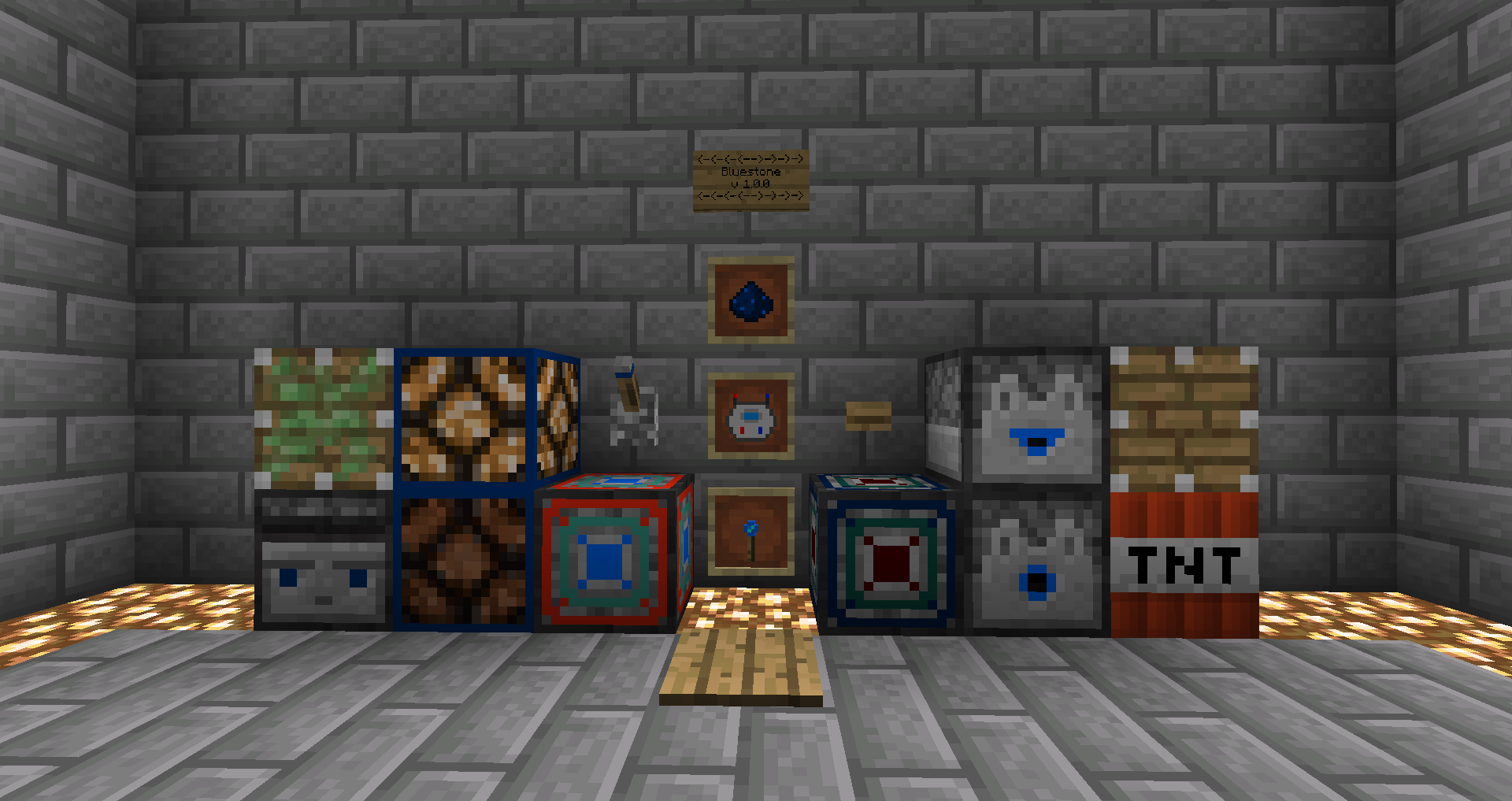
How does it work?
Bluestone blocks are either designated as transmitters or receivers. Transmitters act as sources for bluestone signals, while receivers perform a certain task when receiving a signal. The network tool can be used to easily link and unlink transmitters and receivers, even across great distances.
Getting Started
Just Enough Items is HIGHLY recommended.
To get started, simply combine one redstone and one lapis in order to obtain 2 bluestone dust. From there, craft a networking tool. Determine what type of device you wish to build, and construct the appropriate transmitter and receiver. Shift-right click on the placed transmitter, then do the same on the placed receiver. These two blocks are now linked.
Networking Tool Controls
Set transmitter -> Shift right click on any transmitter block.
Link receiver -> Shift right click on any receiver block to link it to the saved transmitter.
Unlink mode -> Shift right click while facing any non-transmitter/receiver block to toggle the tool into unlink mode. Repeat the same steps used to link blocks.
Clear saved transmitter -> Shift right click while facing upwards towards empty space (no block within reach).
Implemented Features:
Transmitters:
Bluestone Emitter -> Emits a constant bluestone signal, toggleable via redstone signal. Defaults to on.
Bluestone Lever
Bluestone Button (Wood & Stone)
Bluestone Observer
Bluestone Lever
Bluestone Pressure Plate (Wood & Stone)
Bluestone Detector Rail
Bluestone Activator Rail
Logic Gates
Receivers:
Bluestone Receiver -> Emits a redstone signal based on the incoming bluestone signal.
Bluestone Lamp
Bluestone TNT
Bluestone Dropper
Bluestone Dispenser
Bluestone Piston
Bluestone Sticky Piston
Bluestone Powered Rail
Bluestone Doors
Bluestone Trapdoors
Logic Gates
Planned Features:
Bluestone Fence Gates
Bluestone Network Visualization
Interdimensional Bluestone
Non-Binary Bluestone
ComputerCraft & OpenComputers Integration
F.A.Q. and Other Information:
Q: Can I use bluestone in my modpack?
A: Please do!
Q: Can I implement bluestone support in my mod/create an addon for bluestone?
A: Certainly! If you run into any questions or problems with the source code, please feel free to reach out to me. There is currently no dedicated Bluestone API. That being said, if this mod takes off, I will add an API to allow for easy integration with other mods.
Q: I found a bug! What do I do!
A: Please report it on the GitHub issues page, found here.
Q: I would like to suggest/request a feature.
A: Great! Feel free to comment here, create an issue on GitHub, or reach out to me directly, information below.
Q: I would like to contribute code/models/textures/translations to the mod.
A: Reach out to me directly, information below.
Q: You didn't answer my question/I need something else!
A: Reach out to me directly, information below.
Discord: TechDweebGaming#9649
GitHub Project Page: https://github.com/TechDweebGaming/Bluestone
Project description from CurseForge.
Pick your setup
Bluestone by Minecraft version and loader
Choose the version and loader you play, then open the matching release.
Check the dependencies, then try the file in a copied instance before changing a world you care about.
Recent files
Bluestone versions and loaders
1.1.2
bluestone-1.1.2-BETA.jar
27 Dec 2019
Client Source doesn’t say Server Source doesn’t say Dependencies No extras listed Listed on Release listing
Check the 1.14.4 · Forge setup 1.14.4Forge beta
1.1.1
bluestone-1.1.1-BETA.jar
13 Dec 2019
Client Source doesn’t say Server Source doesn’t say Dependencies No extras listed Listed on Release listing
Check the 1.14.4 · Forge setup 1.14.4Forge beta
1.1.0
bluestone-1.1.0-BETA.jar
12 Dec 2019
Client Source doesn’t say Server Source doesn’t say Dependencies No extras listed Listed on Release listing
Check the 1.14.4 · Forge setup 1.14.4Forge beta
1.0.0
Bluestone-1.0.0-BETA.jar
1 Dec 2019
Client Source doesn’t say Server Source doesn’t say Dependencies No extras listed Listed on Release listing
Check the 1.14.4 · Forge setup 1.14.4Forge beta
Looking for an older file? The official CurseForge project page is in Resources.
