Fabric API Needed by Advancements Enlarger [Fabric 1.20(.1)] v0.3.3
requiredMatching file found Matched file: [1.20.1] Fabric API 0.92.12+1.20.1

CurseForge · Minecraft mod
To enlarge the advancements window.
Quick answer
Advancements Enlarger [Fabric 1.20(.1)] v0.3.3 targets 1.20.1, 1.20, 1.20-Snapshot with Fabric, Quilt. The project page does not say whether this file belongs on the client, dedicated server, or both. All 1 required mods have matching files.
Where it goes
The project page does not say whether this file belongs on the client, dedicated server, or both.
The source does not explicitly classify this release as client-only or server-only.
[Fabric 1.20(.1)] v0.3.3. Change the file and its required mods may change too.
Install Fabric API first. We found matching files for this game-version and loader setup.
We only count dependency files that match this setup. A file for another loader does not fill the gap.
Before you install it
Built for Advancements Enlarger [Fabric 1.20(.1)] v0.3.3. Pick another file and the loader, install side or required mods may change.
Use [Fabric 1.20(.1)] v0.3.3. It targets 1.20.1, 1.20, 1.20-Snapshot with Fabric, Quilt; another release may have different loader, side or dependency requirements.
Install Fabric API first. We found matching files for this game-version and loader setup.
The project page does not say whether this file belongs on the client, dedicated server, or both.
Use the “Get this file” button beside [Fabric 1.20(.1)] v0.3.3. It opens that exact file at the source.
About this project
This mod will make your advancement menu bigger, the vanilla size is fixed and small. Requires Fabric API.
The advancement menu theme will adapt if you have Roughly Enough Items installed, dark theme can be enabled in REI's config menu.
Images: 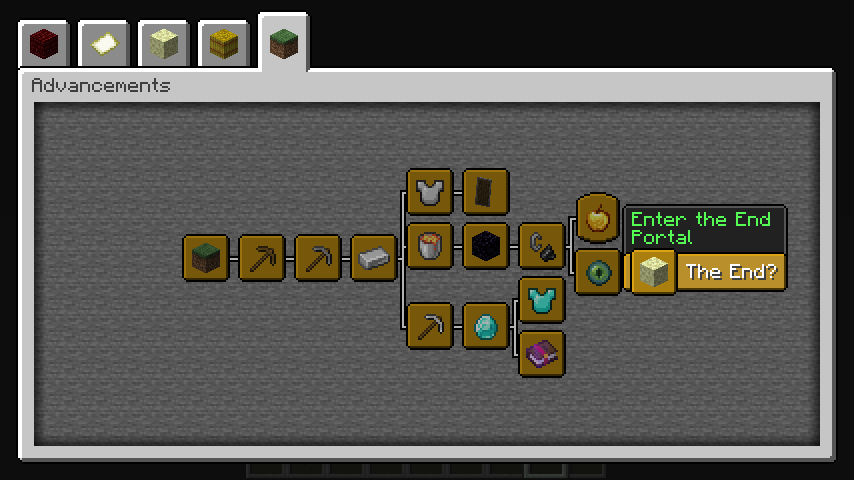
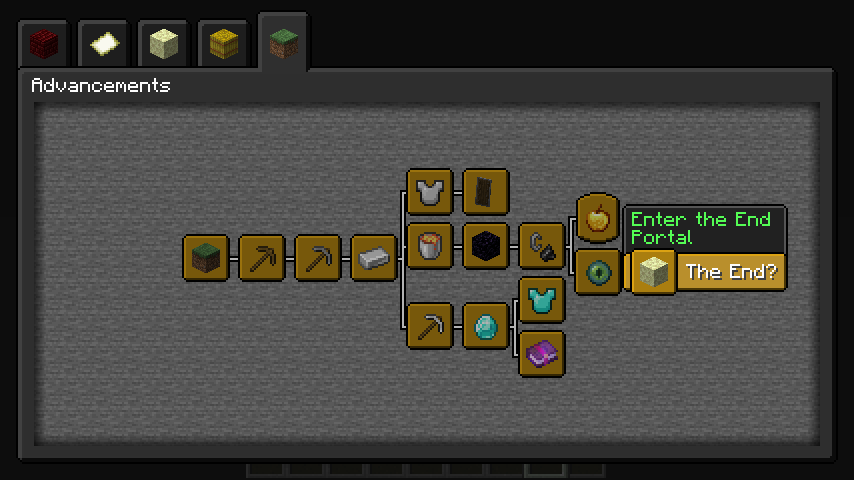
Project description from CurseForge.
Pick your setup
Choose the version and loader you play, then open the matching release.
Showing the newest 12 of 29 game versions. Older files are in the list below.
Check the dependencies, then try the file in a copied instance before changing a world you care about.
Recent files
advancements-enlarger-0.3.3.jar
18 Jun 2023
advancements-enlarger-0.3.2.jar
27 May 2023
advancements-enlarger-0.3.1.jar
27 May 2023
advancements-enlarger-0.3.0-1.19.2.jar
22 Nov 2022
advancements-enlarger-0.2.4.jar
29 May 2021
advancements-enlarger-0.2.3.jar
14 Aug 2020
advancements-enlarger-0.2.2.jar
5 Jul 2020
advancements-enlarger-0.2.1-unstable.jar
14 May 2020
advancements-enlarger-0.2.0-unstable.jar
19 Mar 2020
advancements-enlarger-1.0.0.jar
22 Dec 2019
Looking for an older file? The official CurseForge project page is in Resources.
 mod
modA mod adding many configurable features to EMI!
 mod
modMakes armor trims glow and pulse.
 mod
modCelestia adds synchronized meteor showers to the Overworld. The server calculates the trajectory and appearance so all players see the exact same streak at the same time.